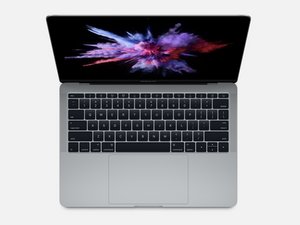
I have a dead 2017 13” MacBook Pro (Function Keys) and need to read the SSD that I’ve removed. Is there an adapter to access it elsewhere? I’ve done a little research and can’t find any info.
I have a MacBook Pro 2017 (Function keys) and I had an accident (water dropping) and the screen and connections are damaged. I couldn’t find affordable fixing, so right now is broken but the SSD works.
I bought a Lenovo A340-24IWL and I’d like to know if is possible to put the SSD from my broken MacBook Pro on this Lenovo A340? Do you have some enclosure or adapter to use this SSD on a PC?
Basically if it was the water and your unit is in non-working condition, there is no way to tell whether your SSD survived or not without testing it in the working A1708. Said that and minding that there are no adapters of any kind for this particular interface your best bet will be to go to someone friendly who have working A1708 on hand and ask for help in transferring data to some other media, compatible with your current setup.
That's a non-starter completely. There is no SSD in a 2017 Macbook Pro that is removable! The storage is part of the logic board and completely non-removable or repairable!
Hi Tony, if you read all the other comments you’ll see others made the same mistake - the Function key version of the 2017 MBP does indeed have a removable SSD, the Touch Bar version has its SSD soldered to the motherboard. I have the function key version and am still looking for a solution. There are some sort of work around a but nothing good (as yet).
Hi Dominic. This weekend I upgraded my MacBook Pro 2017 Function Keys with an Sabrent Rocket of 512 Gb from Amazon, with and adapter bought in Aliexpress of brand NFHK. For less than 100€ I have updated the original 128 Gb SSD to 512. In this link you can find more info:
It was a while ago I posted this question - fortunately there is now a solution in the shape of an adapter from NFHK. If anyone else is trying to solve this, go here for more info: https://forums.macrumors.com/threads/fou...
Adapter shown in your link is to replace Apple's Gen5 SSD with a generic blade-type drive within machine - assuming there's sufficient room.
Adapter I was hoping to see is an enclosure-type for the Gen5 SSD that would turn it into an external drive and allow data recovery (via USB) from the Gen5 drive itself.
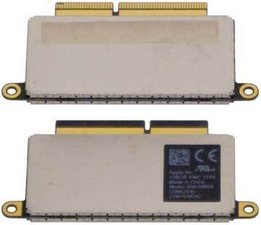
I believe this is the drive Dominic is referring to:
It’s a Gen 5 referenced above, a proprietary SSD that has no adapters or enclosures that I can find.
Between Secure Boot, encryption and proprietary drives, Apple seems to be closing the door on data recovery. A drive or machine failure may well doom all data without a current backup.
As I stated in the question, my SSD is from a 2017 MacBook Pro (Function Keys). As far I'm aware the SSD uses a proprietary Apple Gen. 5A PCIe 3.0 x4 NVMe . I'm asking if anyone knows of an adapter?
all that being said, if the adapter works and the computer recognizes the drive, this will only give you access to data if the system was not encrypted….
@xshawk - Ian sorry guy, neither of these cases will work. Apple uses their own custom connector on their SSD drives. Basically they are not M.2 drives!

 5
5  1
1 
 977
977 


crwdns2944067:013crwdne2944067:0
Hi,
I have a MacBook Pro 2017 (Function keys) and I had an accident (water dropping) and the screen and connections are damaged. I couldn’t find affordable fixing, so right now is broken but the SSD works.
I bought a Lenovo A340-24IWL and I’d like to know if is possible to put the SSD from my broken MacBook Pro on this Lenovo A340? Do you have some enclosure or adapter to use this SSD on a PC?
Thank you very much for your response!!!
crwdns2957956:0crwdnd2957956:0 flaviorrr crwdne2957956:0
Basically if it was the water and your unit is in non-working condition, there is no way to tell whether your SSD survived or not without testing it in the working A1708. Said that and minding that there are no adapters of any kind for this particular interface your best bet will be to go to someone friendly who have working A1708 on hand and ask for help in transferring data to some other media, compatible with your current setup.
crwdns2957956:0crwdnd2957956:0 Seff Ka crwdne2957956:0
That's a non-starter completely. There is no SSD in a 2017 Macbook Pro that is removable! The storage is part of the logic board and completely non-removable or repairable!
crwdns2957956:0crwdnd2957956:0 tony crwdne2957956:0
Hi Tony, if you read all the other comments you’ll see others made the same mistake - the Function key version of the 2017 MBP does indeed have a removable SSD, the Touch Bar version has its SSD soldered to the motherboard. I have the function key version and am still looking for a solution. There are some sort of work around a but nothing good (as yet).
crwdns2957956:0crwdnd2957956:0 Dominic Cazenove crwdne2957956:0
Hi Dominic. This weekend I upgraded my MacBook Pro 2017 Function Keys with an Sabrent Rocket of 512 Gb from Amazon, with and adapter bought in Aliexpress of brand NFHK. For less than 100€ I have updated the original 128 Gb SSD to 512. In this link you can find more info:
https://forums.macrumors.com/threads/fou...
crwdns2957956:0crwdnd2957956:0 josuku crwdne2957956:0
crwdns2934275:08crwdne2934275:0