
I recently changed the screen + digitizer on my 6S Plus, and transferred the home button over for touch ID, but it's not working, aside from the normal home button. TouchID isn't activating, and it doesn't look like it's from a bad cable. No cracks, no tears, nothing. I read the connector is made for the specific logic board, but that doesn't look like a cable that can be transferred. Any help here? I know it's been asked a few times before but I haven't found an answer yet. Thanks in advance!
After a short talk with an Apple Advisor and a diagnostic test, they confirmed the Touch ID module wasn't even detected in the phone... if that helps any
My guess is a bad home button extension cable on the replacement screen. If the old screen still works, try plugging the home button in that one and see if it works.
Sorry but you will have to try another screen to test.
Digitizer on the old screen went kaput hence the reason for a new screen assembly. The cable looks completely intact, no cracks, no tears, nothing I can see. Unless it came loose in the sensor and I can't see that, the cable is fine
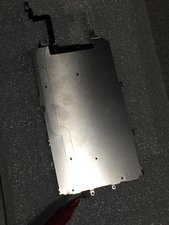
The ribbon on the bottom of the aluminum heat sheild , where the home botton plugs into creased. It is VERY delicate and if you didnt use heat, more than likely you damaged it during disassembly.
Resolution = buy a new heatsheild with flex ribbon already attached for $5 and swap out the old one. Ebay has them cheap. I back myself up with extra heatsheilds and proximity sensors for All iphone 6 repairs
Update (04/27/2017)
Somewhat yes. I always heat that ribbon to the home button from the glass side of the screen but I was actually referring to the connection of the hone button to the back of the heat sheild. That is the sensitive part
it is glued on and damages easy when it is not heated and removed. I just saw after my post to you that a ribbon cable is $2.49 on wholesalegadgetparts.com. I like having a whole back up ready to go for the extra 2.50 but i am pretty confident that is your problem. I had gone through this issue many times before using a hair dryer and heating my GLASS side of the broken screen to be very warm ro touch.
This shield shown isn’t for a 6s+. Also have the same problem and none of the software solutions have worked. No identifiable cracks or issues with the home button cables, but tried it again on the old screen where it used to work and that’s now broken too. My guess is there is some small connection in the cables that got broken. Don’t know otherwise.
I have same experience, but on 7. I changed the lcd and after that ID touch didnt worked. I Update my phone to os 11.4.1 and not believeable it worked. UPDATE YOUR iPHONE to the last os update.
It could simply be that the replacement screen’s home button does not support Touch ID you’ve got to keep the original home button or buy a separate home button that supports Touch ID.
crwdns2947414:01crwdne2947414:0
After a short talk with an Apple Advisor and a diagnostic test, they confirmed the Touch ID module wasn't even detected in the phone... if that helps any
crwdns2957956:0crwdnd2957956:0 Isaac Wood crwdne2957956:0