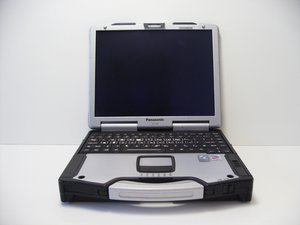
Panasonic released the CF-29 on January 1, 2004. It was designed to survive the harshest environments US Armed Forces, service personnel, and enthusiasts could throw at it. The Black Hawk CF-29 was released in 2009.
Update the mouse driver to the touchpad/touchpanel driver for your model number from the panasonic website. Windows will automatically use a generic mouse driver because mouse "has" to work. It's is the ps/2 mouse driver that must be updated to the correct driver then your touchscreen should start working correctly.
I'm having problems with my touchscreen also. I have a air force only model and can't find the drivers. If anyone could point me in the right direction I would appreciate it. Panasonic was no help at all
Have you checked under the device manager in WinXP to make sure that all your peripherals are recognized? And like lingster mentioned, turn it on in the BIOS. It appears that there are a few people that have the same issues. The way I would proceed is to
you should not have to disassemble to check hardware. there are software tools like SIW for windows. If you can boot into OS it will tell you everything you need to know about the system. http://www.gtopala.com/ its free to use on personal equipment, I purchased the life time Tech license and use it daily.
The order in which your drivers are installed may well determine if your touchscreen will work. To fix this issue, you need to load the needed drivers on a flash drive or another machine. I suggest <h>www.toughbookdrivers.com/drivers/cf-29/</h>
First, restart your computer in safe mode (pressing [F8] as you are cold-starting up).
Then, using CONTROL PANEL, remove all drivers (Video, Audio, Mouse, Peripherals, etc)
Finally, install the Touchpad/Touchscreen driver FIRST. Install then video, then audio, then the rest....EXCEPT save the LAN and WLAN drivers, respectively, for LAST. If you have GPS, add after LAN and WLAN drivers are installed.
If this doesn't work, it's likely your touchscreen card went bad...it is a weak link with these units...especially the Mk IV's or V's.
Try to get a driver touch screen driver from fujitsu for win7. I saw online that somebody was successful when they did this.You may have to reinstall the touchpad driver for xp afterwards, using have disk. Good luck
If you have a Mark I to Mark III (a 1.2 or 1.3 GHz chip), your driver will not have a calibration utility. Mark Iv and Mark V have a calibration tool available.
If your mouse pointer won't move to where you point on the screen, then either you installed the drivers in the wrong order, or (worst case) your touch screen doesn't work any longer.
Uninstall the Mouse driver, then reinstall it (NOTE: make sure you install the correct driver for your unit! You will need the ENTIRE model number to find the right driver from Panasonic. This is found in BIOS or on the bottom of your machine.)
Bear in mind that that not all CF-29's had touchscreen capability; your Model # will give you a lot of info.
No drivers installed. Someone installed a new hard drive. All was put in but no driver for touch screen and no Calibration Tool.
I have the software. I have to send it on a memory stick. Then I would ship it to you. The will give you and Web Address with a video will show you step by step. This will Cost You $50.00 E-mail galente1@gmail.com
The MarkIII definetely has a calibration utility. I have one here (confirmed MK3: CF-29HXXXXX and touchscreen) it consists of nine "crosses" that you have to press using stylus and then you must press enter to confirm it

 2
2  2
2 
 2,4crwdns2936485:0crwdne2936485:0




crwdns2944067:04crwdne2944067:0
Did you activate your Touchscreen in BIOS?
What happens when calibrating?
crwdns2957956:0crwdnd2957956:0 lingster crwdne2957956:0
Update the mouse driver to the touchpad/touchpanel driver for your model number from the panasonic website. Windows will automatically use a generic mouse driver because mouse "has" to work. It's is the ps/2 mouse driver that must be updated to the correct driver then your touchscreen should start working correctly.
crwdns2957956:0crwdnd2957956:0 brokndodge crwdne2957956:0
I'm having problems with my touchscreen also. I have a air force only model and can't find the drivers. If anyone could point me in the right direction I would appreciate it. Panasonic was no help at all
crwdns2957956:0crwdnd2957956:0 Henry Skaggs crwdne2957956:0
It's a Cf-29G
crwdns2957956:0crwdnd2957956:0 Henry Skaggs crwdne2957956:0