crwdns2933423:0crwdne2933423:0
crwdns2947577:0crwdnd2947577:0crwdne2947577:0

The Inspiron 15-3521 has an optional touch screen feature and has a 15.6" display. This laptop is also complete with a matte finish and keyboard complete with number pad.

Why USB ports are not working

the USB is not working I tried all the Dell diagnostic and it is failed.

I tried to rest and still not working.

BIOS is good.

I need to get it repaired but dont know which chip is responsible as both usb ports are not working

crwdns2934089:0crwdne2934089:0 crwdns2934093:0crwdne2934093:0

crwdns2934109:0crwdne2934109:0

crwdns2889612:0crwdne2889612:0 4
crwdns2934285:0crwdne2934285:0

crwdns2933313:01crwdne2933313:0

crwdns2934057:0crwdne2934057:0

Most common case is the burn fuses of the USB port.

A) Check the fuses – if available

B) You can check the power rails and it should be 5V – if you get >4.0V check the main PMU (Power management unit)

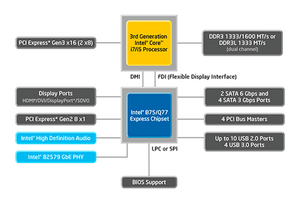
C) 3rd Gen Intel core CPU works with PCH (Platform Controller Hub), the PCH is the responsible chip for USB functioning

crwdns2915344:0crwdne2915344:0

crwdns2934105:0crwdne2934105:0

crwdns2889612:0crwdne2889612:0 1
crwdns2934285:0crwdne2934285:0

crwdns2934229:0crwdne2934229:0

lulujaimearredondo crwdns2934231:0crwdne2934231:0
crwdns2936625:0crwdne2936625:0:

crwdns2936751:024crwdne2936751:0 0

crwdns2936753:07crwdne2936753:0 4

crwdns2936753:030crwdne2936753:0 18

crwdns2942667:0crwdne2942667:0 1,844