My power button cable was also damaged while adding an SSD to my iMac. The conector that connects to the logic board to be more precise. Is there anything that can be done to fix this issue?
To update my situation, I fixed my problem by cutting the wires off the old power button, purchasing a rear housing off eBay and splicing the wires together with the connector from the purchased housing. Everything works great and my computer now has 2 new hard drives. Thanks for the help and answers!
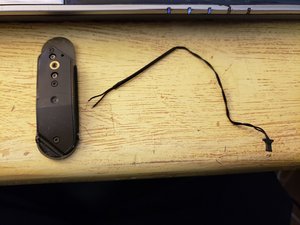
Ouch! So the cable is completely cut. You should be able to splice the cut sections together the button is not polarized so you don't need to worry which way it's wired. If you must add a segment of wire to give you enough length as well as make it so the seams don't get in the way. Some heatshrink tubing should do.
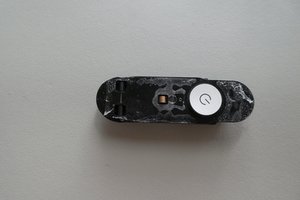
Here’s a quick overview on how to get the button housing out of the case. I got so mad at the prospect of having to buy an entire new rear shell because of one little broken cable that I resolved to find a way. It’s epoxied in, so take a deep breath, find some inner calm and then arm yourself with a heat gun. Remove all the extra stuff anywhere near the button housing (including that little strip of black folds that runs along the bottom of the screen area, held in by five tiny screws). Point the heat gun at the back of the case, just where the button housing sits. Let it heat up real good, and then take a spudger or small flat screwdriver and try prying at the button housing. Be patient, it took me about ten minutes of heating and poking to get it out. But it is do-able, and when you get it, you will attain a deep and magnificent joy. When putting it back, use hot glue to make life easier for anyone who might have to get it out again.
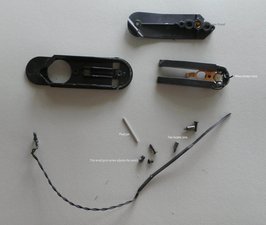
I completely disasembled my switch to solder the wires. There is a hex screw in the back which adjusts the space between the contacts. I found it was quite critical in its adjustment. A bit like tuning a carburettor! If it is too tight or too loose the switch will not function correctly.
Solder the wires directly to the pads where the connector was. Makes no difference which wire went to which, the button simply completes the circuit -power pad then to ground pad turns smc on.
Does anyone know what type of wire is used for this part? I’d like to get a longer wire to splice in as I lost quite a bit while trying to remove the outer casing.
I had to splice in some wire - I had an old mouse sitting around, so I snipped off a bit of the usb cable and used one of the several little wires inside. It worked fine! I don't think the exact type of wire is important, just so long as the gauge is similar enough to allow a decent solder.
The wire needs to be very very light. It rides on the switch and the flex becomes part of the movement of the button. I had to also carve out the switch cover so the wire was not binding. I used a 45 watt tiny tip and the soldering was easy.
Getting the switch back in, I found impossible to get it set perfect. I used a scotch tape double sided - very thin but good sticky. So the button is indented in the case a little bit. I was almost about to pull it out to redo it. And Not put tape on the bottom as the speaker box jams hard against it anyway. But it is just VERY tight and hard to set in. At least on this, my first try.

 2
2  2
2 
 977
977 





crwdns2944067:011crwdne2944067:0
My power button cable was also damaged while adding an SSD to my iMac. The conector that connects to the logic board to be more precise. Is there anything that can be done to fix this issue?
crwdns2957956:0crwdnd2957956:0 Andrew Posani crwdne2957956:0
@Andrew - Do you still have the connector end or is it broken?
crwdns2957956:0crwdnd2957956:0 DanJ crwdne2957956:0
It's broken. I don't even know where it went. I got the logic board reseated and looked up and it was broken.
crwdns2957956:0crwdnd2957956:0 Andrew Posani crwdne2957956:0
To update my situation, I fixed my problem by cutting the wires off the old power button, purchasing a rear housing off eBay and splicing the wires together with the connector from the purchased housing. Everything works great and my computer now has 2 new hard drives. Thanks for the help and answers!
crwdns2957956:0crwdnd2957956:0 Andrew Posani crwdne2957956:0
It's possible to take off the power button ?
crwdns2957956:0crwdnd2957956:0 didier crwdne2957956:0
crwdns2934275:06crwdne2934275:0