crwdns2933423:0crwdne2933423:0
crwdns2947577:0crwdnd2947577:0crwdne2947577:0

crwdns2935311:0crwdnd2935311:0crwdne2935311:0 crwdns2935313:0Wireless LED Lightcrwdnd2935313:0crwdnd2935313:0crwdne2935313:0

  1. Wireless LED Light Teardown, Wireless LED Light Teardown: crwdns2935265:01crwdnd2935265:01crwdnd2935265:03crwdne2935265:0 Wireless LED Light Teardown, Wireless LED Light Teardown: crwdns2935265:01crwdnd2935265:02crwdnd2935265:03crwdne2935265:0 Wireless LED Light Teardown, Wireless LED Light Teardown: crwdns2935265:01crwdnd2935265:03crwdnd2935265:03crwdne2935265:0
    • Here is a little LED light I purchased from Dollar Tree while looking for writing and paper supplies.

    • It consists of 2 wireless LED Lights and one small remote with four different functions, On, Off, Brightness, and a timer function.

    • It uses 2 or 3 AAA batteries for operation.

    • The light is decently bright, but it is made out of very cheap plastic, and is somewhat fragile and brittle when handling.

  2. Wireless LED Light Teardown: crwdns2935265:02crwdnd2935265:01crwdnd2935265:03crwdne2935265:0 Wireless LED Light Teardown: crwdns2935265:02crwdnd2935265:02crwdnd2935265:03crwdne2935265:0 Wireless LED Light Teardown: crwdns2935265:02crwdnd2935265:03crwdnd2935265:03crwdne2935265:0
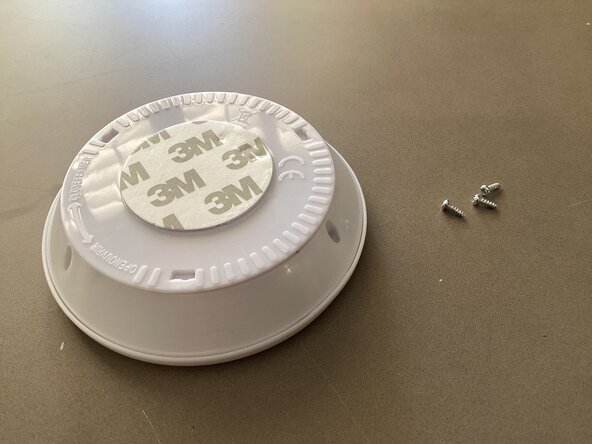
    • For step one of disassembly, use a Philips screwdriver to unscrew all 3 screws holding the case together.

    • Make sure that you keep track of your screws, *they are small*

  3. Wireless LED Light Teardown: crwdns2935265:03crwdnd2935265:01crwdnd2935265:03crwdne2935265:0 Wireless LED Light Teardown: crwdns2935265:03crwdnd2935265:02crwdnd2935265:03crwdne2935265:0 Wireless LED Light Teardown: crwdns2935265:03crwdnd2935265:03crwdnd2935265:03crwdne2935265:0
    • Pull off the lid holding the plastic case onto the bottom. You can easily pull the PCB off of the plastic frame by just wedging a flathead or an opening pick underneath. Next, just pull on the PCB to release it.

  4. Wireless LED Light Teardown: crwdns2935265:04crwdnd2935265:01crwdnd2935265:02crwdne2935265:0 Wireless LED Light Teardown: crwdns2935265:04crwdnd2935265:02crwdnd2935265:02crwdne2935265:0
    • ⴾHere is the light’s PCBⴾ

    • It features an unlabeled microcontroller, IR sensor, and 4 LEDs. There is also a tactile switch, and some small other miscellaneous components.

    • I like how it is spread out, and easy to understand. I support the simple design tactic.

  5. Wireless LED Light Teardown: crwdns2935265:05crwdnd2935265:01crwdnd2935265:03crwdne2935265:0 Wireless LED Light Teardown: crwdns2935265:05crwdnd2935265:02crwdnd2935265:03crwdne2935265:0 Wireless LED Light Teardown: crwdns2935265:05crwdnd2935265:03crwdnd2935265:03crwdne2935265:0
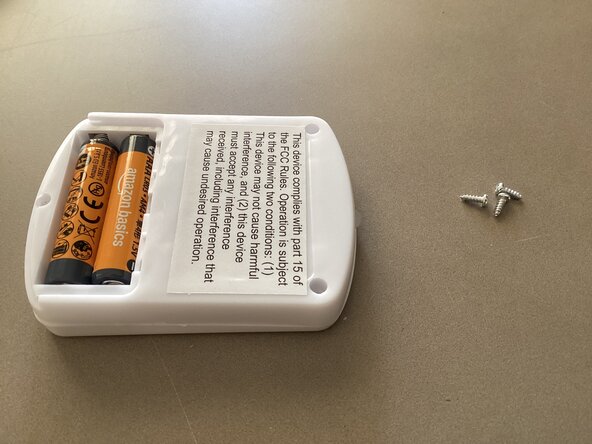
    • For dismantling the light’s remote, pull off the battery cover and unscrew the 3 screws using a Philips screwdriver.

    • As said previously, I recommend keeping track of your screws, they are small!

  6. Wireless LED Light Teardown: crwdns2935265:06crwdnd2935265:01crwdnd2935265:03crwdne2935265:0 Wireless LED Light Teardown: crwdns2935265:06crwdnd2935265:02crwdnd2935265:03crwdne2935265:0 Wireless LED Light Teardown: crwdns2935265:06crwdnd2935265:03crwdnd2935265:03crwdne2935265:0
    • Once the 3 screws are removed, lift up on the plastic case to view the PCB. There are also no clips holding the case, just the previously removed screws.

  7. Wireless LED Light Teardown: crwdns2935265:07crwdnd2935265:01crwdnd2935265:01crwdne2935265:0
    • ⴾHere is the Remote PCB͘ⴾ

    • It features an IR transceiver and a main IC, which is unlabeled. The board also has 4 tactile switches, and an unused spot for a capacitor or resistor.

  8. Wireless LED Light Teardown: crwdns2935265:08crwdnd2935265:01crwdnd2935265:01crwdne2935265:0
    • Thanks for viewing.

Mr.CircuitBoard

crwdns2935283:004/30/25crwdne2935283:0

1,347 crwdns2915208:0crwdne2915208:0

crwdns2935297:014crwdne2935297:0

crwdns2947412:00crwdne2947412:0

crwdns2917038:0crwdne2917038:0

crwdns2936625:0crwdne2936625:0:

crwdns2936751:024crwdne2936751:0 4

crwdns2936753:07crwdne2936753:0 58

crwdns2936753:030crwdne2936753:0 58

crwdns2942667:0crwdne2942667:0 58