

crwdns2853023:0crwdne2853023:0
Charging my iPhone6S using cheap lightning cables (used for iPhone6 to iPhone 14) became erratic after a few years of use. As it was being connected, the phone would sometimes give a sound and show the charging icon, but sometimes it wouldn't. If the cable was pushed in fast it was more likely to work. However the number of failed attempts got worse over the months, and one of these cheap cables stopped working completely.
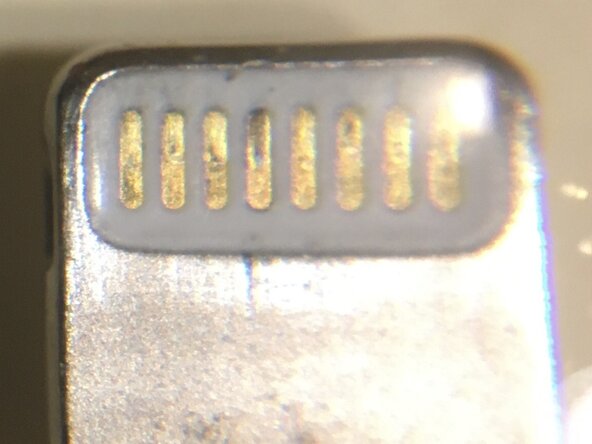
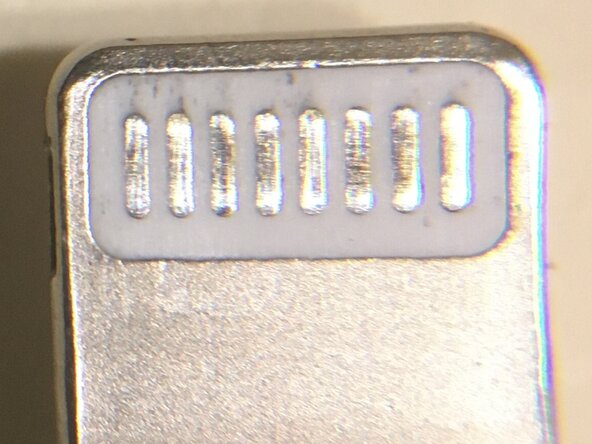
The older original genuine cables that came with iPhones did not have this problem. The original cables had gold coloured contact pads whereas the used cheap ones didn't (see images).
crwdns2853024:0crwdne2853024:0
Repair instructions for poor charging connectivity normally recommend removing the lint from the phone socket using a non-conducting (cocktail) stick, but this didn't initially work in my case.
What did work on both my cheap cables was giving the 8 contact pads on the lightning connector end a good clean. I used a home-made cotton bud (tiny piece of cotton wool wound around a wooden cocktail stick) dampened with contact cleaner (Kontakt 10 super) gently rubbing it for about 5mins.
Unfortunately, this is not a permanent solution and may need to be repeated every few weeks as the stainless steel(?) contact pads don't remain oxide free, which is why a gold coating (or rhodium-ruthenium) is much better.
crwdns2853025:0crwdne2853025:0
Brush off any adhering cotton fibres if applicable- not necessary in my case.
Using a hand lens eg x10 can show progress.
Basic solvent (eg rubbing alcohol) may work, but contact cleaner contains other chemicals to remove oxides.
I assume the original coating on the contacts of the cheap cable had worn away after a couple of years. Then the substrate metal starts to oxidise increasing the contact resistance.
If no improvement, check the wires at the lightning end with a lens (one of mine had a broken wire giving erratic results).
Improved reliability was gained by giving the charging port a good clean (not just removing the dry lint). I used a miniature brush soaked in non conductive solvent to clean the 8 contacts (with phone off) and used a tissue to wick away excess solvent and debris until the tissue was clean after a lens inspection.

crwdns2944067:00crwdne2944067:0