crwdns2933423:0crwdne2933423:0
crwdns2947577:0crwdnd2947577:0crwdne2947577:0

iView-776TPCII Camera Assembly Replacement

crwdns2942213:0crwdne2942213:0

    1. iView-776TPCII Camera Assembly Replacement, Rear Panel: crwdns2935265:01crwdnd2935265:01crwdnd2935265:03crwdne2935265:0 iView-776TPCII Camera Assembly Replacement, Rear Panel: crwdns2935265:01crwdnd2935265:02crwdnd2935265:03crwdne2935265:0 iView-776TPCII Camera Assembly Replacement, Rear Panel: crwdns2935265:01crwdnd2935265:03crwdnd2935265:03crwdne2935265:0
      • Before disassembling your device, make sure that the power is completely turned off.

      • Use the plastic opening tool to release the clips holding the rear panel of the device onto the front section.

      • The clips may take some pressure before releasing.

      • Continue around the entire device until all of the clips have been released.

      crwdns2952109:0crwdne2952109:0

      crwdns2917038:0crwdne2917038:0

    2. iView-776TPCII Camera Assembly Replacement: crwdns2935265:02crwdnd2935265:01crwdnd2935265:02crwdne2935265:0 iView-776TPCII Camera Assembly Replacement: crwdns2935265:02crwdnd2935265:02crwdnd2935265:02crwdne2935265:0
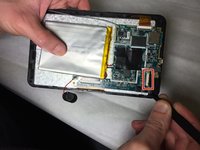
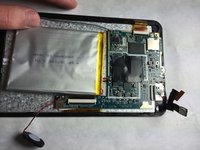
      • Use a spudger to carefully free the speaker from it's housing on the back panel.

      • Place the spudger between the speaker and the rear panel. Use a prying motion to remove the component.

      • Be careful not to apply an over amount of force. If care is not taken, the speaker could break under the pressure.

      crwdns2952109:0crwdne2952109:0

      crwdns2917038:0crwdne2917038:0

    1. iView-776TPCII Camera Assembly Replacement, Camera Assembly: crwdns2935265:03crwdnd2935265:01crwdnd2935265:02crwdne2935265:0 iView-776TPCII Camera Assembly Replacement, Camera Assembly: crwdns2935265:03crwdnd2935265:02crwdnd2935265:02crwdne2935265:0
      crwdns2935267:0crwdne2935267:0
      Heavy-Duty Spudger
      $4.99
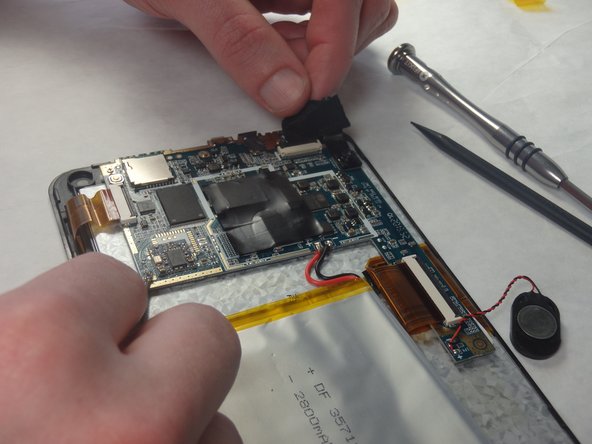
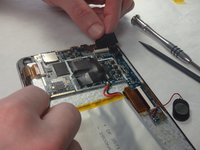
      • The camera module is located in the upper-right corner of the tablet.

      • Loosen the edges of the black tape covering the camera using the heavy-duty spudger.

      • Use the freed edges of the tape to gently remove the camera assembly from its plastic housing.

      • The camera assembly will still be connected to the rest of the device via a ribbon cable. Take care so as not to tear this connection.

      crwdns2952109:0crwdne2952109:0

      crwdns2917038:0crwdne2917038:0

    2. iView-776TPCII Camera Assembly Replacement: crwdns2935265:04crwdnd2935265:01crwdnd2935265:02crwdne2935265:0 iView-776TPCII Camera Assembly Replacement: crwdns2935265:04crwdnd2935265:02crwdnd2935265:02crwdne2935265:0
      crwdns2935267:0crwdne2935267:0
      Tweezers
      $4.99
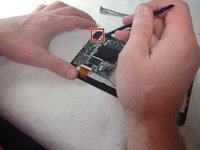
      • Use tweezers to lift the cover off the top of the camera's ZIF adapter.

      • When reassembling the device, be sure to fully secure the ribbon cable from the camera back into the ZIF adapter.

      • Pull the assembly away from the motherboard with a set of tweezers to prepare for desoldering.

      crwdns2952109:0crwdne2952109:0

      crwdns2917038:0crwdne2917038:0

    3. iView-776TPCII Camera Assembly Replacement: crwdns2935265:05crwdnd2935265:01crwdnd2935265:01crwdne2935265:0
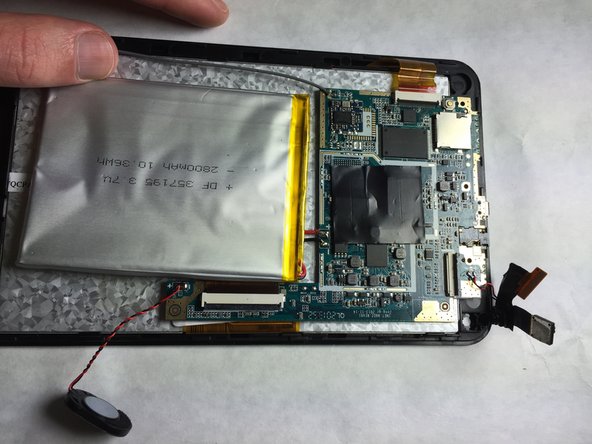
      • Use the Portable Soldering Iron tool to heat the leads coming from the camera assembly to the motherboard, thereby breaking the connection.

      • For help on soldering, refer to the iFixit "How To Solder and Desolder Connections" technique guide as necessary.

      • Once heated, use tweezers to pull the wires free from their connections.

      • To ease reassembly, take note of which wire went to the positive and negative terminals.

      crwdns2952109:0crwdne2952109:0

      crwdns2917038:0crwdne2917038:0

crwdns2915888:0crwdne2915888:0

To reassemble your device, follow these instructions in reverse order.

crwdns2935221:0crwdne2935221:0

crwdns2935227:0crwdne2935227:0

Cory Gratzer

crwdns2935283:009/16/15crwdne2935283:0

586 crwdns2915208:0crwdne2915208:0

crwdns2935297:05crwdne2935297:0

crwdns2935287:0crwdne2935287:0

IUPUI, Team 2-2, Baechle Fall 2015 crwdns2935289:0IUPUI, Team 2-2, Baechle Fall 2015crwdne2935289:0

IUPUI-BAECHLE-F15S2G2

crwdns2931471:03crwdne2931471:0

crwdns2935297:072crwdne2935297:0

crwdns2947412:00crwdne2947412:0

crwdns2917038:0crwdne2917038:0

crwdns2936625:0crwdne2936625:0:

crwdns2936751:024crwdne2936751:0 0

crwdns2936753:07crwdne2936753:0 2

crwdns2936753:030crwdne2936753:0 20

crwdns2942667:0crwdne2942667:0 628