crwdns2915892:0crwdne2915892:0
Replacing the logic board assembly gives you new flash memory as well as a new battery.
crwdns2942213:0crwdne2942213:0
-
-
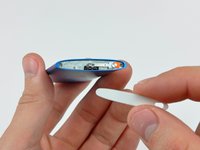
Insert the edge of an iPod opening tool into the gap between the outer case and the top bezel.
-
Pry the top bezel off the adhesive securing it to the display retainer.
-
-
-
Remove the hold switch slider from the top of the Nano.
-
-
-
Remove the two angled Phillips screws from the two corners of the display retainer.
-
-
-
Insert an iPod opening tool between the outer case and the display retainer.
-
Use the tool to slide the display assembly out of the case slightly.
-
-
-
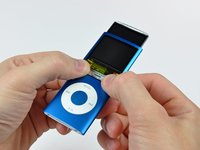
Slide the display out of the Nano. It will move about .5" until the display data cable limits its travel.
-
-
-
With the display pulled out of the case as much as possible, gently press on the lower edge of the glass panel until it pops in slightly (~1 mm).
-
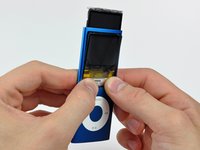
Use your thumbs on the lower edge of the glass panel to slide the glass down and into the case until the top edge pops up out of the case.
-
-
-
Lift the glass panel out of the Nano.
-
-
-
-
Use the edge of an iPod opening tool to separate the hold switch from the adhesive securing it to the top edge of the display.
-
-
-
Peel back the Kapton tape covering the display data cable socket.
-
-
-
While holding the light colored socket down with one finger, use the tip of a spudger to flip the ZIF cable lock up toward the bottom of the Nano.
-
-
-
Use an iPod opening tool to peel the display data cable off the thin metal plate attached to the display.
-
-
-
Pull the display out of the Nano, minding the hold switch cable that may get caught.
-
-
-
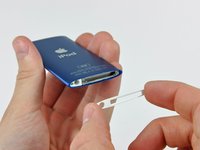
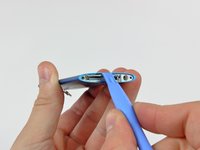
Insert an iPod opening tool between the bottom bezel and the dock connector.
-
Separate the bottom bezel from the adhesive securing it to the Nano and set it aside.
-
-
-
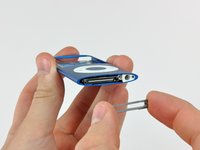
Remove the three Phillips screws along the bottom of the Nano.
-
-
-
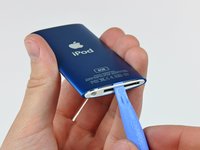
Use an iPod opening tool to pry the aluminum dock bezel out of the Nano.
-
-
-
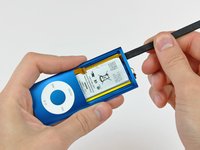
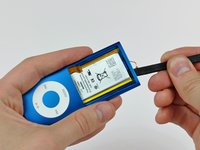
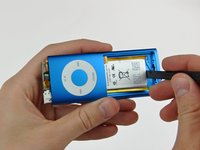
Use the flat end of a spudger to separate the battery from the adhesive securing it to the outer case.
-
Use the flat end of a spudger to push the logic board assembly and battery slightly out of the bottom of the Nano. Stop once it pops out a little bit.
-
-
-
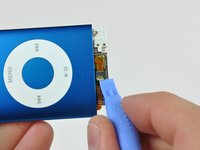
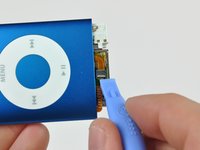
Use the edge of an iPod opening tool to peel the click wheel ribbon cable and its ZIF socket off the dock connector.
-
-
-
Use the edge of an iPod opening tool to flip the ZIF cable lock up toward the headphone jack.
-
-
crwdns2935267:0crwdne2935267:0Tweezers$4.99
-
Use a pair of tweezers to slide the click wheel ribbon cable out of its socket.
-
Peel back the cable on both ends!
-
-
-
Pull the logic board assembly out of the outer case, minding the hold switch and click wheel cables that may get caught.
-














To reassemble your device, follow these instructions in reverse order.
crwdns2935221:0crwdne2935221:0
crwdns2935229:037crwdne2935229:0

crwdns2947412:07crwdne2947412:0
Wouldn't it be easier to open the ZIF socket whilst it is still stuck down?
Pete Green - crwdns2934203:0crwdne2934203:0 crwdns2950251:0crwdne2950251:0
On step 11 I found that the cable was still stuck down by the bit under the metal case. The opening tool failed to get at this.
I cut the live head off a match and trimmed it to a long chisel edge.
Pine is soft,strong and non conductive.I was able to poke under the metal body and release the remaining adhesive seal.
Pete Green - crwdns2934203:0crwdne2934203:0 crwdns2950251:0crwdne2950251:0
Failure. Another broken iPod due to the incompleteness of step 20. I will add a step 21 with description but I will need some nice looking pictures.
Gallomimia - crwdns2934203:0crwdne2934203:0 crwdns2950251:0crwdne2950251:0
Mine broke because of accidentally pulling the board out too fast, but it's dead anyways.
Wizard No. 86 - crwdns2934203:0crwdne2934203:0 crwdns2950251:0crwdne2950251:0
TOOLS: I don't see any offset legs in the screws themselves, however either my 00 phillips is bigger than yours, or these screws are actually 000 phillips. In either case, I found that the heads were full of adhesive, and using a tiny flathead driver and a sharp knife I was able to clear it out just enough to get the screws out.
Gallomimia - crwdns2934203:0crwdne2934203:0 crwdns2950251:0crwdne2950251:0
