
iPhone XR SIM Card Replacement

crwdns2959932:0crwdnd2959932:0Adam O'Cambcrwdnd2959932:0crwdnd2959932:0crwdnd2959932:02crwdnd2959932:0crwdne2959932:0
crwdns2959936:0Huk 24, 2021crwdne2959936:0
crwdns2869540:0crwdne2869540:0: 96K
crwdns2959988:0crwdne2959988:0
- crwdns2959990:0crwdne2959990:0
- 13
- crwdns2959992:0crwdne2959992:0
- 68
- crwdns2959994:0crwdne2959994:0
- 348
- crwdns2959996:0crwdne2959996:0
- 96,453
crwdns2955950:0crwdne2955950:0: 2
crwdns2960002:01crwdne2960002:0, crwdns2960006:01crwdne2960006:0
crwdns2960000:0crwdne2960000:0crwdns2959984:0crwdne2959984:0: 20 21
crwdns2959974:020crwdne2959974:0
crwdns2959970:021crwdne2959970:0
crwdns2959986:0crwdne2959986:0: 0 1
crwdns2959958:0crwdne2959958:0
crwdns2959976:01crwdne2959976:0
crwdns2915892:0crwdne2915892:0
crwdns2959928:0crwdne2959928:0 ↓Use this guide to remove or replace the SIM card tray in your iPhone XR.
crwdns2959930:0crwdne2959930:0
crwdns2943213:0crwdne2943213:0


crwdns2943215:0crwdne2943215:0

-
-
-
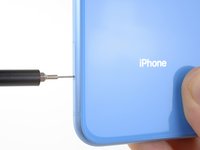
Insert a SIM card eject tool or a paperclip into the small hole in the SIM card tray, located near the bottom of the edge of the iPhone.
-
Press firmly to eject the tray.
 crwdns2952109:0crwdne2952109:0
-
-
-
Remove the SIM card tray from the iPhone.
-
-
-




To reassemble your device, follow these instructions in reverse order.
Repair didn’t go as planned? Check out our Answers community for troubleshooting help.
crwdns2935221:0crwdne2935221:0
crwdns2935229:020crwdne2935229:0

crwdns2947410:01crwdne2947410:0
Unblock imei
Bagus - crwdns2934203:0crwdne2934203:0 crwdns2950251:0crwdne2950251:0
