crwdns2933423:0crwdne2933423:0
crwdns2947577:0crwdnd2947577:0crwdne2947577:0

iPhone 7 Plus SIM Card Replacement

crwdns2942213:0crwdne2942213:0

  1. iPhone 7 Plus SIM Card Replacement, SIM Card: crwdns2935265:01crwdnd2935265:01crwdnd2935265:02crwdne2935265:0 iPhone 7 Plus SIM Card Replacement, SIM Card: crwdns2935265:01crwdnd2935265:02crwdnd2935265:02crwdne2935265:0
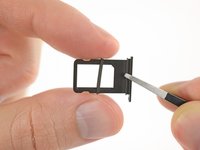
    • Insert a SIM card eject tool or a paperclip into the small hole in the SIM card tray.

    • Press firmly to eject the tray.

  2. iPhone 7 Plus SIM Card Replacement: crwdns2935265:02crwdnd2935265:01crwdnd2935265:03crwdne2935265:0 iPhone 7 Plus SIM Card Replacement: crwdns2935265:02crwdnd2935265:02crwdnd2935265:03crwdne2935265:0 iPhone 7 Plus SIM Card Replacement: crwdns2935265:02crwdnd2935265:03crwdnd2935265:03crwdne2935265:0
    • Remove the SIM card tray from the iPhone.

    • The SIM card will fall out of the tray easily.

    • When reinserting the SIM card, ensure that it is in the proper orientation relative to the tray.

    • A thin rubber gasket around the SIM tray provides water and dust protection. If this gasket is damaged or missing, replace the gasket to protect your iPhone's internal components.

crwdns2915888:0crwdne2915888:0

To reassemble your device, follow these instructions in reverse order.

crwdns2935229:020crwdne2935229:0

Jeff Suovanen

crwdns2935283:008/06/13crwdne2935283:0

448 185 crwdns2915208:0crwdne2915208:0

crwdns2935297:0259crwdne2935297:0

crwdns2935287:0crwdne2935287:0

iFixit crwdns2935289:0iFixitcrwdne2935289:0

Staff

crwdns2931471:0123crwdne2931471:0

crwdns2935297:023 855crwdne2935297:0

crwdns2947412:00crwdne2947412:0

crwdns2917038:0crwdne2917038:0

crwdns2936625:0crwdne2936625:0:

crwdns2936751:024crwdne2936751:0 6

crwdns2936753:07crwdne2936753:0 28

crwdns2936753:030crwdne2936753:0 119

crwdns2942667:0crwdne2942667:0 31,740