crwdns2933423:0crwdne2933423:0
crwdns2947577:0crwdnd2947577:0crwdne2947577:0

iHome iD95 iPod Adapter Replacement

crwdns2942213:0crwdne2942213:0

    1. iHome iD95 iPod Adapter Replacement, Backup Battery: crwdns2935265:01crwdnd2935265:01crwdnd2935265:01crwdne2935265:0
      • Before taking apart the iD95, disconnect the AC cord from the wall socket and AC adapter from the DC jack. Remove any iPods, iPhones, and iPads attached to the device.

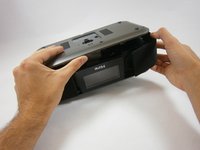
      • Flip over the iD95 so the bottom cover is visible and the LCD screen is facing you.

      crwdns2952109:0crwdne2952109:0

      crwdns2917038:0crwdne2917038:0

    2. iHome iD95 iPod Adapter Replacement: crwdns2935265:02crwdnd2935265:01crwdnd2935265:01crwdne2935265:0
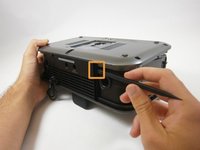
      • Remove the 10 mm-length, 5 mm-head screw using a Phillips #1 screwdriver.

      crwdns2952109:0crwdne2952109:0

      crwdns2917038:0crwdne2917038:0

    3. iHome iD95 iPod Adapter Replacement: crwdns2935265:03crwdnd2935265:01crwdnd2935265:01crwdne2935265:0
      • Use a plastic opening tool to take out the backup battery.

      crwdns2952109:0crwdne2952109:0

      crwdns2917038:0crwdne2917038:0

    1. iHome iD95 iPod Adapter Replacement, Bottom Cover: crwdns2935265:04crwdnd2935265:01crwdnd2935265:01crwdne2935265:0
      • Unscrew five 17 mm-length, 6 mm-head screws using a Phillips #1 screwdriver.

      crwdns2952109:0crwdne2952109:0

      crwdns2917038:0crwdne2917038:0

    2. iHome iD95 iPod Adapter Replacement: crwdns2935265:05crwdnd2935265:01crwdnd2935265:02crwdne2935265:0 iHome iD95 iPod Adapter Replacement: crwdns2935265:05crwdnd2935265:02crwdnd2935265:02crwdne2935265:0
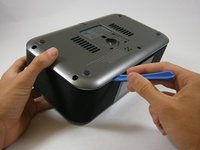
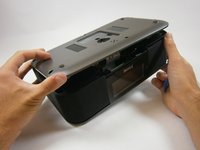
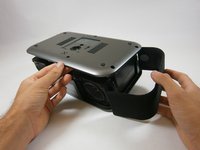
      • The bottom cover is attached to the back cover by two plastic clips. Don't use excessive force.

      • Insert a plastic opening tool between the edge of the bottom cover and the main body.

      • Gently pry the bottom cover from the body. Start anywhere along the front side of the iD95 and work your way around.

      • Grip the bottom portion of the device and gently lift the front part of the bottom cover a couple centimeters up.

      crwdns2952109:0crwdne2952109:0

      crwdns2917038:0crwdne2917038:0

    3. iHome iD95 iPod Adapter Replacement: crwdns2935265:06crwdnd2935265:01crwdnd2935265:02crwdne2935265:0 iHome iD95 iPod Adapter Replacement: crwdns2935265:06crwdnd2935265:02crwdnd2935265:02crwdne2935265:0
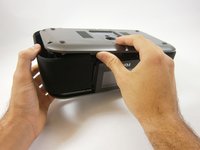
      • Potential for device damage: Be careful not to use too much force or you might break the plastic rings holding the side panels in place.

      • Lift up the bottom cover. Pull the side panel up first, out, and away from the device.

      • The side panels have plastic rings that will need to be lifted up and off the cylinders they are placed around.

      crwdns2952109:0crwdne2952109:0

      crwdns2917038:0crwdne2917038:0

    4. iHome iD95 iPod Adapter Replacement: crwdns2935265:07crwdnd2935265:01crwdnd2935265:02crwdne2935265:0 iHome iD95 iPod Adapter Replacement: crwdns2935265:07crwdnd2935265:02crwdnd2935265:02crwdne2935265:0
      • Apply the same techniques from the previous step to remove the remaining side panel.

      crwdns2952109:0crwdne2952109:0

      crwdns2917038:0crwdne2917038:0

    5. iHome iD95 iPod Adapter Replacement: crwdns2935265:08crwdnd2935265:01crwdnd2935265:03crwdne2935265:0 iHome iD95 iPod Adapter Replacement: crwdns2935265:08crwdnd2935265:02crwdnd2935265:03crwdne2935265:0 iHome iD95 iPod Adapter Replacement: crwdns2935265:08crwdnd2935265:03crwdnd2935265:03crwdne2935265:0
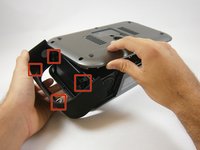
      • Locate the two plastic clips holding the bottom and back cover together.

      • Which clip you remove first is up to you. Rotate the device 90 degrees either left or right. Insert the flat end of a spudger horizontally between the back speaker and the back cover.

      • Place the flat end of the spudger behind one clip and pry it open. This may take repeated attempts.

      • This is the hardest step because the angle is awkward and the visibility is poor. If possible, have someone hold the device or provide lighting.

      • Once a clip has been removed, hold the bottom cover open so the clip will not fall back into place. One clip remains to be removed; you are almost there!

      crwdns2952109:0crwdne2952109:0

      crwdns2917038:0crwdne2917038:0

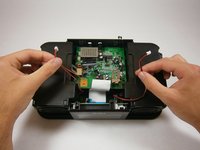
    6. iHome iD95 iPod Adapter Replacement: crwdns2935265:09crwdnd2935265:01crwdnd2935265:02crwdne2935265:0 iHome iD95 iPod Adapter Replacement: crwdns2935265:09crwdnd2935265:02crwdnd2935265:02crwdne2935265:0
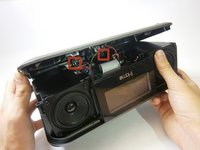
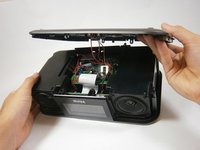
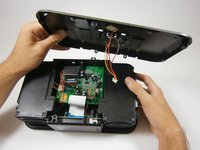
      • Use the same steps to remove the remaining clip.

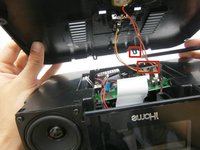
      • The bottom cover is still connected to the motherboard by wiring.

      crwdns2952109:0crwdne2952109:0

      crwdns2917038:0crwdne2917038:0

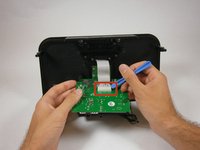
    7. iHome iD95 iPod Adapter Replacement: crwdns2935265:010crwdnd2935265:01crwdnd2935265:02crwdne2935265:0 iHome iD95 iPod Adapter Replacement: crwdns2935265:010crwdnd2935265:02crwdnd2935265:02crwdne2935265:0
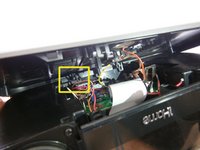
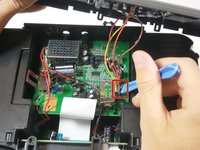
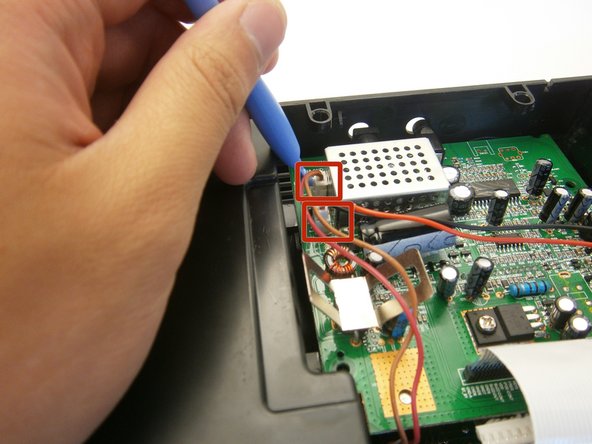
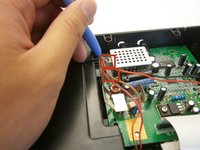
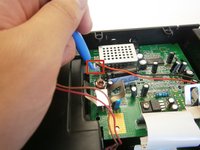
      • Use a plastic opening tool to pry off the white ZIF connector joining the wires to the motherboard.

      • Don't pull the wires. Take your time using a plastic opening tool.

      crwdns2952109:0crwdne2952109:0

      crwdns2917038:0crwdne2917038:0

    1. iHome iD95 iPod Adapter Replacement, Speakers: crwdns2935265:011crwdnd2935265:01crwdnd2935265:01crwdne2935265:0
      • Take out four 14 mm screws using a Phillips #1 screwdriver.

      crwdns2952109:0crwdne2952109:0

      crwdns2917038:0crwdne2917038:0

    2. iHome iD95 iPod Adapter Replacement: crwdns2935265:012crwdnd2935265:01crwdnd2935265:03crwdne2935265:0 iHome iD95 iPod Adapter Replacement: crwdns2935265:012crwdnd2935265:02crwdnd2935265:03crwdne2935265:0 iHome iD95 iPod Adapter Replacement: crwdns2935265:012crwdnd2935265:03crwdnd2935265:03crwdne2935265:0
      • Use a plastic opening tool to lift the two speaker zip connectors from the logic board.

      • Do not pull on the speaker wires directly. Continue to use a plastic opening tool.

      crwdns2952109:0crwdne2952109:0

      crwdns2917038:0crwdne2917038:0

    3. iHome iD95 iPod Adapter Replacement: crwdns2935265:013crwdnd2935265:01crwdnd2935265:01crwdne2935265:0
      • Lift and remove both speakers.

      crwdns2952109:0crwdne2952109:0

      crwdns2917038:0crwdne2917038:0

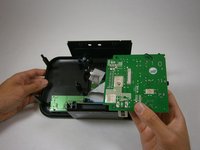
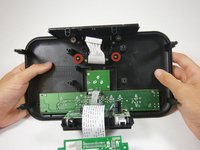
    1. iHome iD95 iPod Adapter Replacement, iPod Adapter: crwdns2935265:014crwdnd2935265:01crwdnd2935265:02crwdne2935265:0 iHome iD95 iPod Adapter Replacement, iPod Adapter: crwdns2935265:014crwdnd2935265:02crwdnd2935265:02crwdne2935265:0
      • Flip the logic board over.

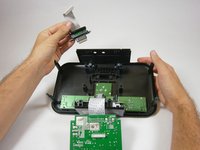
      • Use a plastic opening tool to pry and lift the iPod adapter zip connector from the logic board.

      crwdns2952109:0crwdne2952109:0

      crwdns2917038:0crwdne2917038:0

    2. iHome iD95 iPod Adapter Replacement: crwdns2935265:015crwdnd2935265:01crwdnd2935265:02crwdne2935265:0 iHome iD95 iPod Adapter Replacement: crwdns2935265:015crwdnd2935265:02crwdnd2935265:02crwdne2935265:0
      • Remove two 4 mm-head 12 mm-length screws using a Phillips #1 screwdriver.

      • Pull the iPod adapter from the top cover.

      crwdns2952109:0crwdne2952109:0

      crwdns2917038:0crwdne2917038:0

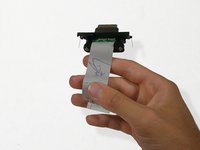
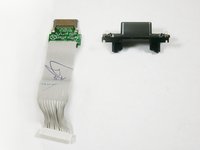
    3. iHome iD95 iPod Adapter Replacement: crwdns2935265:016crwdnd2935265:01crwdnd2935265:02crwdne2935265:0 iHome iD95 iPod Adapter Replacement: crwdns2935265:016crwdnd2935265:02crwdnd2935265:02crwdne2935265:0
      • Use a Phillips #1 screwdriver to take out the two, 12 mm-length 4 mm-head, screws holding the iPod adapter to its casing.

      crwdns2952109:0crwdne2952109:0

      crwdns2917038:0crwdne2917038:0

crwdns2915888:0crwdne2915888:0

To reassemble your device, follow these instructions in reverse order.

crwdns2935221:0crwdne2935221:0

crwdns2935227:0crwdne2935227:0

Vincent Chan

crwdns2935283:004/18/13crwdne2935283:0

19 crwdns2915208:0crwdne2915208:0

crwdns2935297:06crwdne2935297:0

crwdns2935287:0crwdne2935287:0

Cal Poly, Team 12-37, Amido Spring 2013 crwdns2935289:0Cal Poly, Team 12-37, Amido Spring 2013crwdne2935289:0

CPSU-AMIDO-S13S12G37

crwdns2931471:04crwdne2931471:0

crwdns2935297:084crwdne2935297:0

crwdns2947410:01crwdne2947410:0

Great article. I have an iHome iDL95 and would like to swap the Lightening adapter with a 30-pin adapter so that I can utilize my iPod 5.5 Classic. Is this possible? If so, where do I obtain the required 30-pin replacement adapter? Thanks.

P. Matt - crwdns2934203:0crwdne2934203:0 crwdns2950251:0crwdne2950251:0

crwdns2917038:0crwdne2917038:0

crwdns2936625:0crwdne2936625:0:

crwdns2936751:024crwdne2936751:0 1

crwdns2936753:07crwdne2936753:0 8

crwdns2936753:030crwdne2936753:0 24

crwdns2942667:0crwdne2942667:0 2,316