crwdns2933423:0crwdne2933423:0
crwdns2947577:0crwdnd2947577:0crwdne2947577:0

dreamGEAR Quad Dock Pro LEDs Replacement

crwdns2869540:0crwdne2869540:0: 654

crwdns2959988:0crwdne2959988:0

crwdns2959990:0crwdne2959990:0
3
crwdns2959992:0crwdne2959992:0
21
crwdns2959994:0crwdne2959994:0
94
crwdns2959996:0crwdne2959996:0
654
crwdns2955950:0crwdne2955950:0: 0

crwdns2959998:0crwdne2959998:0

crwdns2960000:0crwdne2960000:0
crwdns2959984:0crwdne2959984:0: 1

crwdns2959972:01crwdne2959972:0

crwdns2959986:0crwdne2959986:0: 1

crwdns2959980:01crwdne2959980:0

crwdns2955944:0crwdne2955944:0: crwdns2931287:015crwdne2931287:0
crwdns2955970:0crwdne2955970:0: crwdns2937803:0crwdne2937803:0
dreamGEAR Quad Dock Pro LEDs Replacement

crwdns2915892:0crwdne2915892:0

crwdns2959928:0crwdne2959928:0 ↓

While the LEDs should not interfere with the function of the Quad Dock, it is nice to see them work. Find out how to replace them.

crwdns2959930:0crwdne2959930:0

crwdns2943215:0crwdne2943215:0

    1. dreamGEAR Quad Dock Pro LEDs Replacement, Prerequisite Guide to Accessing Interior: crwdns2935265:01crwdnd2935265:01crwdnd2935265:02crwdne2935265:0 dreamGEAR Quad Dock Pro LEDs Replacement, Prerequisite Guide to Accessing Interior: crwdns2935265:01crwdnd2935265:02crwdnd2935265:02crwdne2935265:0
      • Remove the rubber foot pads on the bottom of the device using a plastic opening tool.

      crwdns2952109:0crwdne2952109:0

      crwdns2917038:0crwdne2917038:0

    2. dreamGEAR Quad Dock Pro LEDs Replacement: crwdns2935265:02crwdnd2935265:01crwdnd2935265:02crwdne2935265:0 dreamGEAR Quad Dock Pro LEDs Replacement: crwdns2935265:02crwdnd2935265:02crwdnd2935265:02crwdne2935265:0
      • Remove the six 2 mm PH0 screws on the bottom of the device.

      • Four of those screws are located under the foot pads.

      crwdns2952109:0crwdne2952109:0

      crwdns2917038:0crwdne2917038:0

    3. dreamGEAR Quad Dock Pro LEDs Replacement: crwdns2935265:03crwdnd2935265:01crwdnd2935265:01crwdne2935265:0
      • Gently remove the bottom of the device.

      crwdns2952109:0crwdne2952109:0

      crwdns2917038:0crwdne2917038:0

    1. dreamGEAR Quad Dock Pro LEDs Replacement, Mother Board: crwdns2935265:04crwdnd2935265:01crwdnd2935265:02crwdne2935265:0 dreamGEAR Quad Dock Pro LEDs Replacement, Mother Board: crwdns2935265:04crwdnd2935265:02crwdnd2935265:02crwdne2935265:0
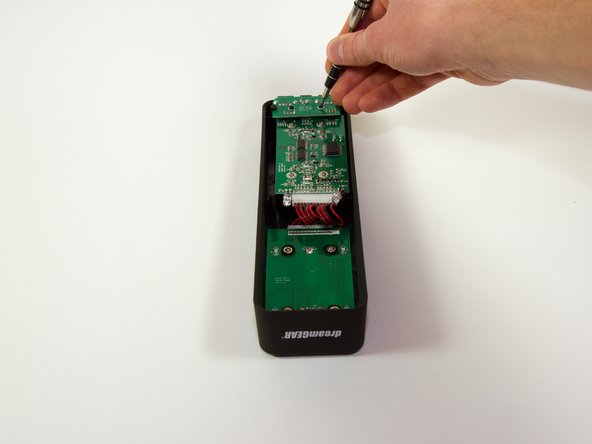
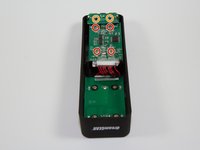
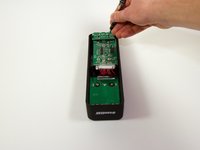
      • Remove the four 1.8 mm J1 screws.

      • Remove the two 2mm PH0 screws.

      crwdns2952109:0crwdne2952109:0

      crwdns2917038:0crwdne2917038:0

    2. dreamGEAR Quad Dock Pro LEDs Replacement: crwdns2935265:05crwdnd2935265:01crwdnd2935265:01crwdne2935265:0
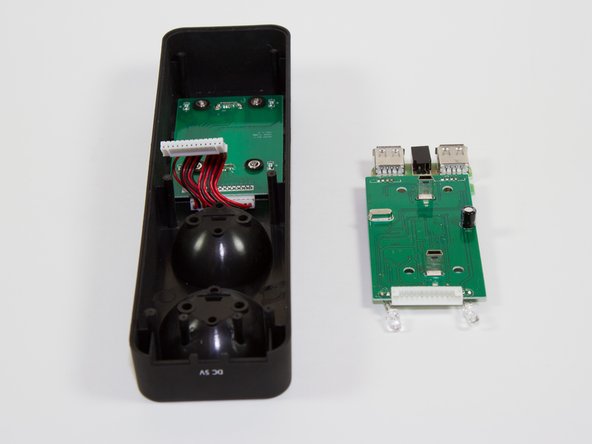
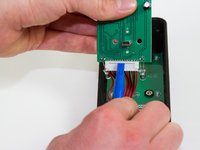
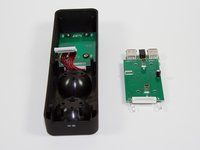
      • Gently pick up the mother board

      • Pick the mother board straight up or you may risk damaging the mini-USB charging ports.

      crwdns2952109:0crwdne2952109:0

      crwdns2917038:0crwdne2917038:0

    3. dreamGEAR Quad Dock Pro LEDs Replacement: crwdns2935265:06crwdnd2935265:01crwdnd2935265:02crwdne2935265:0 dreamGEAR Quad Dock Pro LEDs Replacement: crwdns2935265:06crwdnd2935265:02crwdnd2935265:02crwdne2935265:0
      • Use a plastic opening tool or similar tool to gently pry the power ribbon cord out of its port.

      crwdns2952109:0crwdne2952109:0

      crwdns2917038:0crwdne2917038:0

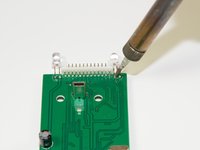
    1. dreamGEAR Quad Dock Pro LEDs Replacement, LEDs: crwdns2935265:07crwdnd2935265:01crwdnd2935265:02crwdne2935265:0 dreamGEAR Quad Dock Pro LEDs Replacement, LEDs: crwdns2935265:07crwdnd2935265:02crwdnd2935265:02crwdne2935265:0
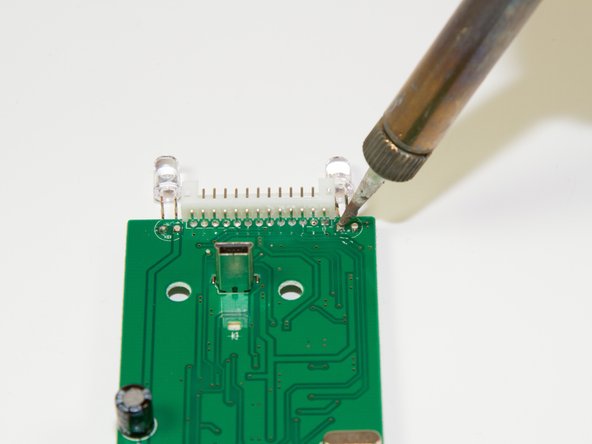
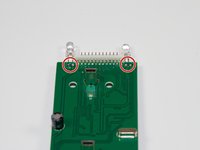
      • Desolder the two points following the instructions included in your soldering kit as you remove the light.

      • FIRE HAZARD! BURN DANGER! Follow all the safety precautions included with your soldering kit.

      • You can follow iFixit's guide to soldering here.

      crwdns2952109:0crwdne2952109:0

      crwdns2917038:0crwdne2917038:0

crwdns2915888:0crwdne2915888:0

To reassemble your device, follow these instructions in reverse order.

crwdns2935221:0crwdne2935221:0

crwdns2935227:0crwdne2935227:0

Jacob

crwdns2935283:003/11/15crwdne2935283:0

757 crwdns2915208:0crwdne2915208:0

crwdns2935297:06crwdne2935297:0

crwdns2935287:0crwdne2935287:0

Colorado Springs, Team 4-4, Panko Spring 2015 crwdns2935289:0Colorado Springs, Team 4-4, Panko Spring 2015crwdne2935289:0

UCCS-PANKO-S15S4G4

crwdns2931471:03crwdne2931471:0

crwdns2935297:072crwdne2935297:0

crwdns2947412:00crwdne2947412:0

crwdns2917038:0crwdne2917038:0

crwdns2936625:0crwdne2936625:0:

crwdns2936751:024crwdne2936751:0 3

crwdns2936753:07crwdne2936753:0 21

crwdns2936753:030crwdne2936753:0 94

crwdns2959996:0crwdne2959996:0 654