crwdns2933423:0crwdne2933423:0
crwdns2947577:0crwdnd2947577:0crwdne2947577:0

Zune Flash 2nd Generation Back Cover Replacement

crwdns2942213:0crwdne2942213:0

  1. Zune Flash 2nd Generation Back Cover Replacement, Back Cover: crwdns2935265:01crwdnd2935265:01crwdnd2935265:02crwdne2935265:0 Zune Flash 2nd Generation Back Cover Replacement, Back Cover: crwdns2935265:01crwdnd2935265:02crwdnd2935265:02crwdne2935265:0
    • Prior to disassembly, verify the hold switch is engaged to ensure the device will not turn on during the procedure.

    • If the device turns on while it is being disassembled it could cause irreversible damage to the device.

    • PICS MAKE NO SENSE.

    crwdns2952109:0crwdne2952109:0

    crwdns2917038:0crwdne2917038:0

  2. Zune Flash 2nd Generation Back Cover Replacement: crwdns2935265:02crwdnd2935265:01crwdnd2935265:02crwdne2935265:0 Zune Flash 2nd Generation Back Cover Replacement: crwdns2935265:02crwdnd2935265:02crwdnd2935265:02crwdne2935265:0
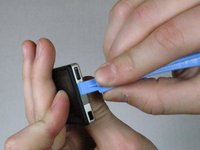
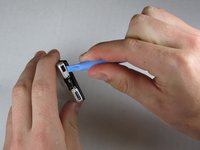
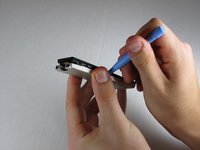
    • Remove the top metal clip by inserting a Zune opening tool in between the faceplate and back cover and pulling gently back as shown in the images.

    • You should hear a 'click' as the clip detaches from the device.

    crwdns2952109:0crwdne2952109:0

    crwdns2917038:0crwdne2917038:0

  3. Zune Flash 2nd Generation Back Cover Replacement: crwdns2935265:03crwdnd2935265:01crwdnd2935265:01crwdne2935265:0
    • Remove the two screws shown using a Y00 Tri-Wing screwdriver.

    crwdns2952109:0crwdne2952109:0

    crwdns2917038:0crwdne2917038:0

  4. Zune Flash 2nd Generation Back Cover Replacement: crwdns2935265:04crwdnd2935265:01crwdnd2935265:03crwdne2935265:0 Zune Flash 2nd Generation Back Cover Replacement: crwdns2935265:04crwdnd2935265:02crwdnd2935265:03crwdne2935265:0 Zune Flash 2nd Generation Back Cover Replacement: crwdns2935265:04crwdnd2935265:03crwdnd2935265:03crwdne2935265:0
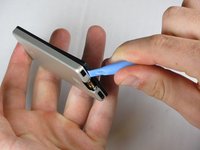
    • Insert the Zune opening tool between the faceplate and the back cover, starting from the top and slowly work your way around the device.

    crwdns2952109:0crwdne2952109:0

    crwdns2917038:0crwdne2917038:0

  5. Zune Flash 2nd Generation Back Cover Replacement: crwdns2935265:05crwdnd2935265:01crwdnd2935265:03crwdne2935265:0 Zune Flash 2nd Generation Back Cover Replacement: crwdns2935265:05crwdnd2935265:02crwdnd2935265:03crwdne2935265:0 Zune Flash 2nd Generation Back Cover Replacement: crwdns2935265:05crwdnd2935265:03crwdnd2935265:03crwdne2935265:0
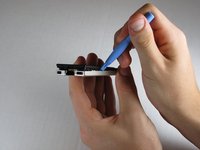
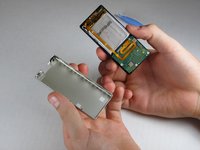
    • Work your way around the Zune until the back cover comes free. Remove the back plate and set it aside.

    crwdns2952109:0crwdne2952109:0

    crwdns2917038:0crwdne2917038:0

crwdns2915888:0crwdne2915888:0

To reassemble your device, follow these instructions in reverse order.

crwdns2935221:0crwdne2935221:0

ybahman

crwdns2935283:011/01/09crwdne2935283:0

139 crwdns2915208:0crwdne2915208:0

crwdns2935297:04crwdne2935297:0

crwdns2935287:0crwdne2935287:0

Cal Poly, Team 9-20, Regan Fall 2009 crwdns2935289:0Cal Poly, Team 9-20, Regan Fall 2009crwdne2935289:0

CPSU-REGAN-F09S9G20

crwdns2931471:05crwdne2931471:0

crwdns2935297:07crwdne2935297:0

crwdns2947412:00crwdne2947412:0

crwdns2917038:0crwdne2917038:0

crwdns2936625:0crwdne2936625:0:

crwdns2936751:024crwdne2936751:0 2

crwdns2936753:07crwdne2936753:0 19

crwdns2936753:030crwdne2936753:0 50

crwdns2942667:0crwdne2942667:0 4,156