crwdns2933423:0crwdne2933423:0
crwdns2947577:0crwdnd2947577:0crwdne2947577:0

ZTE Compel Speaker Replacement

crwdns2942213:0crwdne2942213:0

    1. ZTE Compel Speaker Replacement, Battery: crwdns2935265:01crwdnd2935265:01crwdnd2935265:01crwdne2935265:0
      • Place the phone on a flat surface with the screen facing down. This will allow easy access to the removable black plastic cover on the back of the phone.

      crwdns2952109:0crwdne2952109:0

      crwdns2917038:0crwdne2917038:0

    2. ZTE Compel Speaker Replacement: crwdns2935265:02crwdnd2935265:01crwdnd2935265:01crwdne2935265:0
      • In the bottom right corner of the device, use your fingernail to remove the back cover of the phone by lifting up and holding the device with your other hand.

      crwdns2952109:0crwdne2952109:0

      crwdns2917038:0crwdne2917038:0

    3. ZTE Compel Speaker Replacement: crwdns2935265:03crwdnd2935265:01crwdnd2935265:01crwdne2935265:0
      • In the top-right area of the battery, use your fingernail to lift the battery out of the phone.

      • If your battery is corroded, take all necessary precautions, such as, gloves and protective eyewear.

      crwdns2952109:0crwdne2952109:0

      crwdns2917038:0crwdne2917038:0

    1. ZTE Compel Speaker Replacement, Speaker: crwdns2935265:04crwdnd2935265:01crwdnd2935265:02crwdne2935265:0 ZTE Compel Speaker Replacement, Speaker: crwdns2935265:04crwdnd2935265:02crwdnd2935265:02crwdne2935265:0
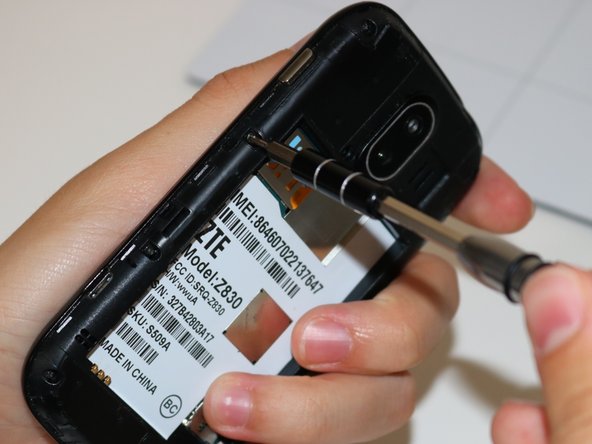
      • Remove the 9 screws that measure 4 mm Phillips. Use your PH000 screwdriver attachment.

      • Use your iFixit Magnetic Project Mat to hold your removed screws while working on your ZTE Compel

      crwdns2952109:0crwdne2952109:0

      crwdns2917038:0crwdne2917038:0

    2. ZTE Compel Speaker Replacement: crwdns2935265:05crwdnd2935265:01crwdnd2935265:03crwdne2935265:0 ZTE Compel Speaker Replacement: crwdns2935265:05crwdnd2935265:02crwdnd2935265:03crwdne2935265:0 ZTE Compel Speaker Replacement: crwdns2935265:05crwdnd2935265:03crwdnd2935265:03crwdne2935265:0
      • Insert the flat end of your black plastic spudger into the crease and work it around the entire circumference of the phone until the front and back are separated.

      crwdns2952109:0crwdne2952109:0

      crwdns2917038:0crwdne2917038:0

    3. ZTE Compel Speaker Replacement: crwdns2935265:06crwdnd2935265:01crwdnd2935265:01crwdne2935265:0
      crwdns2935267:0crwdne2935267:0
      Tweezers
      $4.99
      • The speaker is located in the top-left corner of the back plate. Using your tweezers, grip the sides of the speaker and pull it out.

      • Be cautious pulling the speaker out as it might move while pulling it due to adhesive wearing away.

      crwdns2952109:0crwdne2952109:0

      crwdns2917038:0crwdne2917038:0

crwdns2915888:0crwdne2915888:0

To reassemble your device, follow these instructions in reverse order.

crwdns2935221:0crwdne2935221:0

Tayler McCleese

crwdns2935283:009/06/18crwdne2935283:0

246 crwdns2915208:0crwdne2915208:0

crwdns2935297:02crwdne2935297:0

crwdns2935287:0crwdne2935287:0

Ohio State, Team S1-G4, Whitney Fall 2018 crwdns2935289:0Ohio State, Team S1-G4, Whitney Fall 2018crwdne2935289:0

OSU-WHITNEY-F18S1G4

crwdns2931471:02crwdne2931471:0

crwdns2935297:060crwdne2935297:0

crwdns2947412:00crwdne2947412:0

crwdns2917038:0crwdne2917038:0

crwdns2936625:0crwdne2936625:0:

crwdns2936751:024crwdne2936751:0 4

crwdns2936753:07crwdne2936753:0 20

crwdns2936753:030crwdne2936753:0 42

crwdns2942667:0crwdne2942667:0 544