
ZD-N Plus Wireless Controller Battery Replacement

crwdns2959932:0crwdnd2959932:0Devin Matoscrwdnd2959932:0crwdnd2959932:0crwdnd2959932:03crwdnd2959932:0crwdne2959932:0
crwdns2959936:0Sun 3, 2020crwdne2959936:0
crwdns2869540:0crwdne2869540:0: 998
crwdns2959988:0crwdne2959988:0
- crwdns2959990:0crwdne2959990:0
- 3
- crwdns2959992:0crwdne2959992:0
- 15
- crwdns2959994:0crwdne2959994:0
- 67
- crwdns2959996:0crwdne2959996:0
- 998
crwdns2955950:0crwdne2955950:0: 0
crwdns2959998:0crwdne2959998:0
crwdns2960000:0crwdne2960000:0crwdns2959984:0crwdne2959984:0: 0 1
crwdns2959956:0crwdne2959956:0
crwdns2959968:01crwdne2959968:0
crwdns2959986:0crwdne2959986:0: 0 1
crwdns2959958:0crwdne2959958:0
crwdns2959976:01crwdne2959976:0
crwdns2862615:0crwdne2862615:0
crwdns2862616:0crwdne2862616:0
crwdns2915892:0crwdne2915892:0
crwdns2959928:0crwdne2959928:0 ↓This guide is designed to explain how to replace the battery in the ZD-N208 Plus Wireless Controller. The Z-DN Plus contains a rechargeable lithium polymer battery, which generally can be found online or in electronic stores. They retail for around $20 USD. The guide will outline how to disconnect the battery from the controller in order to replace it with a new battery. Note, if you are having trouble starting your controller it is suggested that you attempt other troubleshooting options to find potential issues before replacing the battery, as your troubles may not be caused by a broken battery.
crwdns2959930:0crwdne2959930:0
crwdns2943215:0crwdne2943215:0


-
-
-
Remove the seven 12mm JIS #00 screws that hold the back panel in place.
 crwdns2952109:0crwdne2952109:0
-
-
-
Lift up on the back panel of the ZD-N Plus to remove it from the rest of the controller.
-
-
-
-
-
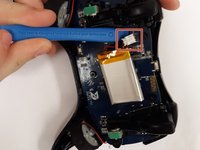
Use an opening tool to pry the battery from its original position.
-
-
-
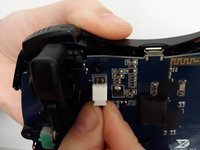
Use an opening tool to pry the connector away from the two metallic prongs.
-
-
-
-
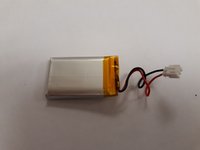
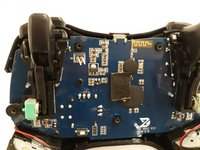
Remove the battery from the controller.
-
-




To reassemble your device, follow these instructions in reverse order.

crwdns2935287:0crwdne2935287:0

Grand Valley State University, Team S4-G1, DeVasto Fall 2019 crwdns2935289:0Grand Valley State University, Team S4-G1, DeVasto Fall 2019crwdne2935289:0
GVSU-DEVASTO-F19S4G1
crwdns2931471:04crwdne2931471:0
crwdns2935297:084crwdne2935297:0
