crwdns2933423:0crwdne2933423:0
crwdns2947577:0crwdnd2947577:0crwdne2947577:0

Yuneec Breeze 4K Camera Replacement

crwdns2942213:0crwdne2942213:0

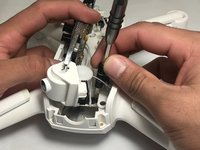
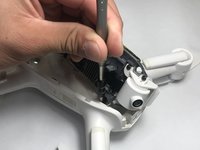
  1. Yuneec Breeze 4K Camera Replacement, Camera: crwdns2935265:01crwdnd2935265:01crwdnd2935265:02crwdne2935265:0 Yuneec Breeze 4K Camera Replacement, Camera: crwdns2935265:01crwdnd2935265:02crwdnd2935265:02crwdne2935265:0
    • Before you begin start by putting on a ESD wrist strap to prevent ESD damage and remove the battery.

    • Once the battery is taken out, flip over the drone so that the cameras are now facing up.

    crwdns2952109:0crwdne2952109:0
  2. Yuneec Breeze 4K Camera Replacement: crwdns2935265:02crwdnd2935265:01crwdnd2935265:01crwdne2935265:0
    • Using small pliers grip the connector of the wire and pull it out slowly.

    crwdns2952109:0crwdne2952109:0
  3. Yuneec Breeze 4K Camera Replacement: crwdns2935265:03crwdnd2935265:01crwdnd2935265:01crwdne2935265:0
    • Remove the four white rubber dampeners located in each corner of the frame that hold the it in place.

    crwdns2952109:0crwdne2952109:0
  4. Yuneec Breeze 4K Camera Replacement: crwdns2935265:04crwdnd2935265:01crwdnd2935265:01crwdne2935265:0
    • Unplug the two vertical plugs located in the rear of the M7 board.

    crwdns2952109:0crwdne2952109:0
  5. Yuneec Breeze 4K Camera Replacement: crwdns2935265:05crwdnd2935265:01crwdnd2935265:01crwdne2935265:0
    • Slightly lift the M7 board to remove the two plugs located under the rear of the board.

    crwdns2952109:0crwdne2952109:0
  6. Yuneec Breeze 4K Camera Replacement: crwdns2935265:06crwdnd2935265:01crwdnd2935265:01crwdne2935265:0
    • Once all plugs on top of the M7 board are disconnected, carefully lift the M7 board onto its side and remove all plugs on the bottom.

    crwdns2952109:0crwdne2952109:0
  7. Yuneec Breeze 4K Camera Replacement: crwdns2935265:07crwdnd2935265:01crwdnd2935265:02crwdne2935265:0 Yuneec Breeze 4K Camera Replacement: crwdns2935265:07crwdnd2935265:02crwdnd2935265:02crwdne2935265:0
    • Tilt the M7 board onto its side. Using the Phillips #00 screwdriver remove the two black screws connected to the large black two pronged input.

    crwdns2952109:0crwdne2952109:0
  8. Yuneec Breeze 4K Camera Replacement: crwdns2935265:08crwdnd2935265:01crwdnd2935265:01crwdne2935265:0
    • Using a pair of pliers pull apart the battery connector.

    crwdns2952109:0crwdne2952109:0
  9. Yuneec Breeze 4K Camera Replacement: crwdns2935265:09crwdnd2935265:01crwdnd2935265:01crwdne2935265:0
    • Flip over the entire frame along with the M7 board and the A9 board.

    crwdns2952109:0crwdne2952109:0
  10. Yuneec Breeze 4K Camera Replacement: crwdns2935265:010crwdnd2935265:01crwdnd2935265:01crwdne2935265:0
    • There will be 4 screws that hold the A9 board together. Using a H1.5 Alan bit unscrew those bolts to take the A9 board apart.

    crwdns2952109:0crwdne2952109:0
  11. Yuneec Breeze 4K Camera Replacement: crwdns2935265:011crwdnd2935265:01crwdnd2935265:01crwdne2935265:0
    • Unplug the only wire that is connected to the A9 board.

    crwdns2952109:0crwdne2952109:0
  12. Yuneec Breeze 4K Camera Replacement: crwdns2935265:012crwdnd2935265:01crwdnd2935265:01crwdne2935265:0
    • Pull apart the frame from the other board. The camera will be connected by a plug and it should pull out easily.

    crwdns2952109:0crwdne2952109:0
  13. Yuneec Breeze 4K Camera Replacement: crwdns2935265:013crwdnd2935265:01crwdnd2935265:01crwdne2935265:0
    • Unscrew the four screws that are holding the camera to the frame.

    crwdns2952109:0crwdne2952109:0
crwdns2915888:0crwdne2915888:0

To reassemble your device, follow these instructions in reverse order.

crwdns2935229:03crwdne2935229:0

Wes Knutson

crwdns2935283:010/04/18crwdne2935283:0

481 crwdns2915208:0crwdne2915208:0

crwdns2935297:03crwdne2935297:0

crwdns2935287:0crwdne2935287:0

UW Stout, Team S6-G5, Ogden Fall 2018 crwdns2935289:0UW Stout, Team S6-G5, Ogden Fall 2018crwdne2935289:0

UWSTOUT-OGDEN-F18S6G5

crwdns2931471:04crwdne2931471:0

crwdns2935297:04crwdne2935297:0

crwdns2947410:01crwdne2947410:0

Excellent! I don’t think that the process could of have been any more clear than this.

neonjohn25 - crwdns2934203:0crwdne2934203:0 crwdns2950251:0crwdne2950251:0

crwdns2917038:0crwdne2917038:0

crwdns2936625:0crwdne2936625:0:

crwdns2936751:024crwdne2936751:0 1

crwdns2936753:07crwdne2936753:0 13

crwdns2936753:030crwdne2936753:0 89

crwdns2942667:0crwdne2942667:0 2,343