crwdns2933423:0crwdne2933423:0
crwdns2947577:0crwdnd2947577:0crwdne2947577:0

Xbox 360 Wireless Controller Bottom Panel Replacement

crwdns2942213:0crwdne2942213:0

  1. Xbox 360 Wireless Controller Bottom Panel Replacement, Battery: crwdns2935265:01crwdnd2935265:01crwdnd2935265:02crwdne2935265:0 Xbox 360 Wireless Controller Bottom Panel Replacement, Battery: crwdns2935265:01crwdnd2935265:02crwdnd2935265:02crwdne2935265:0
    • Depress the battery release button on the top of the controller.

    • Remove the battery holder from the controller.

    • The standard option for Xbox 360 Wireless Controllers Battery Packs is AA batteries. A rechargeable battery is also available, but both battery options are removed from the controller in the same way.

    crwdns2952109:0crwdne2952109:0
  2. Xbox 360 Wireless Controller Bottom Panel Replacement, Rear Case: crwdns2935265:02crwdnd2935265:01crwdnd2935265:01crwdne2935265:0
    crwdns2935267:0crwdne2935267:0
    Tweezers
    $4.99
    • Use a pair of tweezers to peel the barcode sticker from the battery compartment.

    crwdns2952109:0crwdne2952109:0
  3. Xbox 360 Wireless Controller Bottom Panel Replacement: crwdns2935265:03crwdnd2935265:01crwdnd2935265:01crwdne2935265:0
    • Remove the seven 9.3 mm T8 Security Torx screws securing the rear case to the front case.

    crwdns2952109:0crwdne2952109:0
  4. Xbox 360 Wireless Controller Bottom Panel Replacement: crwdns2935265:04crwdnd2935265:01crwdnd2935265:02crwdne2935265:0 Xbox 360 Wireless Controller Bottom Panel Replacement: crwdns2935265:04crwdnd2935265:02crwdnd2935265:02crwdne2935265:0
    crwdns2935267:0crwdne2935267:0
    Spudger
    $2.99
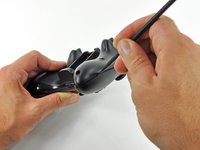
    • Insert a Spudger between the front and rear cases along the left edge of the controller.

    • Rotate the spudger toward the front of the controller, prying the two cases apart.

    crwdns2952109:0crwdne2952109:0
  5. Xbox 360 Wireless Controller Bottom Panel Replacement: crwdns2935265:05crwdnd2935265:01crwdnd2935265:02crwdne2935265:0 Xbox 360 Wireless Controller Bottom Panel Replacement: crwdns2935265:05crwdnd2935265:02crwdnd2935265:02crwdne2935265:0
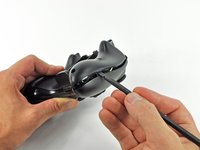
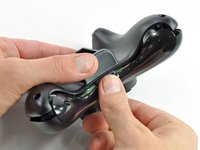
    • Insert a spudger between the front and rear cases, near the headphone jack.

    • Rotate the spudger toward the front of the controller to pry the two cases apart.

    crwdns2952109:0crwdne2952109:0
  6. Xbox 360 Wireless Controller Bottom Panel Replacement: crwdns2935265:06crwdnd2935265:01crwdnd2935265:02crwdne2935265:0 Xbox 360 Wireless Controller Bottom Panel Replacement: crwdns2935265:06crwdnd2935265:02crwdnd2935265:02crwdne2935265:0
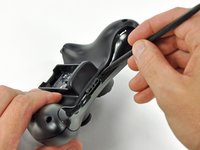
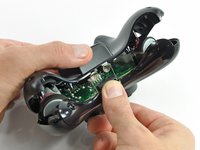
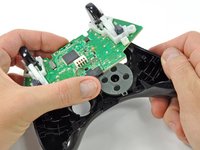
    • Grasp the controller by the battery compartment and the headphone jack.

    • Lift the battery compartment away from the headphone jack, separating the rear case from the front case and logic board.

    • The battery contact springs are held in place by slots in the battery housing in the rear case. Be sure to realign them properly during reassembly.

    crwdns2952109:0crwdne2952109:0
  7. Xbox 360 Wireless Controller Bottom Panel Replacement, Vibration Motors: crwdns2935265:07crwdnd2935265:01crwdnd2935265:02crwdne2935265:0 Xbox 360 Wireless Controller Bottom Panel Replacement, Vibration Motors: crwdns2935265:07crwdnd2935265:02crwdnd2935265:02crwdne2935265:0
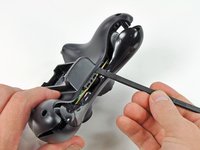
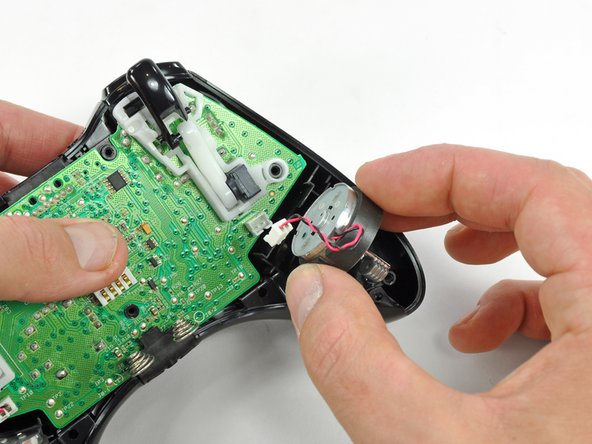
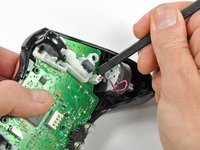
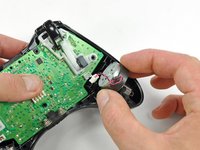
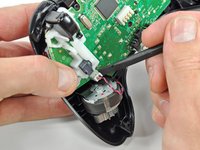
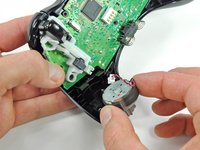
    • Use the flat end of a spudger to remove the vibration motor cable, moving it upward from its socket on the logic board.

    • Lift the vibration motor out of the front case.

    crwdns2952109:0crwdne2952109:0
  8. Xbox 360 Wireless Controller Bottom Panel Replacement: crwdns2935265:08crwdnd2935265:01crwdnd2935265:02crwdne2935265:0 Xbox 360 Wireless Controller Bottom Panel Replacement: crwdns2935265:08crwdnd2935265:02crwdnd2935265:02crwdne2935265:0
    • Remove the vibration motor from the other side of the controller using the same method previously described.

    • The left motor has significantly more counterweight than the right motor.

    crwdns2952109:0crwdne2952109:0
  9. Xbox 360 Wireless Controller Bottom Panel Replacement, Logic Board: crwdns2935265:09crwdnd2935265:01crwdnd2935265:02crwdne2935265:0 Xbox 360 Wireless Controller Bottom Panel Replacement, Logic Board: crwdns2935265:09crwdnd2935265:02crwdnd2935265:02crwdne2935265:0
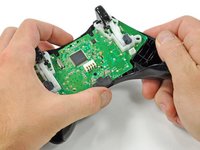
    • Lifting from the headphone jack and power plug, remove the logic board from the front case.

    crwdns2952109:0crwdne2952109:0
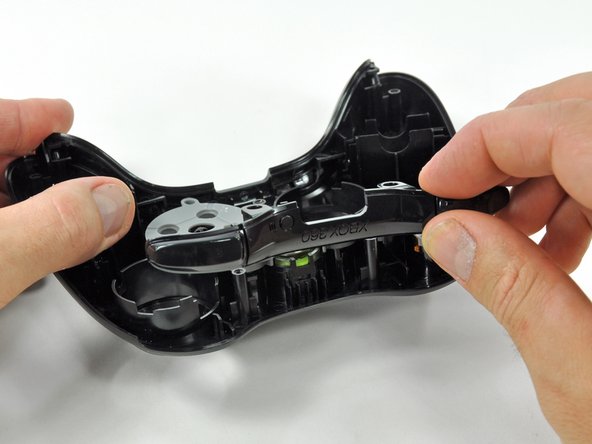
  10. Xbox 360 Wireless Controller Bottom Panel Replacement, Bottom Panel: crwdns2935265:010crwdnd2935265:01crwdnd2935265:02crwdne2935265:0 Xbox 360 Wireless Controller Bottom Panel Replacement, Bottom Panel: crwdns2935265:010crwdnd2935265:02crwdnd2935265:02crwdne2935265:0
    • Lift the bumper panel off of the front case.

    crwdns2952109:0crwdne2952109:0
  11. Xbox 360 Wireless Controller Bottom Panel Replacement: crwdns2935265:011crwdnd2935265:01crwdnd2935265:01crwdne2935265:0
    • Remove the rubber pad from the back of the D-pad.

    crwdns2952109:0crwdne2952109:0
  12. Xbox 360 Wireless Controller Bottom Panel Replacement: crwdns2935265:012crwdnd2935265:01crwdnd2935265:01crwdne2935265:0
    • Remove the two 7.0 mm silver Phillips screws from the back of the D-pad.

    crwdns2952109:0crwdne2952109:0
  13. Xbox 360 Wireless Controller Bottom Panel Replacement: crwdns2935265:013crwdnd2935265:01crwdnd2935265:02crwdne2935265:0 Xbox 360 Wireless Controller Bottom Panel Replacement: crwdns2935265:013crwdnd2935265:02crwdnd2935265:02crwdne2935265:0
    crwdns2935267:0crwdne2935267:0
    Tweezers
    $4.99
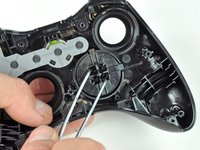
    • The D-pad is secured to its backing by two diagonal clips, shown in red.

    • Use a pair of tweezers and squeeze the clips together to release the D-pad from its backing.

    crwdns2952109:0crwdne2952109:0
  14. Xbox 360 Wireless Controller Bottom Panel Replacement: crwdns2935265:014crwdnd2935265:01crwdnd2935265:02crwdne2935265:0 Xbox 360 Wireless Controller Bottom Panel Replacement: crwdns2935265:014crwdnd2935265:02crwdnd2935265:02crwdne2935265:0
    • Lift the D-pad backing out of its compartment on the front case.

    • The D-pad remains below the front case.

    • The D-pad will fall once its backing is removed. Be sure to support it as you remove the backing.

    • The backing is slotted to its compartment to ensure that it will always be aligned properly.

    crwdns2952109:0crwdne2952109:0
  15. Xbox 360 Wireless Controller Bottom Panel Replacement: crwdns2935265:015crwdnd2935265:01crwdnd2935265:01crwdne2935265:0
    • Remove the rubber pad from the back of the input buttons.

    crwdns2952109:0crwdne2952109:0
  16. Xbox 360 Wireless Controller Bottom Panel Replacement: crwdns2935265:016crwdnd2935265:01crwdnd2935265:02crwdne2935265:0 Xbox 360 Wireless Controller Bottom Panel Replacement: crwdns2935265:016crwdnd2935265:02crwdnd2935265:02crwdne2935265:0
    • Using a pair or tweezers, remove the following buttons from the front panel:

    • A Button

    • B Button

    • X Button

    • Y Button

    • Start Button

    • Select Button

    • Guide Button

    crwdns2952109:0crwdne2952109:0
  17. Xbox 360 Wireless Controller Bottom Panel Replacement: crwdns2935265:017crwdnd2935265:01crwdnd2935265:01crwdne2935265:0
    • Using a pair of tweezers, remove the LED ring from the front panel.

    crwdns2952109:0crwdne2952109:0
  18. Xbox 360 Wireless Controller Bottom Panel Replacement: crwdns2935265:018crwdnd2935265:01crwdnd2935265:03crwdne2935265:0 Xbox 360 Wireless Controller Bottom Panel Replacement: crwdns2935265:018crwdnd2935265:02crwdnd2935265:03crwdne2935265:0 Xbox 360 Wireless Controller Bottom Panel Replacement: crwdns2935265:018crwdnd2935265:03crwdnd2935265:03crwdne2935265:0
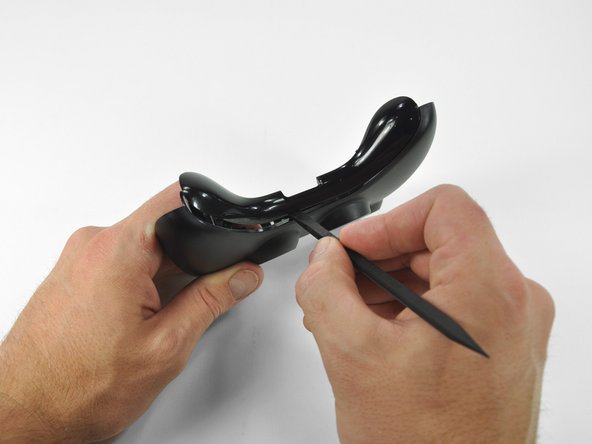
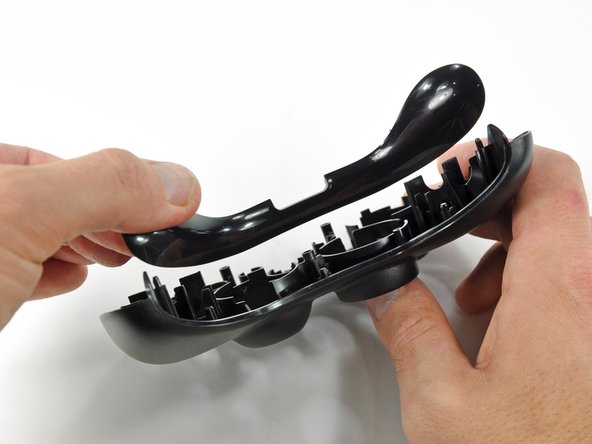
    • Insert a spudger between the lower panel and front case.

    • Slide the spudger along the gap between the two case components.

    • Lift the lower panel off of the front case.

    crwdns2952109:0crwdne2952109:0
crwdns2915888:0crwdne2915888:0

To reassemble your device, follow these instructions in reverse order.

crwdns2935229:020crwdne2935229:0

Brett Hartt

crwdns2935283:004/12/10crwdne2935283:0

132,073 crwdns2915208:0crwdne2915208:0

crwdns2935297:0144crwdne2935297:0

crwdns2935287:0crwdne2935287:0

iFixit crwdns2935289:0iFixitcrwdne2935289:0

Staff

crwdns2931471:0123crwdne2931471:0

crwdns2935297:025,710crwdne2935297:0

crwdns2947412:02crwdne2947412:0

I have 2 remote controllers of X box one which is not working.

ravi.gopalakrishnan - crwdns2934203:0crwdne2934203:0 crwdns2950251:0crwdne2950251:0

crwdns2917038:0crwdne2917038:0

crwdns2936625:0crwdne2936625:0:

crwdns2936751:024crwdne2936751:0 6

crwdns2936753:07crwdne2936753:0 21

crwdns2936753:030crwdne2936753:0 138

crwdns2942667:0crwdne2942667:0 19,695