crwdns2915892:0crwdne2915892:0
There is no such thing as too much hard drive space, and nothing more frustrating than too little. This guide will show you how to replace your Xbox 360 S hard drive.
crwdns2942213:0crwdne2942213:0
-
-
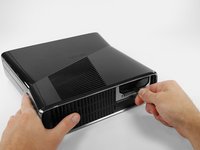
Push the latch holding down the hard drive cover to the left.
-
Pull the hard drive cover away from the console.
 crwdns2952109:0crwdne2952109:0
-
-
-
-
Firmly grasp the fabric tab labeled with the size of the hard drive (e.g. "250 GB") attached to the hard drive.
-
Pull the hard drive straight out of the console.
-




To reassemble your device, follow these instructions in reverse order.
crwdns2935221:0crwdne2935221:0
crwdns2935229:0112crwdne2935229:0


crwdns2947412:05crwdne2947412:0
do you have to transfer the OS? or data? if so what utility is used? do you need a data transfer cable?
Can I just add an external drive to supplement the existing HDD?
David Johnson - crwdns2934203:0crwdne2934203:0 crwdns2950251:0crwdne2950251:0
no the os is on the internal drive all the hard drive is doing is adding more storge space
Nightwolf Gamer - crwdns2934203:0crwdne2934203:0 crwdns2950251:0crwdne2950251:0
My hardrive says its unformated but its not and i dont want to loose content
Javier Eduardo Pacheco Hazim - crwdns2934203:0crwdne2934203:0 crwdns2950251:0crwdne2950251:0
Can I take the external out of the little black cover?
Lallie Cooney - crwdns2934203:0crwdne2934203:0 crwdns2950251:0crwdne2950251:0
Will it play backwards compatible games
justin rzonca - crwdns2934203:0crwdne2934203:0 crwdns2950251:0crwdne2950251:0
