crwdns2933423:0crwdne2933423:0
crwdns2947577:0crwdnd2947577:0crwdne2947577:0

Wen 2307 Power Cable Replacement

crwdns2869540:0crwdne2869540:0: 952

crwdns2959988:0crwdne2959988:0

crwdns2959990:0crwdne2959990:0
3
crwdns2959992:0crwdne2959992:0
27
crwdns2959994:0crwdne2959994:0
95
crwdns2959996:0crwdne2959996:0
952
crwdns2955950:0crwdne2955950:0: 0

crwdns2959998:0crwdne2959998:0

crwdns2960000:0crwdne2960000:0
crwdns2959984:0crwdne2959984:0: 0

crwdns2959956:0crwdne2959956:0

crwdns2959986:0crwdne2959986:0: 0

crwdns2959958:0crwdne2959958:0

crwdns2955944:0crwdne2955944:0: crwdns2931287:010crwdne2931287:0
crwdns2955970:0crwdne2955970:0: crwdns2937799:0crwdne2937799:0
Wen 2307 Power Cable Replacement

crwdns2915892:0crwdne2915892:0

crwdns2959928:0crwdne2959928:0 ↓

If your device is not powering on your power cable may be damaged. If it needs to be replaced this guide will show you how.

crwdns2959930:0crwdne2959930:0

crwdns2943215:0crwdne2943215:0

    1. Wen 2307 Power Cable Replacement, Front Panel: crwdns2935265:01crwdnd2935265:01crwdnd2935265:01crwdne2935265:0
      • Unscrew the locking sleeve.

      crwdns2952109:0crwdne2952109:0

      crwdns2917038:0crwdne2917038:0

    2. Wen 2307 Power Cable Replacement: crwdns2935265:02crwdnd2935265:01crwdnd2935265:01crwdne2935265:0
      • Remove the hanging clip.

      crwdns2952109:0crwdne2952109:0

      crwdns2917038:0crwdne2917038:0

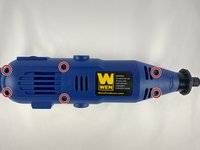
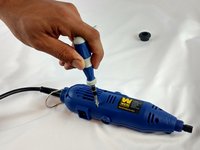
    3. Wen 2307 Power Cable Replacement: crwdns2935265:03crwdnd2935265:01crwdnd2935265:02crwdne2935265:0 Wen 2307 Power Cable Replacement: crwdns2935265:03crwdnd2935265:02crwdnd2935265:02crwdne2935265:0
      • Unscrew the six 8mm PH2 screws.

      crwdns2952109:0crwdne2952109:0

      crwdns2917038:0crwdne2917038:0

    4. Wen 2307 Power Cable Replacement: crwdns2935265:04crwdnd2935265:01crwdnd2935265:01crwdne2935265:0
      • While pressing the spindle lock button, unscrew the collet nut and remove it along with the brass collet.

      crwdns2952109:0crwdne2952109:0

      crwdns2917038:0crwdne2917038:0

    5. Wen 2307 Power Cable Replacement: crwdns2935265:05crwdnd2935265:01crwdnd2935265:01crwdne2935265:0
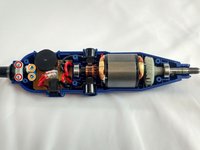
      • To remove the front panel, pry the device apart while holding the device with the other hand.

      • The front panel should come out easily.

      crwdns2952109:0crwdne2952109:0

      crwdns2917038:0crwdne2917038:0

    1. Wen 2307 Power Cable Replacement, Power Cable: crwdns2935265:06crwdnd2935265:01crwdnd2935265:02crwdne2935265:0 Wen 2307 Power Cable Replacement, Power Cable: crwdns2935265:06crwdnd2935265:02crwdnd2935265:02crwdne2935265:0
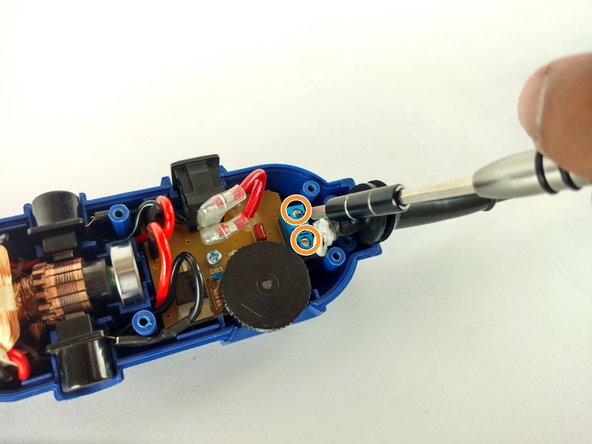
      • Identify the screws.

      • Unscrew the two 3mm phillips PH2.

      • Don't forget to put them appart from the ones unscrewed before.

      • Don't forget to put them appart from the ones unscrewed before.

      • Phillips PH2

      • Flathead 2.5mm

      crwdns2952109:0crwdne2952109:0

      crwdns2917038:0crwdne2917038:0

    2. Wen 2307 Power Cable Replacement: crwdns2935265:07crwdnd2935265:01crwdnd2935265:01crwdne2935265:0
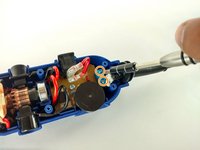
      • Remove the place boar carefully.

      crwdns2952109:0crwdne2952109:0

      crwdns2917038:0crwdne2917038:0

    3. Wen 2307 Power Cable Replacement: crwdns2935265:08crwdnd2935265:01crwdnd2935265:01crwdne2935265:0
      • Pull out the power cable connectors.

      crwdns2952109:0crwdne2952109:0

      crwdns2917038:0crwdne2917038:0

    4. Wen 2307 Power Cable Replacement: crwdns2935265:09crwdnd2935265:01crwdnd2935265:01crwdne2935265:0
      • Pull out the cord sleve for the new cable replacement.

      crwdns2952109:0crwdne2952109:0

      crwdns2917038:0crwdne2917038:0

crwdns2915888:0crwdne2915888:0

To reassemble your device, follow these instructions in reverse order.

crwdns2935221:0crwdne2935221:0

Sergio Palacio

crwdns2935283:002/08/16crwdne2935283:0

458 crwdns2915208:0crwdne2915208:0

crwdns2935297:02crwdne2935297:0

crwdns2935287:0crwdne2935287:0

USF Tampa, Team 12-1, Eyestone Spring 2016 crwdns2935289:0USF Tampa, Team 12-1, Eyestone Spring 2016crwdne2935289:0

USFT-EYESTONE-S16S12G1

crwdns2931471:04crwdne2931471:0

crwdns2935297:072crwdne2935297:0

crwdns2947412:00crwdne2947412:0

crwdns2917038:0crwdne2917038:0

crwdns2936625:0crwdne2936625:0:

crwdns2936751:024crwdne2936751:0 3

crwdns2936753:07crwdne2936753:0 27

crwdns2936753:030crwdne2936753:0 95

crwdns2959996:0crwdne2959996:0 952