crwdns2933423:0crwdne2933423:0
crwdns2947577:0crwdnd2947577:0crwdne2947577:0

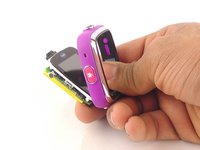
Vtech Kidizoom Smart Watch DX Buttons Replacement

crwdns2869540:0crwdne2869540:0: 6783

crwdns2959988:0crwdne2959988:0

crwdns2959990:0crwdne2959990:0
2
crwdns2959992:0crwdne2959992:0
16
crwdns2959994:0crwdne2959994:0
93
crwdns2959996:0crwdne2959996:0
6,783
crwdns2955950:0crwdne2955950:0: 7

crwdns2960004:06crwdne2960004:0, crwdns2960006:01crwdne2960006:0

crwdns2960000:0crwdne2960000:0
crwdns2959984:0crwdne2959984:0: 2

crwdns2959974:02crwdne2959974:0

crwdns2959986:0crwdne2959986:0: 0

crwdns2959958:0crwdne2959958:0

crwdns2955944:0crwdne2955944:0: 20 - 25 crwdns2931279:0crwdne2931279:0
crwdns2955970:0crwdne2955970:0: crwdns2937803:0crwdne2937803:0
Vtech Kidizoom Smart Watch DX Buttons Replacement

crwdns2915892:0crwdne2915892:0

crwdns2959928:0crwdne2959928:0 ↓

If the buttons are not working properly, this guide will help you replace them. Note: This guide requires soldering.

crwdns2959930:0crwdne2959930:0

crwdns2943215:0crwdne2943215:0

    1. Vtech Kidizoom Smart Watch DX Buttons Replacement, Master Switch: crwdns2935265:01crwdnd2935265:01crwdnd2935265:01crwdne2935265:0
      • Make sure the master switch is "OFF" before disassembly, to avoid an electric shock.

      • Flip the watch over with the back facing up.

      crwdns2952109:0crwdne2952109:0

      crwdns2917038:0crwdne2917038:0

    2. Vtech Kidizoom Smart Watch DX Buttons Replacement: crwdns2935265:02crwdnd2935265:01crwdnd2935265:01crwdne2935265:0
      • Remove the four 6.0 mm screws on the back plate with the Phillips #00 screwdriver.

      crwdns2952109:0crwdne2952109:0

      crwdns2917038:0crwdne2917038:0

    3. Vtech Kidizoom Smart Watch DX Buttons Replacement: crwdns2935265:03crwdnd2935265:01crwdnd2935265:01crwdne2935265:0
      • Gently pull the back plate from the watch casing.

      crwdns2952109:0crwdne2952109:0

      crwdns2917038:0crwdne2917038:0

    4. Vtech Kidizoom Smart Watch DX Buttons Replacement: crwdns2935265:04crwdnd2935265:01crwdnd2935265:02crwdne2935265:0 Vtech Kidizoom Smart Watch DX Buttons Replacement: crwdns2935265:04crwdnd2935265:02crwdnd2935265:02crwdne2935265:0
      • Lift the master switch from the circuit board.

      crwdns2952109:0crwdne2952109:0

      crwdns2917038:0crwdne2917038:0

    1. Vtech Kidizoom Smart Watch DX Buttons Replacement, Circuit Board: crwdns2935265:05crwdnd2935265:01crwdnd2935265:02crwdne2935265:0 Vtech Kidizoom Smart Watch DX Buttons Replacement, Circuit Board: crwdns2935265:05crwdnd2935265:02crwdnd2935265:02crwdne2935265:0
      • The speaker wires are fragile. They may break if excessive force is used to remove the circuit board.

      • Removal of the circuit board requires soldering.

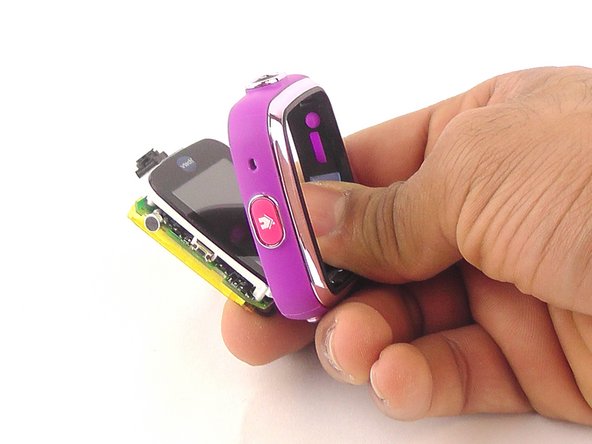
      • Gently push on the display from the front, near the camera. The circuit board and display will pop out through the back.

      crwdns2952109:0crwdne2952109:0

      crwdns2917038:0crwdne2917038:0

    2. Vtech Kidizoom Smart Watch DX Buttons Replacement: crwdns2935265:06crwdnd2935265:01crwdnd2935265:01crwdne2935265:0
      • Lift the circuit board carefully from the casing, without breaking or detaching the speaker wires at the bottom of the circuit board.

      crwdns2952109:0crwdne2952109:0

      crwdns2917038:0crwdne2917038:0

    3. Vtech Kidizoom Smart Watch DX Buttons Replacement: crwdns2935265:07crwdnd2935265:01crwdnd2935265:01crwdne2935265:0
      • Note which wire is connected to which lead before continuing. There are no markers on the circuit board to indicate where each wire belongs.

      • De-solder the black speaker wire from the circuit board.

      crwdns2952109:0crwdne2952109:0

      crwdns2917038:0crwdne2917038:0

    4. Vtech Kidizoom Smart Watch DX Buttons Replacement: crwdns2935265:08crwdnd2935265:01crwdnd2935265:01crwdne2935265:0
      • De-solder the red speaker wire, as in the previous step.

      crwdns2952109:0crwdne2952109:0

      crwdns2917038:0crwdne2917038:0

    5. Vtech Kidizoom Smart Watch DX Buttons Replacement: crwdns2935265:09crwdnd2935265:01crwdnd2935265:01crwdne2935265:0
      • Wait for the solder to cool down and solidify, then remove the circuit board from the casing.

      crwdns2952109:0crwdne2952109:0

      crwdns2917038:0crwdne2917038:0

    1. Vtech Kidizoom Smart Watch DX Buttons Replacement, Buttons: crwdns2935265:010crwdnd2935265:01crwdnd2935265:01crwdne2935265:0
      crwdns2935267:0crwdne2935267:0
      Tweezers
      $4.99
      • Use the the tweezers to pull off the blue rubber cover behind the button.

      • The blue cover is adhesive, so you can stick it back onto the back of the buttons after replacement.

      crwdns2952109:0crwdne2952109:0

      crwdns2917038:0crwdne2917038:0

    2. Vtech Kidizoom Smart Watch DX Buttons Replacement: crwdns2935265:011crwdnd2935265:01crwdnd2935265:01crwdne2935265:0
      • Use tweezers to separate the backside tab from the front side of the button.

      crwdns2952109:0crwdne2952109:0

      crwdns2917038:0crwdne2917038:0

    3. Vtech Kidizoom Smart Watch DX Buttons Replacement: crwdns2935265:012crwdnd2935265:01crwdnd2935265:01crwdne2935265:0
      • Push the other half of the button out of the casing.

      • Repeat steps 11 and 12 for all buttons.

      crwdns2952109:0crwdne2952109:0

      crwdns2917038:0crwdne2917038:0

crwdns2915888:0crwdne2915888:0

To reassemble your device, follow these instructions in reverse order.

crwdns2935221:0crwdne2935221:0

crwdns2935229:02crwdne2935229:0

Mohammed Alyaarubi

crwdns2935283:001/20/16crwdne2935283:0

365 crwdns2915208:0crwdne2915208:0

crwdns2935295:0crwdne2935295:0

crwdns2935287:0crwdne2935287:0

USF Tampa, Team 10-6, Remmell Spring 2016 crwdns2935289:0USF Tampa, Team 10-6, Remmell Spring 2016crwdne2935289:0

USFT-REMMELL-S16S10G6

crwdns2931471:04crwdne2931471:0

crwdns2935297:072crwdne2935297:0

crwdns2947410:01crwdne2947410:0

Where can you buy the replacement cover?

Katrina Nullatamby - crwdns2934203:0crwdne2934203:0 crwdns2950251:0crwdne2950251:0

crwdns2917038:0crwdne2917038:0

crwdns2936625:0crwdne2936625:0:

crwdns2936751:024crwdne2936751:0 2

crwdns2936753:07crwdne2936753:0 16

crwdns2936753:030crwdne2936753:0 93

crwdns2959996:0crwdne2959996:0 6,783