crwdns2915892:0crwdne2915892:0
Device model: Volisun 4-inch recessed LED light.
What this guide does: Replace a burned or degraded 4-inch VOLISUN recessed LED light. By completing the steps of the guide, you will have a new working LED light.
About the part: The LED connects to a small driver box(power box) that is above the ceiling. This guide only replaces the LED light.
When to use the guide: Use the guide when the LED light won't turn on or is physically damaged. If you have a similar light, make sure it's LED-compatible before replacing.
crwdns2942213:0crwdne2942213:0
-
-
Find where the clips are for your LED light by pulling carefully.
-
Carefully pull down from one side where the clip is.
-
Press down the clip to not damage part of the ceiling.
-
Pull towards you so the other clips comes out.
-
-
-
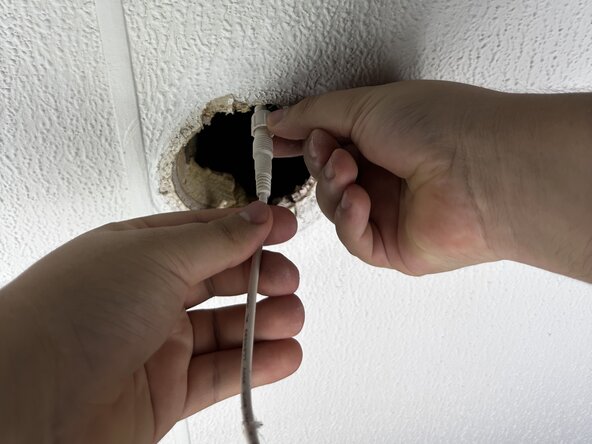
Twist the cap counterclockwise.
-
Pull the cap up.
-
Disconnect the LED connector from the driver connection.
-
-
-
-
Replace the old LED light with a new one.
-
-
-
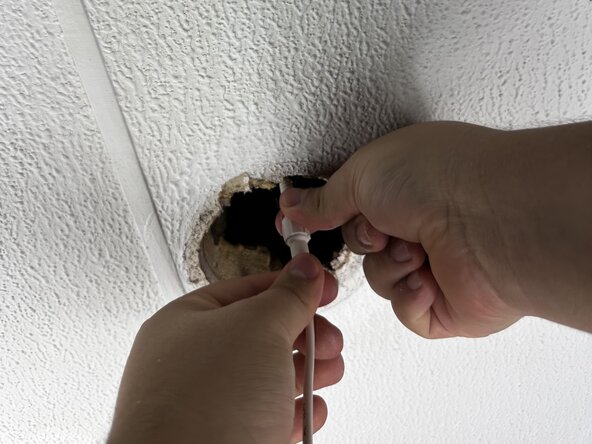
Attach the new LED light connector to the driver connection.
-
Put the cap back.
-
Twist in a clockwise direction.
-
-
-
Push both sides of the clips towards the middle.
-
Push up until the clips are inside the hole.
-
Push until it's flush with the ceiling.
-
-
-
Turn the breaker back on, flip the switch, and test the fixture.
-






crwdns2935287:0crwdne2935287:0

Austin Community College, Team 1-10, Bray Fall 2025 crwdns2935289:0Austin Community College, Team 1-10, Bray Fall 2025crwdne2935289:0
AUSTINCC-BRAY-F25S1G10
crwdns2934841:01crwdne2934841:0
crwdns2935303:01crwdne2935303:0
