crwdns2933423:0crwdne2933423:0
crwdns2947577:0crwdnd2947577:0crwdne2947577:0

VTech MobiGo Touch Learning System Buttons Replacement

crwdns2869540:0crwdne2869540:0: 1752

crwdns2959988:0crwdne2959988:0

crwdns2959990:0crwdne2959990:0
3
crwdns2959992:0crwdne2959992:0
23
crwdns2959994:0crwdne2959994:0
95
crwdns2959996:0crwdne2959996:0
1,752
crwdns2955950:0crwdne2955950:0: 0

crwdns2959998:0crwdne2959998:0

crwdns2960000:0crwdne2960000:0
crwdns2959984:0crwdne2959984:0: 1

crwdns2959972:01crwdne2959972:0

crwdns2959986:0crwdne2959986:0: 1

crwdns2959980:01crwdne2959980:0

crwdns2955944:0crwdne2955944:0: crwdns2931273:0crwdne2931273:0
crwdns2955970:0crwdne2955970:0: crwdns2937801:0crwdne2937801:0
crwdns2890100:0crwdne2890100:0

crwdns2944378:0crwdne2944378:0

VTech MobiGo Touch Learning System Buttons Replacement

crwdns2915892:0crwdne2915892:0

crwdns2959928:0crwdne2959928:0 ↓

This guide show users how they can replace the buttons of the device.

crwdns2959930:0crwdne2959930:0

crwdns2943215:0crwdne2943215:0

    1. VTech MobiGo Touch Learning System Buttons Replacement, Case: crwdns2935265:01crwdnd2935265:01crwdnd2935265:01crwdne2935265:0
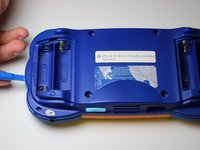
      • Remove the battery covers and the four batteries.

      crwdns2952109:0crwdne2952109:0

      crwdns2917038:0crwdne2917038:0

    2. VTech MobiGo Touch Learning System Buttons Replacement: crwdns2935265:02crwdnd2935265:01crwdnd2935265:02crwdne2935265:0 VTech MobiGo Touch Learning System Buttons Replacement: crwdns2935265:02crwdnd2935265:02crwdnd2935265:02crwdne2935265:0
      • Remove the four plastic caps with a metal spudger to expose the 6.0 mm Philips JIS #0 case screws.

      • Remove the eight 6.0 mm JIS #0 case screws.

      crwdns2952109:0crwdne2952109:0

      crwdns2917038:0crwdne2917038:0

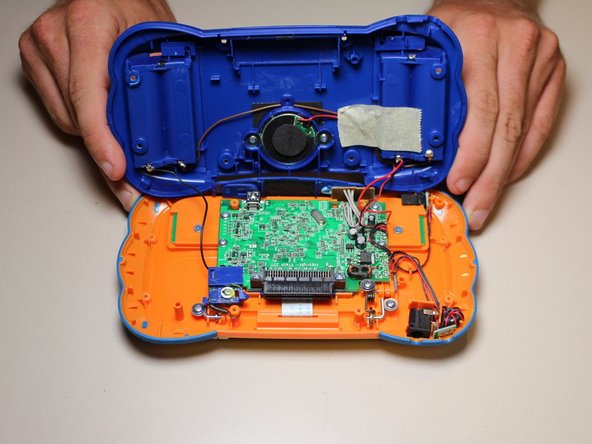
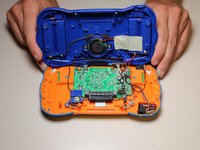
    3. VTech MobiGo Touch Learning System Buttons Replacement: crwdns2935265:03crwdnd2935265:01crwdnd2935265:02crwdne2935265:0 VTech MobiGo Touch Learning System Buttons Replacement: crwdns2935265:03crwdnd2935265:02crwdnd2935265:02crwdne2935265:0
      • Using a plastic opening tool, separate the two pieces of the case carefully.

      crwdns2952109:0crwdne2952109:0

      crwdns2917038:0crwdne2917038:0

    1. VTech MobiGo Touch Learning System Buttons Replacement, Disassembling VTech MobiGo Touch Learning System Screen Enclosure: crwdns2935265:04crwdnd2935265:01crwdnd2935265:01crwdne2935265:0
      • Remove the three 4.0 mm Philips J0 screws holding the "L" shaped brackets in place.

      crwdns2952109:0crwdne2952109:0

      crwdns2917038:0crwdne2917038:0

    2. VTech MobiGo Touch Learning System Buttons Replacement: crwdns2935265:05crwdnd2935265:01crwdnd2935265:01crwdne2935265:0
      • Remove the three "L" shaped brackets and the spring.

      crwdns2952109:0crwdne2952109:0

      crwdns2917038:0crwdne2917038:0

    3. VTech MobiGo Touch Learning System Buttons Replacement: crwdns2935265:06crwdnd2935265:01crwdnd2935265:01crwdne2935265:0
      • Flip the device over and remove the three 4.0 mm Philips J0 case screws.

      crwdns2952109:0crwdne2952109:0

      crwdns2917038:0crwdne2917038:0

    4. VTech MobiGo Touch Learning System Buttons Replacement: crwdns2935265:07crwdnd2935265:01crwdnd2935265:01crwdne2935265:0
      • Separate the front and back of the case.

      • Use a plastic opening tool if necessary.

      crwdns2952109:0crwdne2952109:0

      crwdns2917038:0crwdne2917038:0

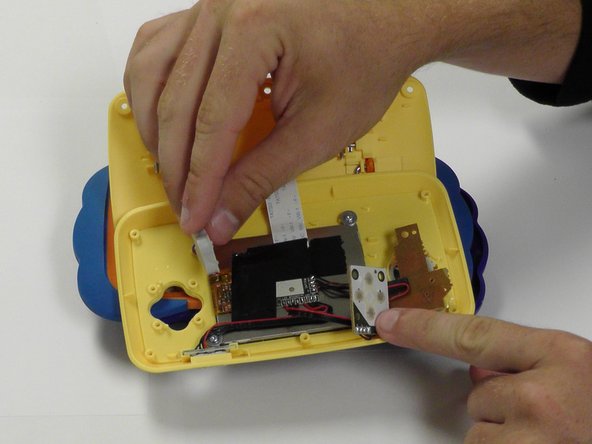
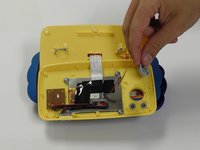
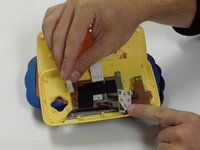
    1. VTech MobiGo Touch Learning System Buttons Replacement, Buttons: crwdns2935265:08crwdnd2935265:01crwdnd2935265:01crwdne2935265:0
      • Remove 6 (3.8 mm Philips J0) screws holding the buttons in.

      crwdns2952109:0crwdne2952109:0

      crwdns2917038:0crwdne2917038:0

    2. VTech MobiGo Touch Learning System Buttons Replacement: crwdns2935265:09crwdnd2935265:01crwdnd2935265:02crwdne2935265:0 VTech MobiGo Touch Learning System Buttons Replacement: crwdns2935265:09crwdnd2935265:02crwdnd2935265:02crwdne2935265:0
      • From here you can remove and replace the buttons.

      crwdns2952109:0crwdne2952109:0

      crwdns2917038:0crwdne2917038:0

crwdns2915888:0crwdne2915888:0

To reassemble your device, follow these instructions in reverse order.

crwdns2935221:0crwdne2935221:0

crwdns2935227:0crwdne2935227:0

Daniel Kresge

crwdns2935283:009/01/15crwdne2935283:0

409 crwdns2915208:0crwdne2915208:0

crwdns2935297:04crwdne2935297:0

crwdns2935287:0crwdne2935287:0

USF Tampa, Team 8-3, Eyestone Fall 2015 crwdns2935289:0USF Tampa, Team 8-3, Eyestone Fall 2015crwdne2935289:0

USFT-EYESTONE-F15S8G3

crwdns2931471:03crwdne2931471:0

crwdns2935297:072crwdne2935297:0

crwdns2947412:00crwdne2947412:0

crwdns2917038:0crwdne2917038:0

crwdns2936625:0crwdne2936625:0:

crwdns2936751:024crwdne2936751:0 3

crwdns2936753:07crwdne2936753:0 23

crwdns2936753:030crwdne2936753:0 95

crwdns2959996:0crwdne2959996:0 1,752