crwdns2933423:0crwdne2933423:0
crwdns2947577:0crwdnd2947577:0crwdne2947577:0

VTech Learning Tunes Karaoke Power Button Replacement

crwdns2869540:0crwdne2869540:0: 902

crwdns2959988:0crwdne2959988:0

crwdns2959990:0crwdne2959990:0
2
crwdns2959992:0crwdne2959992:0
18
crwdns2959994:0crwdne2959994:0
85
crwdns2959996:0crwdne2959996:0
902
crwdns2955950:0crwdne2955950:0: 0

crwdns2959998:0crwdne2959998:0

crwdns2960000:0crwdne2960000:0
crwdns2959984:0crwdne2959984:0: 0

crwdns2959956:0crwdne2959956:0

crwdns2959986:0crwdne2959986:0: 0

crwdns2959958:0crwdne2959958:0

crwdns2955944:0crwdne2955944:0: 15 - 30 crwdns2931279:0crwdne2931279:0
crwdns2955970:0crwdne2955970:0: crwdns2937801:0crwdne2937801:0
VTech Learning Tunes Karaoke Power Button Replacement

crwdns2915892:0crwdne2915892:0

crwdns2959928:0crwdne2959928:0 ↓

Having issues turning on and off the Vtech Learning Tunes Karaoke? Follow this guide to solve the problem.

crwdns2959930:0crwdne2959930:0

crwdns2943215:0crwdne2943215:0

    1. VTech Learning Tunes Karaoke Power Button Replacement, Power Button: crwdns2935265:01crwdnd2935265:01crwdnd2935265:01crwdne2935265:0
      • To remove the battery door, loosen the 4mm screw using a Flathead screwdriver.

      • A coin can also be used to loosen the screw

      crwdns2952109:0crwdne2952109:0

      crwdns2917038:0crwdne2917038:0

    2. VTech Learning Tunes Karaoke Power Button Replacement: crwdns2935265:02crwdnd2935265:01crwdnd2935265:02crwdne2935265:0 VTech Learning Tunes Karaoke Power Button Replacement: crwdns2935265:02crwdnd2935265:02crwdnd2935265:02crwdne2935265:0
      • Remove the battery door and take out the batteries.

      crwdns2952109:0crwdne2952109:0

      crwdns2917038:0crwdne2917038:0

    3. VTech Learning Tunes Karaoke Power Button Replacement: crwdns2935265:03crwdnd2935265:01crwdnd2935265:01crwdne2935265:0
      • Remove the six 9.5 mm Phillips #2 screws.

      • Remove the six 6.0 mm Phillips #2 screws.

      crwdns2952109:0crwdne2952109:0

      crwdns2917038:0crwdne2917038:0

    4. VTech Learning Tunes Karaoke Power Button Replacement: crwdns2935265:04crwdnd2935265:01crwdnd2935265:02crwdne2935265:0 VTech Learning Tunes Karaoke Power Button Replacement: crwdns2935265:04crwdnd2935265:02crwdnd2935265:02crwdne2935265:0
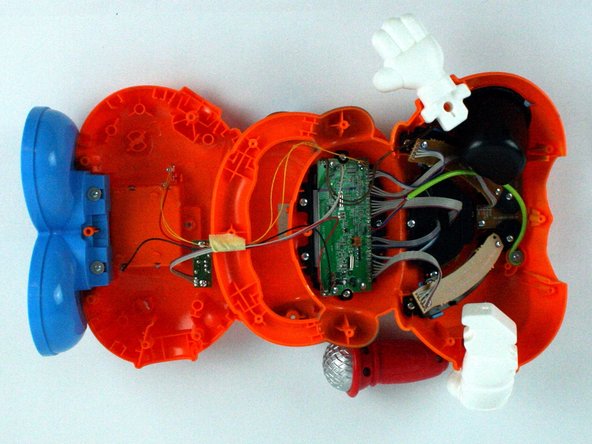
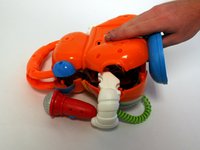
      • Gently pull up on the rear panel.

      • Be careful to not pull on the wire connections.

      • Gently place the back panel underneath the top panel with the tops facing each other, as shown in the picture.

      crwdns2952109:0crwdne2952109:0

      crwdns2917038:0crwdne2917038:0

    5. VTech Learning Tunes Karaoke Power Button Replacement: crwdns2935265:05crwdnd2935265:01crwdnd2935265:01crwdne2935265:0
      • Remove four 7.9 mm screws from the mode selector and voice selector trays.

      crwdns2952109:0crwdne2952109:0

      crwdns2917038:0crwdne2917038:0

    6. VTech Learning Tunes Karaoke Power Button Replacement: crwdns2935265:06crwdnd2935265:01crwdnd2935265:01crwdne2935265:0
      • Remove the two 5.6 mm screws from the power button board.

      crwdns2952109:0crwdne2952109:0

      crwdns2917038:0crwdne2917038:0

    7. VTech Learning Tunes Karaoke Power Button Replacement: crwdns2935265:07crwdnd2935265:01crwdnd2935265:01crwdne2935265:0
      • Carefully move the power button board out of the way.

      • From here you can replace the button.

      crwdns2952109:0crwdne2952109:0

      crwdns2917038:0crwdne2917038:0

crwdns2915888:0crwdne2915888:0

To reassemble your device, follow these instructions in reverse order.

crwdns2935221:0crwdne2935221:0

Gamuchirai Chifamba

crwdns2935283:002/09/16crwdne2935283:0

249 crwdns2915208:0crwdne2915208:0

crwdns2935297:02crwdne2935297:0

crwdns2935287:0crwdne2935287:0

USF Tampa, Team 7-2, Cheng Spring 2016 crwdns2935289:0USF Tampa, Team 7-2, Cheng Spring 2016crwdne2935289:0

USFT-CHENG-S16S7G2

crwdns2931471:04crwdne2931471:0

crwdns2935297:060crwdne2935297:0

crwdns2947412:00crwdne2947412:0

crwdns2917038:0crwdne2917038:0

crwdns2936625:0crwdne2936625:0:

crwdns2936751:024crwdne2936751:0 2

crwdns2936753:07crwdne2936753:0 18

crwdns2936753:030crwdne2936753:0 85

crwdns2959996:0crwdne2959996:0 902