crwdns2933423:0crwdne2933423:0
crwdns2947577:0crwdnd2947577:0crwdne2947577:0

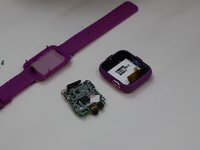
VTech Kidizoom Smartwatch DX2 Motherboard Replacement

crwdns2942213:0crwdne2942213:0

    1. VTech Kidizoom Smartwatch DX2 Motherboard Replacement, Master Switch: crwdns2935265:01crwdnd2935265:01crwdnd2935265:02crwdne2935265:0 VTech Kidizoom Smartwatch DX2 Motherboard Replacement, Master Switch: crwdns2935265:01crwdnd2935265:02crwdnd2935265:02crwdne2935265:0
      • Begin by flipping the watch over with its back facing upwards.

      crwdns2952109:0crwdne2952109:0

      crwdns2917038:0crwdne2917038:0

    2. VTech Kidizoom Smartwatch DX2 Motherboard Replacement: crwdns2935265:02crwdnd2935265:01crwdnd2935265:02crwdne2935265:0 VTech Kidizoom Smartwatch DX2 Motherboard Replacement: crwdns2935265:02crwdnd2935265:02crwdnd2935265:02crwdne2935265:0
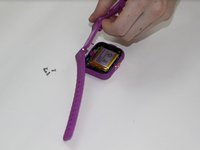
      • Next, use the Phillips #00 screwdriver to unscrew the four 6.0 mm screws located in each corner of the watch to remove the backplate.

      crwdns2952109:0crwdne2952109:0

      crwdns2917038:0crwdne2917038:0

    3. VTech Kidizoom Smartwatch DX2 Motherboard Replacement: crwdns2935265:03crwdnd2935265:01crwdnd2935265:02crwdne2935265:0 VTech Kidizoom Smartwatch DX2 Motherboard Replacement: crwdns2935265:03crwdnd2935265:02crwdnd2935265:02crwdne2935265:0
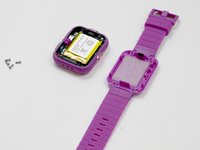
      • Gently lift the backplate up to remove it.

      crwdns2952109:0crwdne2952109:0

      crwdns2917038:0crwdne2917038:0

    4. VTech Kidizoom Smartwatch DX2 Motherboard Replacement: crwdns2935265:04crwdnd2935265:01crwdnd2935265:03crwdne2935265:0 VTech Kidizoom Smartwatch DX2 Motherboard Replacement: crwdns2935265:04crwdnd2935265:02crwdnd2935265:03crwdne2935265:0 VTech Kidizoom Smartwatch DX2 Motherboard Replacement: crwdns2935265:04crwdnd2935265:03crwdnd2935265:03crwdne2935265:0
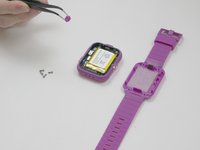
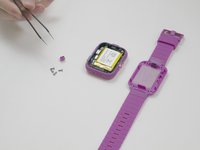
      • After removing the backplate, lift the master switch up from the circuit board.

      crwdns2952109:0crwdne2952109:0

      crwdns2917038:0crwdne2917038:0

    1. VTech Kidizoom Smartwatch DX2 Motherboard Replacement, Motherboard: crwdns2935265:05crwdnd2935265:01crwdnd2935265:01crwdne2935265:0
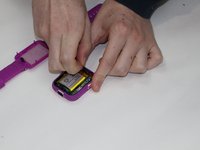
      • Using a Phillips #00 screwdriver, remove the 0.6 mm screw.

      crwdns2952109:0crwdne2952109:0

      crwdns2917038:0crwdne2917038:0

    2. VTech Kidizoom Smartwatch DX2 Motherboard Replacement: crwdns2935265:06crwdnd2935265:01crwdnd2935265:02crwdne2935265:0 VTech Kidizoom Smartwatch DX2 Motherboard Replacement: crwdns2935265:06crwdnd2935265:02crwdnd2935265:02crwdne2935265:0
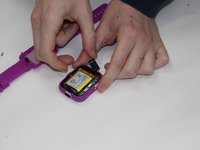
      • Carefully remove the speaker from the case without disconnecting it from the motherboard.

      crwdns2952109:0crwdne2952109:0

      crwdns2917038:0crwdne2917038:0

    3. VTech Kidizoom Smartwatch DX2 Motherboard Replacement: crwdns2935265:07crwdnd2935265:01crwdnd2935265:02crwdne2935265:0 VTech Kidizoom Smartwatch DX2 Motherboard Replacement: crwdns2935265:07crwdnd2935265:02crwdnd2935265:02crwdne2935265:0
      crwdns2935267:0crwdne2935267:0
      Tweezers
      $4.99
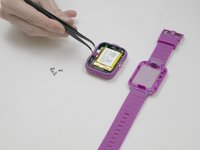
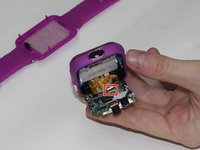
      • Using the tweezers, carefully lift the bar holding the connection to the screen.

      • Remove the motherboard from the device.

      crwdns2952109:0crwdne2952109:0

      crwdns2917038:0crwdne2917038:0

crwdns2915888:0crwdne2915888:0

To reassemble your device, follow these instructions in reverse order.

crwdns2935221:0crwdne2935221:0

crwdns2935229:05crwdne2935229:0

Jessica Richard

crwdns2935283:010/25/18crwdne2935283:0

515 crwdns2915208:0crwdne2915208:0

crwdns2935297:04crwdne2935297:0

crwdns2935287:0crwdne2935287:0

UMass Dartmouth, Team S3-G5, Peak Fall 2018 crwdns2935289:0UMass Dartmouth, Team S3-G5, Peak Fall 2018crwdne2935289:0

UMASSD-PEAK-F18S3G5

crwdns2931471:04crwdne2931471:0

crwdns2935297:084crwdne2935297:0

crwdns2947412:03crwdne2947412:0

This shows how to take the motherboard out, but how to I get a replacement motherboard? I don’t see anywhere that I can purchase one…

ltiede12 - crwdns2934203:0crwdne2934203:0 crwdns2950251:0crwdne2950251:0

I’m interested in the components on the motherboard. What type of SOC does it use, what operating system, etc…

Asher Kobin - crwdns2934203:0crwdne2934203:0 crwdns2950251:0crwdne2950251:0

Which screen is the motherboard connected to bcause I have to replace it cause it is broken

TECH DUDE - crwdns2934203:0crwdne2934203:0 crwdns2950251:0crwdne2950251:0

crwdns2917038:0crwdne2917038:0

crwdns2936625:0crwdne2936625:0:

crwdns2936751:024crwdne2936751:0 0

crwdns2936753:07crwdne2936753:0 6

crwdns2936753:030crwdne2936753:0 48

crwdns2942667:0crwdne2942667:0 4,453