crwdns2933423:0crwdne2933423:0
crwdns2947577:0crwdnd2947577:0crwdne2947577:0

VTech InnoTab Max Cover Replacement

crwdns2869540:0crwdne2869540:0: 1.3K

crwdns2959988:0crwdne2959988:0

crwdns2959990:0crwdne2959990:0
2
crwdns2959992:0crwdne2959992:0
21
crwdns2959994:0crwdne2959994:0
90
crwdns2959996:0crwdne2959996:0
1,306
crwdns2955950:0crwdne2955950:0: 1

crwdns2960002:01crwdne2960002:0.

crwdns2959984:0crwdne2959984:0: 1

crwdns2959972:01crwdne2959972:0

crwdns2959986:0crwdne2959986:0: 0

crwdns2959958:0crwdne2959958:0

crwdns2955944:0crwdne2955944:0: 5 - 10 crwdns2931279:0crwdne2931279:0
crwdns2955970:0crwdne2955970:0: crwdns2937801:0crwdne2937801:0
VTech InnoTab Max Cover Replacement

crwdns2959930:0crwdne2959930:0

crwdns2943215:0crwdne2943215:0

crwdns2915892:0crwdne2915892:0

crwdns2959928:0crwdne2959928:0 ↓

This guide will show any user how to replace the cover on a VTech InnoTab Max.

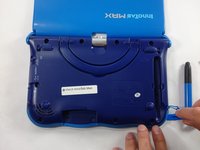
    1. VTech InnoTab Max Cover Replacement, Cover: crwdns2935265:01crwdnd2935265:01crwdnd2935265:03crwdne2935265:0 VTech InnoTab Max Cover Replacement, Cover: crwdns2935265:01crwdnd2935265:02crwdnd2935265:03crwdne2935265:0 VTech InnoTab Max Cover Replacement, Cover: crwdns2935265:01crwdnd2935265:03crwdnd2935265:03crwdne2935265:0
      • Remove all screw caps from the back panel using a metal spudger.

      crwdns2952109:0crwdne2952109:0

      crwdns2917038:0crwdne2917038:0

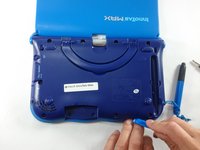
    2. VTech InnoTab Max Cover Replacement: crwdns2935265:02crwdnd2935265:01crwdnd2935265:03crwdne2935265:0 VTech InnoTab Max Cover Replacement: crwdns2935265:02crwdnd2935265:02crwdnd2935265:03crwdne2935265:0 VTech InnoTab Max Cover Replacement: crwdns2935265:02crwdnd2935265:03crwdnd2935265:03crwdne2935265:0
      • Next remove all of the now uncovered screws.

      • If there is a cartridge in the device make sure to remove it.

      crwdns2952109:0crwdne2952109:0

      crwdns2917038:0crwdne2917038:0

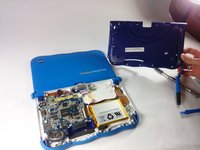
    3. VTech InnoTab Max Cover Replacement: crwdns2935265:03crwdnd2935265:01crwdnd2935265:02crwdne2935265:0 VTech InnoTab Max Cover Replacement: crwdns2935265:03crwdnd2935265:02crwdnd2935265:02crwdne2935265:0
      • Now that all of the screws have been removed, pry the back cover off using a plastic opening tool.

      crwdns2952109:0crwdne2952109:0

      crwdns2917038:0crwdne2917038:0

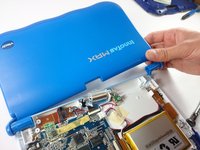
    4. VTech InnoTab Max Cover Replacement: crwdns2935265:04crwdnd2935265:01crwdnd2935265:02crwdne2935265:0 VTech InnoTab Max Cover Replacement: crwdns2935265:04crwdnd2935265:02crwdnd2935265:02crwdne2935265:0
      • Here you can see the back cover has been fully removed and you can now access the front cover.

      • To remove the front cover, remove the springs holding the pictured brackets in place, then pull it away.

      crwdns2952109:0crwdne2952109:0

      crwdns2917038:0crwdne2917038:0

crwdns2915888:0crwdne2915888:0

To reassemble your device, follow these instructions in reverse order.

crwdns2935221:0crwdne2935221:0

crwdns2935227:0crwdne2935227:0

crwdns2862417:0crwdne2862417:0

crwdns2935293:0crwdne2935293:0

Alexander Bees

crwdns2935283:002/15/17crwdne2935283:0

152 crwdns2915208:0crwdne2915208:0

crwdns2935295:0crwdne2935295:0

crwdns2935287:0crwdne2935287:0

USF Tampa, Team S5-G5, Lacy Spring 2017 crwdns2935289:0USF Tampa, Team S5-G5, Lacy Spring 2017crwdne2935289:0

USFT-LACY-S17S5G5

crwdns2931471:03crwdne2931471:0

crwdns2935297:060crwdne2935297:0

crwdns2947412:00crwdne2947412:0

crwdns2917038:0crwdne2917038:0

crwdns2936625:0crwdne2936625:0:

crwdns2936751:024crwdne2936751:0 2

crwdns2936753:07crwdne2936753:0 21

crwdns2936753:030crwdne2936753:0 90

crwdns2959996:0crwdne2959996:0 1,306