
VTech CS6719-2 Screen Replacement

crwdns2959932:0crwdnd2959932:0Joshua Woodwardcrwdnd2959932:0crwdnd2959932:0crwdnd2959932:03crwdnd2959932:0crwdne2959932:0
crwdns2959936:0Mud 16, 2016crwdne2959936:0
crwdns2869540:0crwdne2869540:0: 773
crwdns2959988:0crwdne2959988:0
- crwdns2959990:0crwdne2959990:0
- 1
- crwdns2959992:0crwdne2959992:0
- 17
- crwdns2959994:0crwdne2959994:0
- 80
- crwdns2959996:0crwdne2959996:0
- 773
crwdns2955950:0crwdne2955950:0: 0
crwdns2959998:0crwdne2959998:0
crwdns2960000:0crwdne2960000:0crwdns2959984:0crwdne2959984:0: 0 1
crwdns2959956:0crwdne2959956:0
crwdns2959968:01crwdne2959968:0
crwdns2959986:0crwdne2959986:0: 0 1
crwdns2959958:0crwdne2959958:0
crwdns2959976:01crwdne2959976:0
crwdns2890100:0crwdne2890100:0
crwdns2944378:0crwdne2944378:0
crwdns2915892:0crwdne2915892:0
crwdns2959928:0crwdne2959928:0 ↓During this guide, the back of the phone and the circuit board will need to be taken off to access the plastic screen.
crwdns2959930:0crwdne2959930:0
crwdns2943215:0crwdne2943215:0


-
-
-
Push down on the battery cover in the direction of the arrow located on the back of the phone.
 crwdns2952109:0crwdne2952109:0
-
-
-
Pull the battery cover off of the back of the phone.
-
-
-
Unplug the battery input cable.
-
-
-
-
Lift the battery out of the back of the phone.
-
-
-
-
-
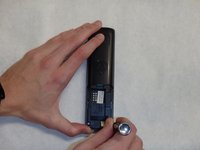
Remove the two 9mm screws on the back side with a Phillips #0 screwdriver.
-
-
-
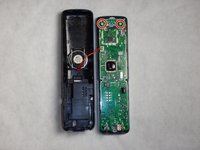
Use the plastic opening tool and spudger to pry the back side of the phone off.
-
-
-
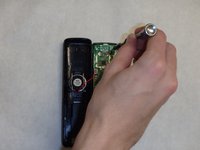
Remove the two 9mm screws located inside the back cover at the top.
-
-
-
-
-
Remove the plastic screen.
-
-






To reassemble your device, follow these instructions in reverse order.

crwdns2935287:0crwdne2935287:0

IUPUI, Team 1-4, Baechle Spring 2016 crwdns2935289:0IUPUI, Team 1-4, Baechle Spring 2016crwdne2935289:0
IUPUI-BAECHLE-S16S1G4
crwdns2931471:04crwdne2931471:0
crwdns2935297:096crwdne2935297:0
