crwdns2933423:0crwdne2933423:0
crwdns2947577:0crwdnd2947577:0crwdne2947577:0

VTech Baby's Learning Laptop Volume Switch Replacement

crwdns2869540:0crwdne2869540:0: 1,4 k

crwdns2959988:0crwdne2959988:0

crwdns2959990:0crwdne2959990:0
3
crwdns2959992:0crwdne2959992:0
19
crwdns2959994:0crwdne2959994:0
101
crwdns2959996:0crwdne2959996:0
1 429
crwdns2955950:0crwdne2955950:0: 1

crwdns2960002:01crwdne2960002:0.

crwdns2959984:0crwdne2959984:0: 0

crwdns2959956:0crwdne2959956:0

crwdns2959986:0crwdne2959986:0: 0

crwdns2959958:0crwdne2959958:0

crwdns2955944:0crwdne2955944:0: crwdns2931287:05crwdne2931287:0
crwdns2955970:0crwdne2955970:0: crwdns2937799:0crwdne2937799:0
VTech Baby's Learning Laptop Volume Switch  Replacement

crwdns2915892:0crwdne2915892:0

crwdns2959928:0crwdne2959928:0 ↓

Has the sound for your device suddenly stopped working? Unable to adjust the volume? This guide may be the solution to your problem.

crwdns2959930:0crwdne2959930:0

crwdns2943215:0crwdne2943215:0

    1. VTech Baby's Learning Laptop Volume Switch  Replacement, Battery and Rear Panel: crwdns2935265:01crwdnd2935265:01crwdnd2935265:01crwdne2935265:0
      • To remove the battery door, loosen the screw shown using a Phillips #2 screwdriver.

      • A coin can also be used to loosen the screw.

      crwdns2952109:0crwdne2952109:0

      crwdns2917038:0crwdne2917038:0

    2. VTech Baby's Learning Laptop Volume Switch  Replacement: crwdns2935265:02crwdnd2935265:01crwdnd2935265:01crwdne2935265:0
      • Remove the battery door.

      • Take out the batteries.

      crwdns2952109:0crwdne2952109:0

      crwdns2917038:0crwdne2917038:0

    3. VTech Baby's Learning Laptop Volume Switch  Replacement: crwdns2935265:03crwdnd2935265:01crwdnd2935265:01crwdne2935265:0
      • Remove the rear panel screws using a Phillips #2 screwdriver.

      • Two 21.6mm (Long)

      • One 9.8mm (Short)

      • Five 13.8mm (Medium)

      crwdns2952109:0crwdne2952109:0

      crwdns2917038:0crwdne2917038:0

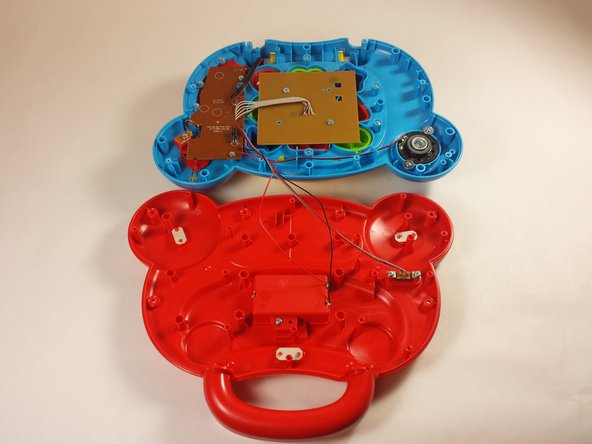
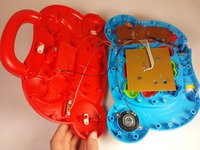
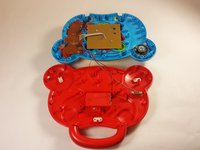
    4. VTech Baby's Learning Laptop Volume Switch  Replacement: crwdns2935265:04crwdnd2935265:01crwdnd2935265:02crwdne2935265:0 VTech Baby's Learning Laptop Volume Switch  Replacement: crwdns2935265:04crwdnd2935265:02crwdnd2935265:02crwdne2935265:0
      • Gently pull up on the rear panel.

      • Be careful not to pull on the wire connections.

      • Rest the laptop open on the table.

      crwdns2952109:0crwdne2952109:0

      crwdns2917038:0crwdne2917038:0

    1. VTech Baby's Learning Laptop Volume Switch  Replacement, Volume Switch: crwdns2935265:05crwdnd2935265:01crwdnd2935265:01crwdne2935265:0
      • Flip your device so the bottom panel is facing up.

      crwdns2952109:0crwdne2952109:0

      crwdns2917038:0crwdne2917038:0

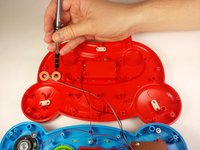
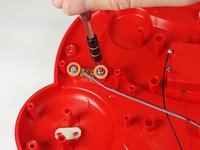
    2. VTech Baby's Learning Laptop Volume Switch  Replacement: crwdns2935265:06crwdnd2935265:01crwdnd2935265:02crwdne2935265:0 VTech Baby's Learning Laptop Volume Switch  Replacement: crwdns2935265:06crwdnd2935265:02crwdnd2935265:02crwdne2935265:0
      • Use a Phillips #2 screwdriver to remove the two 7.7mm screws on the volume switch.

      crwdns2952109:0crwdne2952109:0

      crwdns2917038:0crwdne2917038:0

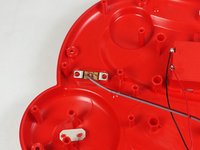
    3. VTech Baby's Learning Laptop Volume Switch  Replacement: crwdns2935265:07crwdnd2935265:01crwdnd2935265:02crwdne2935265:0 VTech Baby's Learning Laptop Volume Switch  Replacement: crwdns2935265:07crwdnd2935265:02crwdnd2935265:02crwdne2935265:0
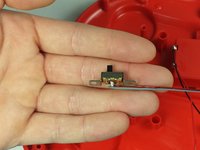
      • Remove the volume switch.

      • Be careful not damage the wiring.

      crwdns2952109:0crwdne2952109:0

      crwdns2917038:0crwdne2917038:0

crwdns2915888:0crwdne2915888:0

To reassemble your device, follow these instructions in reverse order.

crwdns2935221:0crwdne2935221:0

Jordan Smith

crwdns2935283:009/03/15crwdne2935283:0

210 crwdns2915208:0crwdne2915208:0

crwdns2935297:02crwdne2935297:0

crwdns2935287:0crwdne2935287:0

USF Tampa, Team 12-2, Blackwell Fall 2015 crwdns2935289:0USF Tampa, Team 12-2, Blackwell Fall 2015crwdne2935289:0

USFT-BLACKWELL-F15S12G2

crwdns2931471:04crwdne2931471:0

crwdns2935297:084crwdne2935297:0

crwdns2947412:00crwdne2947412:0

crwdns2917038:0crwdne2917038:0

crwdns2936625:0crwdne2936625:0:

crwdns2936751:024crwdne2936751:0 3

crwdns2936753:07crwdne2936753:0 19

crwdns2936753:030crwdne2936753:0 101

crwdns2959996:0crwdne2959996:0 1,429