crwdns2915892:0crwdne2915892:0
One of the cool things ChatGPT can be used for is for device troubleshooting. By following the steps below, you can effectively utilize ChatGPT to obtain insights and guidance for diagnosing and resolving problems with a device.
Remember that ChatGPT's training data only extends up to September 2021, which means it is not aware of events or developments that have occurred after that time. Use ChatGPT's inside as a resource alongside your own technical expertise and judgement throughout the troubleshooting process.
-
-
-
Visit the ChatGPT interface.
 crwdns2952109:0crwdne2952109:0
-
-
-
Clearly describe the problem you are facing with your electronic device. Include relevant details such as symptoms, error messages, and any recent changes that might be related to the issue.
-
-
-
Enter your troubleshooting query into the ChatGPT interface. Phrase your question in a way that is easy for the model to understand, and provide any additional context or information that may help in the troubleshooting process.
-
-
-
-
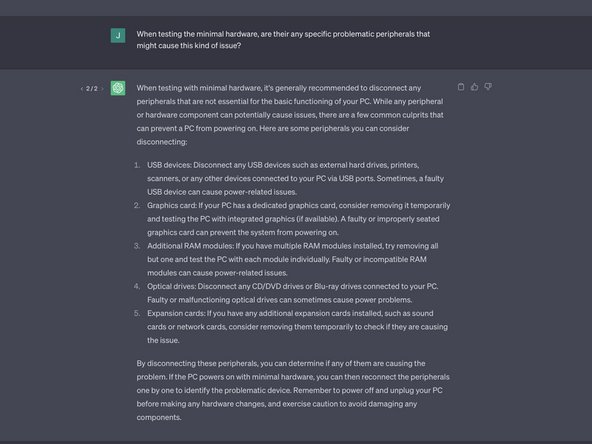
Carefully review the response generated by ChatGPT. Analyze the suggestions, recommendations, or insights it provides. It might offer troubleshooting steps, explanations, or potential solutions to your problem.
-
If the response from ChatGPT is unclear or you require more information, don't hesitate to ask for clarification. Ask specific follow-up questions to gain a better understanding of the troubleshooting steps or concepts mentioned.
-
-
-
Based on the guidance provided by ChatGPT, start implementing the recommended troubleshooting steps.
-
-
-
Assess the effectiveness of the troubleshooting steps suggested by ChatGPT. Note any improvements, changes, or resolutions achieved through the process.
-
If the issue persists or new challenges arise, return to the ChatGPT interface for further assistance.
-
-
-
Share feedback on the accuracy and usefulness of ChatGPT's responses. This feedback helps in refining and improving the model's performance for future users.
-
-


By leveraging ChatGPT for troubleshooting, you can leverage its language processing capabilities to gain insights and potential solutions for common issues with electronic devices.
Remember to use ChatGPT as a valuable resource alongside your own technical expertise and judgement throughout the troubleshooting process.
crwdns2935221:0crwdne2935221:0
crwdns2935229:06crwdne2935229:0


