crwdns2915892:0crwdne2915892:0
The front facing buttons of the Turtle Beach Stealth Ultra controller (model number TBS-0710-05) are essential for the controller's usability. They are responsible for registering user input and sending that to the video game console. In order to replace them, you first need to disassemble the controller. As you do, be cautious not to damage the screen or motherboard. Follow these steps to fix it.
Additional Resources:
Stealth Ultra Controller Support Site
Video on Turtle Beach Stealth Ultra Disassembly and Reassembly
crwdns2942213:0crwdne2942213:0
-
-
Use tweezers to pull out rubber pieces in front of the screws.
 crwdns2952109:0crwdne2952109:0
-
-
-
Remove the 10 mm screws using a Phillips #00 screwdriver.
-
-
-
Remove the sticker on the back of the plate.
-
Remove the 10 mm screws from the back plate using a Phillips #00 screwdriver.
-
-
-
Use an iFixit opening tool to pry the front button plate and analog stick plate off.
-
Use a Phillips #00 screwdriver to remove the screws from the front plate on both sides of the controller.
-
-
-
-
Use an opening tool to detach the front plate from the back.
-
-
-
Use a Phillips #00 screwdriver to remove the 10 mm screws connecting the handles to the controller frame.
-
-
-
Detach the cables from the motherboard.
-
-
-
Remove the yellow ribbon cable from the handle.
-
-
-
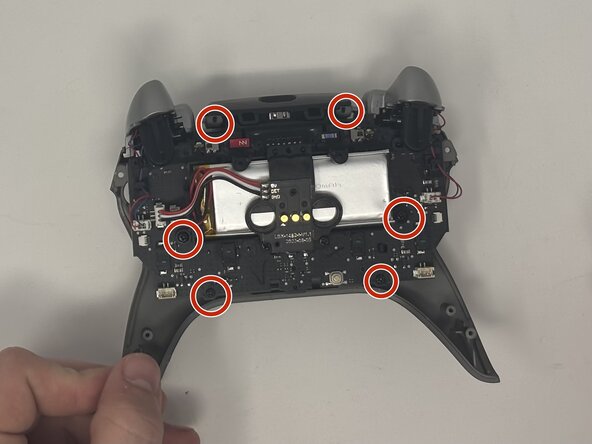
Remove the six 10 mm screws connected to the motherboard using a Phillips #00 screwdriver.
-
-
-
Gently pull the motherboard away from the frame.
-
-
-
Pull the buttons out from the front plate.
-




To reassemble your device, follow these instructions in reverse order.
crwdns2935221:0crwdne2935221:0
crwdns2935227:0crwdne2935227:0

crwdns2935287:0crwdne2935287:0

Utah Tech University, Team 1-7, McMurrin Fall 2025 crwdns2935289:0Utah Tech University, Team 1-7, McMurrin Fall 2025crwdne2935289:0
UTAHTECH-MCMURRIN-F25S1G7
crwdns2931471:02crwdne2931471:0
crwdns2935297:07crwdne2935297:0
