crwdns2915892:0crwdne2915892:0
Use this guide to replace the battery in the Turtle Beach Pure Air Wireless Mouse. A failing battery can cause rapid power loss, failure to hold a charge, or the mouse not powering on, which you can confirm using the troubleshooting page.
Power off the device and follow all safety precautions, especially when handling damaged or swollen batteries.
crwdns2942213:0crwdne2942213:0
-
-
-
Power off the mouse by moving the power switch to the center.
 crwdns2952109:0crwdne2952109:0
-
-
-
Peel back the mouse feet.
-
Remove the three 1.6mm screws using a JIS #000 screwdriver.
-
Remove the single 1.6mm screws using remove using a 1.3 mm hex screwdriver.
-
-
-
Carefully remove the bottom cover of the mouse.
-
-
-
-
Disconnect the ribbon cable securing the upper shell to the motherboard.
-
Lift the locking clip to release the cable from its connector.
-
-
-
-
-
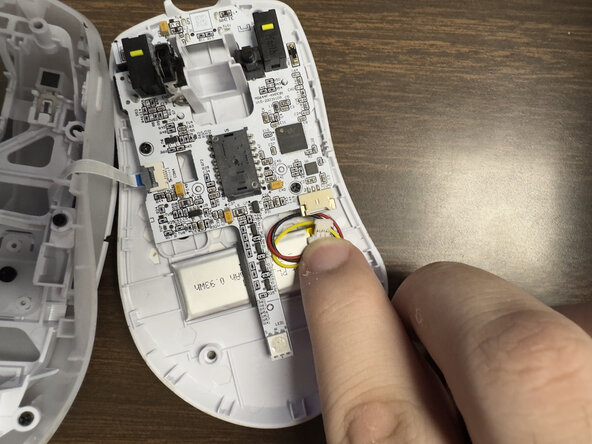
Carefully disconnect the battery clip from the motherboard socket by softly pulling the bottom of the clip.
-
-
-
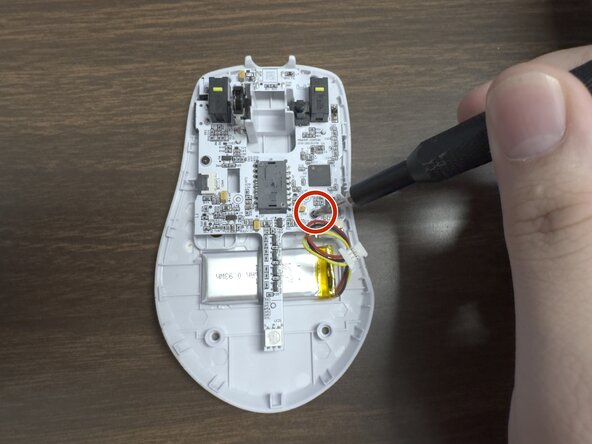
Remove the two 1.6 mm screws on the middle left and lower right sides with a JIS000 screwdriver to disconnect the motherboard from the lower shell.
-
-
-
Gently lift the motherboard out of the housing.
-
-
-
-
-
Carefully pry up the battery.
-
-






To reassemble your device, follow these instructions in reverse order.

crwdns2935287:0crwdne2935287:0

Austin Community College, Team 9-1, Watkins Spring 2026 crwdns2935289:0Austin Community College, Team 9-1, Watkins Spring 2026crwdne2935289:0
AUSTINCC-WATKINS-S26S9G1
crwdns2931471:03crwdne2931471:0
crwdns2935297:072crwdne2935297:0
