crwdns2933423:0crwdne2933423:0
crwdns2947577:0crwdnd2947577:0crwdne2947577:0

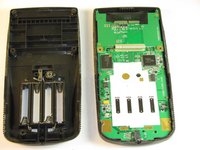
Texas Instruments TI-83 Plus Back Case Replacement

crwdns2942213:0crwdne2942213:0

    1. Texas Instruments TI-83 Plus Back Case Replacement, Backup Battery: crwdns2935265:01crwdnd2935265:01crwdnd2935265:02crwdne2935265:0 Texas Instruments TI-83 Plus Back Case Replacement, Backup Battery: crwdns2935265:01crwdnd2935265:02crwdnd2935265:02crwdne2935265:0
      • Remove the battery cover.

      • Remove the AAA batteries from the calculator.

      crwdns2952109:0crwdne2952109:0

      crwdns2917038:0crwdne2917038:0

    2. Texas Instruments TI-83 Plus Back Case Replacement: crwdns2935265:02crwdnd2935265:01crwdnd2935265:01crwdne2935265:0
      • Remove the 5mm Philips #00 screw holding backup battery cover.

      • Remove the backup battery cover.

      crwdns2952109:0crwdne2952109:0

      crwdns2917038:0crwdne2917038:0

    3. Texas Instruments TI-83 Plus Back Case Replacement: crwdns2935265:03crwdnd2935265:01crwdnd2935265:01crwdne2935265:0
      • Use plastic opening tool to remove the backup battery. Place the tool in the small cut-out next to the battery and pry the battery out.

      • Be careful, the backup battery is spring loaded and may shoot up when you remove it.

      crwdns2952109:0crwdne2952109:0

      crwdns2917038:0crwdne2917038:0

    1. Texas Instruments TI-83 Plus Back Case Replacement, Back Case: crwdns2935265:04crwdnd2935265:01crwdnd2935265:01crwdne2935265:0
      • Unscrew the six 7.5mm T6 screws on the back case. You will need to use a screwdriver with a long and skinny head.

      crwdns2952109:0crwdne2952109:0

      crwdns2917038:0crwdne2917038:0

    2. Texas Instruments TI-83 Plus Back Case Replacement: crwdns2935265:05crwdnd2935265:01crwdnd2935265:02crwdne2935265:0 Texas Instruments TI-83 Plus Back Case Replacement: crwdns2935265:05crwdnd2935265:02crwdnd2935265:02crwdne2935265:0
      • Pry back case off. Insert the plastic opening tool in the track for the protective cover and pry the halves of the case apart.

      crwdns2952109:0crwdne2952109:0

      crwdns2917038:0crwdne2917038:0

crwdns2915888:0crwdne2915888:0

To reassemble your device, follow these instructions in reverse order.

crwdns2935221:0crwdne2935221:0

crwdns2935229:08crwdne2935229:0

Jared

crwdns2935283:010/02/12crwdne2935283:0

156 crwdns2915208:0crwdne2915208:0

crwdns2935297:02crwdne2935297:0

crwdns2935287:0crwdne2935287:0

Cal Poly, Team 18-37, Regan Fall 2012 crwdns2935289:0Cal Poly, Team 18-37, Regan Fall 2012crwdne2935289:0

CPSU-REGAN-F12S18G37

crwdns2931471:05crwdne2931471:0

crwdns2935297:060crwdne2935297:0

crwdns2947412:00crwdne2947412:0

crwdns2917038:0crwdne2917038:0

crwdns2936625:0crwdne2936625:0:

crwdns2936751:024crwdne2936751:0 9

crwdns2936753:07crwdne2936753:0 32

crwdns2936753:030crwdne2936753:0 136

crwdns2942667:0crwdne2942667:0 10,902