
Technique - Test the Battery

crwdns2959932:0crwdnd2959932:0Melinda Phancrwdnd2959932:0crwdnd2959932:0crwdnd2959932:06crwdnd2959932:0crwdne2959932:0
crwdns2959936:0Huk 13, 2017crwdne2959936:0
crwdns2869540:0crwdne2869540:0: 12 k
crwdns2959988:0crwdne2959988:0
- crwdns2959990:0crwdne2959990:0
- 5
- crwdns2959992:0crwdne2959992:0
- 33
- crwdns2959994:0crwdne2959994:0
- 103
- crwdns2959996:0crwdne2959996:0
- 11,564
crwdns2955950:0crwdne2955950:0: 5
crwdns2960004:03crwdne2960004:0, crwdns2960008:02crwdne2960008:0
crwdns2960000:0crwdne2960000:0crwdns2959984:0crwdne2959984:0: 1 2
crwdns2959972:01crwdne2959972:0
crwdns2959970:02crwdne2959970:0
crwdns2959986:0crwdne2959986:0: 3 4
crwdns2959982:03crwdne2959982:0
crwdns2959978:04crwdne2959978:0
crwdns2959930:0crwdne2959930:0
crwdns2943215:0crwdne2943215:0

-
-
-
Remove back cover by applying pressure and sliding up towards the top of the phone.
 crwdns2952109:0crwdne2952109:0
-
-
-
-
Remove the battery by lifting from slot on the right hand side.
-
-
-
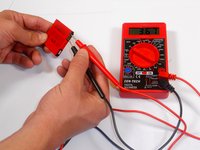
Use Multimeter to test the voltage of the battery.
-
Put the black lead into ground slot of multimeter and the red lead into the V(ohm)mA slot.
-
Place the red and black leads to the two outside metal plate, each on opposite sides, on the battery as shown.
-
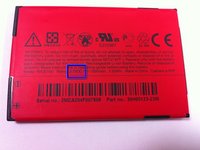
Check that the voltage displayed on the multimeter matches closely to the voltage defined on the battery. Normally 3.7 V.
-
-


To reassemble your device, follow these instructions in reverse order.
crwdns2935221:0crwdne2935221:0
crwdns2935227:0crwdne2935227:0

crwdns2935287:0crwdne2935287:0

Cal Poly, Team 9-64, Walters Spring 2011 crwdns2935289:0Cal Poly, Team 9-64, Walters Spring 2011crwdne2935289:0
CPSU-WALTERS-S11S9G64
crwdns2931471:05crwdne2931471:0
crwdns2935297:0108crwdne2935297:0
crwdns2947412:02crwdne2947412:0
Hello one the question was tablet not telephone and it's really vague how you guys explain these things you need to go to work on your site
Roger Slater - crwdns2934203:0crwdne2934203:0 crwdns2950251:0crwdne2950251:0
yes,not tablet with battery removal difficult
paulbeames7 - crwdns2934203:0crwdne2934203:0 crwdns2950251:0crwdne2950251:0
