crwdns2933423:0crwdne2933423:0
crwdns2947577:0crwdnd2947577:0crwdne2947577:0

Tagital T7X Camera Replacement

crwdns2942213:0crwdne2942213:0

  1. Tagital T7X Camera  Replacement, Case: crwdns2935265:01crwdnd2935265:01crwdnd2935265:03crwdne2935265:0 Tagital T7X Camera  Replacement, Case: crwdns2935265:01crwdnd2935265:02crwdnd2935265:03crwdne2935265:0 Tagital T7X Camera  Replacement, Case: crwdns2935265:01crwdnd2935265:03crwdnd2935265:03crwdne2935265:0
    • Place the Tagital T7X on a sturdy surface.

    • Insert the plastic opening tool into the crack and pry open the tablet. Move the tool along the edge, while continuing to pry up the casing.

    crwdns2952109:0crwdne2952109:0

    crwdns2917038:0crwdne2917038:0

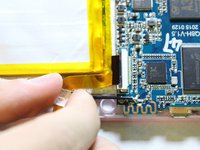
  2. Tagital T7X Camera  Replacement, Camera: crwdns2935265:02crwdnd2935265:01crwdnd2935265:03crwdne2935265:0 Tagital T7X Camera  Replacement, Camera: crwdns2935265:02crwdnd2935265:02crwdnd2935265:03crwdne2935265:0 Tagital T7X Camera  Replacement, Camera: crwdns2935265:02crwdnd2935265:03crwdnd2935265:03crwdne2935265:0
    • Use a spudger to hold the cameras in place.

    • Gently pull the black tape away using your finger.

    crwdns2952109:0crwdne2952109:0

    crwdns2917038:0crwdne2917038:0

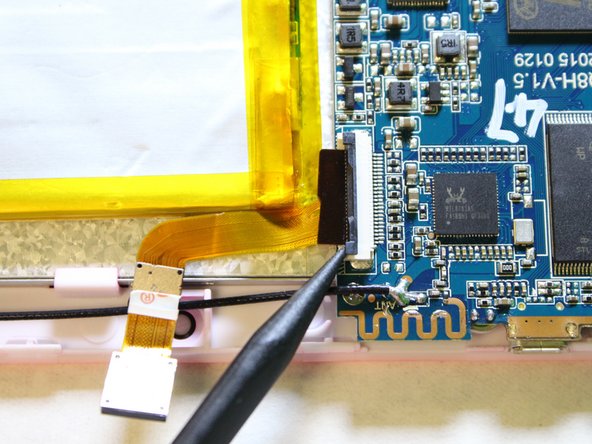
  3. Tagital T7X Camera  Replacement: crwdns2935265:03crwdnd2935265:01crwdnd2935265:03crwdne2935265:0 Tagital T7X Camera  Replacement: crwdns2935265:03crwdnd2935265:02crwdnd2935265:03crwdne2935265:0 Tagital T7X Camera  Replacement: crwdns2935265:03crwdnd2935265:03crwdnd2935265:03crwdne2935265:0
    • Remove the ribbon cable from the motherboard.

    • Use a spudger to lift the two tabs, freeing the ribbon cable from the socket.

    crwdns2952109:0crwdne2952109:0

    crwdns2917038:0crwdne2917038:0

  4. Tagital T7X Camera  Replacement: crwdns2935265:04crwdnd2935265:01crwdnd2935265:03crwdne2935265:0 Tagital T7X Camera  Replacement: crwdns2935265:04crwdnd2935265:02crwdnd2935265:03crwdne2935265:0 Tagital T7X Camera  Replacement: crwdns2935265:04crwdnd2935265:03crwdnd2935265:03crwdne2935265:0
    • Gently pull the ribbon cable away from the motherboard.

    • Don't be afraid to use some force to pull the ribbon cable.

    crwdns2952109:0crwdne2952109:0

    crwdns2917038:0crwdne2917038:0

crwdns2915888:0crwdne2915888:0

To reassemble your device, follow these instructions in reverse order.

crwdns2935221:0crwdne2935221:0

crwdns2935227:0crwdne2935227:0

Hanlong Chen

crwdns2935283:002/10/16crwdne2935283:0

265 crwdns2915208:0crwdne2915208:0

crwdns2935297:02crwdne2935297:0

crwdns2935287:0crwdne2935287:0

USF Tampa, Team 2-1, Sullivan Spring 2016 crwdns2935289:0USF Tampa, Team 2-1, Sullivan Spring 2016crwdne2935289:0

USFT-SULLIVAN-S16S2G1

crwdns2931471:04crwdne2931471:0

crwdns2935297:012crwdne2935297:0

crwdns2947412:00crwdne2947412:0

crwdns2917038:0crwdne2917038:0

crwdns2936625:0crwdne2936625:0:

crwdns2936751:024crwdne2936751:0 1

crwdns2936753:07crwdne2936753:0 10

crwdns2936753:030crwdne2936753:0 27

crwdns2942667:0crwdne2942667:0 390