
Tagital T7X Battery Replacement

crwdns2959932:0crwdnd2959932:0Kevin Denniscrwdnd2959932:0crwdnd2959932:0crwdnd2959932:03crwdnd2959932:0crwdne2959932:0
crwdns2959936:0Mud 10, 2016crwdne2959936:0
crwdns2869540:0crwdne2869540:0: 1533
crwdns2959988:0crwdne2959988:0
- crwdns2959990:0crwdne2959990:0
- 1
- crwdns2959992:0crwdne2959992:0
- 21
- crwdns2959994:0crwdne2959994:0
- 92
- crwdns2959996:0crwdne2959996:0
- 1,533
crwdns2955950:0crwdne2955950:0: 1
crwdns2960006:01crwdne2960006:0
crwdns2960000:0crwdne2960000:0crwdns2959984:0crwdne2959984:0: 1 2
crwdns2959972:01crwdne2959972:0
crwdns2959970:02crwdne2959970:0
crwdns2959986:0crwdne2959986:0: 0 1
crwdns2959958:0crwdne2959958:0
crwdns2959976:01crwdne2959976:0
crwdns2915892:0crwdne2915892:0
crwdns2959928:0crwdne2959928:0 ↓This guide shows the reader how to remove the case from the Tagital T7X and replace the battery. This repair is often done to replace a battery that has lost its ability to hold a charge. The battery is directly connected to the motherboard, meaning basic soldering skills are necessary.
crwdns2959930:0crwdne2959930:0
crwdns2943215:0crwdne2943215:0
-
-
-
Spudger4.9


-
-
-
Place the Tagital T7X on a sturdy surface.
-
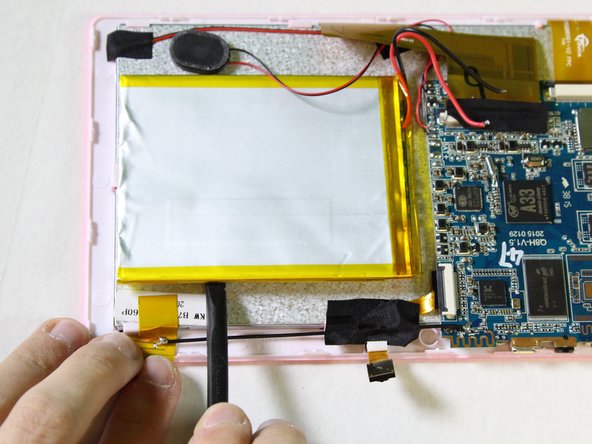
Insert the plastic opening tool into the crack and pry open the tablet. Move the tool along the edge, while continuing to pry up the casing.
 crwdns2952109:0crwdne2952109:0
-
-
-
-
-
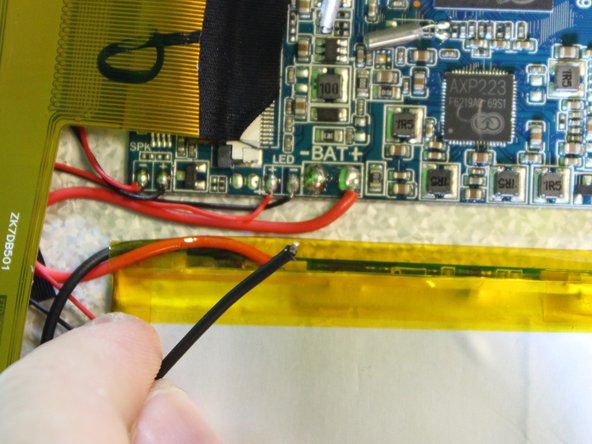
Follow the attached wires to the positive and negative connections.
-
-
-
-
Touch the tip of the soldering iron to the solder connecting the negative wire.
-
Pull back on the wire with the iron in place, removing it from the hot solder.
-
Repeat this step for the positive wire.
-
-
-
Use the nylon spudger to pry the battery from the back of the screen. Work your way around the edges, similar to opening the casing.
-
-






To reassemble your device, follow these instructions in reverse order.
crwdns2935221:0crwdne2935221:0
crwdns2935227:0crwdne2935227:0

crwdns2935287:0crwdne2935287:0

USF Tampa, Team 2-1, Sullivan Spring 2016 crwdns2935289:0USF Tampa, Team 2-1, Sullivan Spring 2016crwdne2935289:0
USFT-SULLIVAN-S16S2G1
crwdns2931471:04crwdne2931471:0
crwdns2935297:072crwdne2935297:0
crwdns2947410:01crwdne2947410:0
We're can I get a battery? And I don't think the part should have died in less than a year . The battery lasted less than 6 mos. I bought the tablet for my mom to play cards on and that's it .She doesn't go on line. I put a book on it before I gave it to her and that is it. She doesn't even use it every day . What's the deal?
Melanie Bouy - crwdns2934203:0crwdne2934203:0 crwdns2950251:0crwdne2950251:0
