crwdns2915892:0crwdne2915892:0
For this guide you will remove the back cover and battery cover in order to replace the battery.
crwdns2942213:0crwdne2942213:0
-
-
-
Remove the calculator's protective cover.
-
Place the calculator face down.
 crwdns2952109:0crwdne2952109:0
-
-
-
Using a Phillips #1 screwdriver, remove the six 6mm screws from the back of the case and place them to the side.
-
Start from the notches on the top edge and use your fingers or a prying tool to carefully pry the back cover from the calculator.
-
-
-
-
-
-
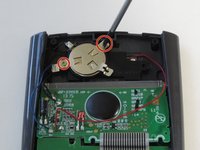
Use a Phillips #00 screwdriver to remove the two 7.5 mm screws holding the battery cover to the case.
-
Use your finger to move the battery cover to the side.
-
-
-
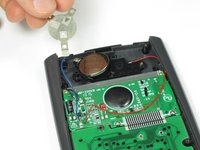
Use the flat side of a spudger to remove the battery by lifting the bottom edge.
-
-



To reassemble your device, follow these instructions in reverse order.
crwdns2935221:0crwdne2935221:0
crwdns2935229:011crwdne2935229:0

crwdns2935287:0crwdne2935287:0

Cal Poly, Team 11-52, Amido Spring 2014 crwdns2935289:0Cal Poly, Team 11-52, Amido Spring 2014crwdne2935289:0
CPSU-AMIDO-S14S11G52
crwdns2931471:04crwdne2931471:0
crwdns2935297:060crwdne2935297:0
crwdns2947412:05crwdne2947412:0
Interesting that the cr2032 battery is not rechargeable, so is the solar panel real? Or does it bypass the battery and use the solar panel in lighted situations?
frogman896 - crwdns2934203:0crwdne2934203:0 crwdns2950251:0crwdne2950251:0
The guide should specify that the CR2032 needs to be rechargeable. They are readily available at a popular online shopping website. I was skeptical that the solar was real too, because of the frosted plastic placed over it. Based on the pictures in this teardown, and another video showing a red LED in the solar circuit, I conclude that the solar charging circuit is real.
Jacob Ertel - crwdns2934203:0crwdne2934203:0 crwdns2950251:0crwdne2950251:0
The manual doesn't specify a rechargeable battery. It just says a CR2032 Lithium battery. Unless all such batteries are rechargeable? I guess I'll find out since I just replaced the battery in mine and it's an Energizer CR2032, but it doesn't appear to say rechargeable anywhere on the packaging or the battery itself. I guess if it kills my calculator, it had a good run....
EDIT: The original battery that I took out of the calculator doesn't say rechargeable on it either.
Marc W - crwdns2934203:0crwdne2934203:0 crwdns2950251:0crwdne2950251:0
good guide, I'd just like to add that in my case I needed to press the "Reset" button for my calculator to start up again
Greg B - crwdns2934203:0crwdne2934203:0 crwdns2950251:0crwdne2950251:0
yeah but I have done that 3 times and now my calculator is officially announced dead....
Danielle Kennedy - crwdns2934203:0crwdne2934203:0 crwdns2950251:0crwdne2950251:0
