crwdns2933423:0crwdne2933423:0
crwdns2947577:0crwdnd2947577:0crwdne2947577:0

Sony Xperia Sola Camera Module Replacement

crwdns2942213:0crwdne2942213:0

  1. Sony Xperia Sola Camera Module Replacement, Motherboard: crwdns2935265:01crwdnd2935265:01crwdnd2935265:02crwdne2935265:0 Sony Xperia Sola Camera Module Replacement, Motherboard: crwdns2935265:01crwdnd2935265:02crwdnd2935265:02crwdne2935265:0
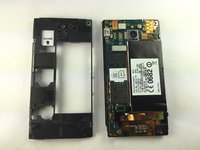
    • Place phone down with screen side down and camera side facing up as shown.

    • Push on cover away from you. You should hear a snap or pop. This will let you view the battery and sim/sd card slots. Then lift the cover off.

    crwdns2952109:0crwdne2952109:0

    crwdns2917038:0crwdne2917038:0

  2. Sony Xperia Sola Camera Module Replacement: crwdns2935265:02crwdnd2935265:01crwdnd2935265:03crwdne2935265:0 Sony Xperia Sola Camera Module Replacement: crwdns2935265:02crwdnd2935265:02crwdnd2935265:03crwdne2935265:0 Sony Xperia Sola Camera Module Replacement: crwdns2935265:02crwdnd2935265:03crwdnd2935265:03crwdne2935265:0
    • Remove the five (5) screws on the phone, using a screwdriver. The screws are at the top and the bottom of the phone as shown.

    crwdns2952109:0crwdne2952109:0

    crwdns2917038:0crwdne2917038:0

  3. Sony Xperia Sola Camera Module Replacement: crwdns2935265:03crwdnd2935265:01crwdnd2935265:02crwdne2935265:0 Sony Xperia Sola Camera Module Replacement: crwdns2935265:03crwdnd2935265:02crwdnd2935265:02crwdne2935265:0
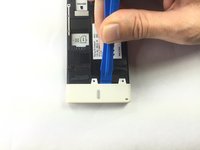
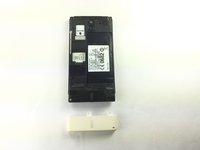
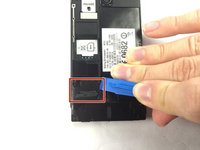
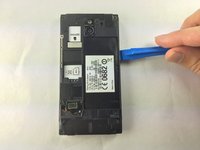
    • Pry off the bottom white cover by using the opening tool as a lever.

    crwdns2952109:0crwdne2952109:0

    crwdns2917038:0crwdne2917038:0

  4. Sony Xperia Sola Camera Module Replacement: crwdns2935265:04crwdnd2935265:01crwdnd2935265:02crwdne2935265:0 Sony Xperia Sola Camera Module Replacement: crwdns2935265:04crwdnd2935265:02crwdnd2935265:02crwdne2935265:0
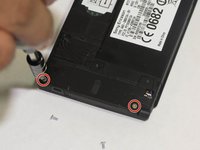
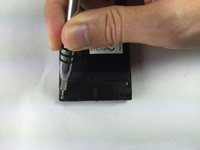
    • Remove the two additional screws using the Torx screwdriver.

    crwdns2952109:0crwdne2952109:0

    crwdns2917038:0crwdne2917038:0

  5. Sony Xperia Sola Camera Module Replacement: crwdns2935265:05crwdnd2935265:01crwdnd2935265:02crwdne2935265:0 Sony Xperia Sola Camera Module Replacement: crwdns2935265:05crwdnd2935265:02crwdnd2935265:02crwdne2935265:0
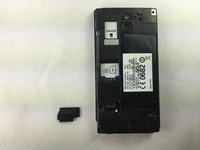
    • Locate the black cover on the bottom left of phone. Use an opening tool to pry up and remove the black cover.

    crwdns2952109:0crwdne2952109:0

    crwdns2917038:0crwdne2917038:0

  6. Sony Xperia Sola Camera Module Replacement: crwdns2935265:06crwdnd2935265:01crwdnd2935265:01crwdne2935265:0
    crwdns2935267:0crwdne2935267:0
    Tweezers
    $4.99
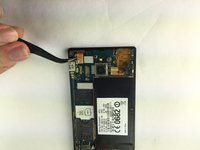
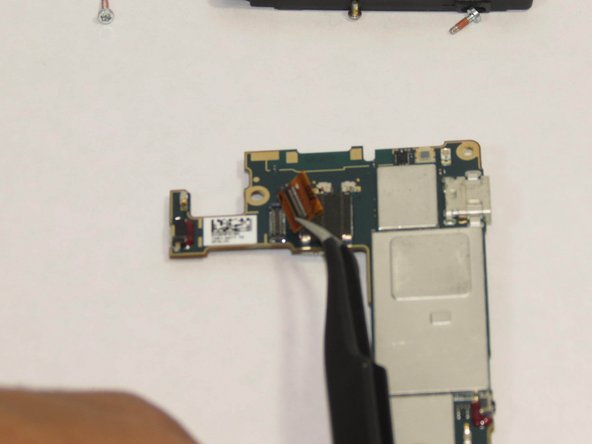
    • Disconnect the circuit by lifting the connector straight up as shown using the tweezers.

    crwdns2952109:0crwdne2952109:0

    crwdns2917038:0crwdne2917038:0

  7. Sony Xperia Sola Camera Module Replacement: crwdns2935265:07crwdnd2935265:01crwdnd2935265:03crwdne2935265:0 Sony Xperia Sola Camera Module Replacement: crwdns2935265:07crwdnd2935265:02crwdnd2935265:03crwdne2935265:0 Sony Xperia Sola Camera Module Replacement: crwdns2935265:07crwdnd2935265:03crwdnd2935265:03crwdne2935265:0
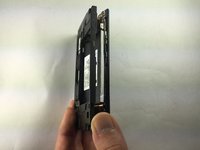
    • Turn the phone onto its side. Insert a plastic opening tool into seam, and gently remove the cover. You can also slide the spudger in from the top.

    • Once the cover is loose, lift it off the phone. The side buttons may feel a bit sticky, but this is normal.

    crwdns2952109:0crwdne2952109:0

    crwdns2917038:0crwdne2917038:0

  8. Sony Xperia Sola Camera Module Replacement: crwdns2935265:08crwdnd2935265:01crwdnd2935265:01crwdne2935265:0
    • Locate the additional circuit at the bottom left. Using the tweezers, remove it gently by pulling up.

    crwdns2952109:0crwdne2952109:0

    crwdns2917038:0crwdne2917038:0

  9. Sony Xperia Sola Camera Module Replacement: crwdns2935265:09crwdnd2935265:01crwdnd2935265:02crwdne2935265:0 Sony Xperia Sola Camera Module Replacement: crwdns2935265:09crwdnd2935265:02crwdnd2935265:02crwdne2935265:0
    • Use the tweezers to lift up on the circuit located at the top left.

    crwdns2952109:0crwdne2952109:0

    crwdns2917038:0crwdne2917038:0

  10. Sony Xperia Sola Camera Module Replacement: crwdns2935265:010crwdnd2935265:01crwdnd2935265:01crwdne2935265:0
    • Use the spudger and slide it under the top left of the board then lift the board straight up. The board should come up very easily.

    crwdns2952109:0crwdne2952109:0

    crwdns2917038:0crwdne2917038:0

  11. Sony Xperia Sola Camera Module Replacement, Place the board as shown.: crwdns2935265:011crwdnd2935265:01crwdnd2935265:01crwdne2935265:0
    • This will ensure easy removal of the camera module.

    crwdns2952109:0crwdne2952109:0

    crwdns2917038:0crwdne2917038:0

  12. Sony Xperia Sola Camera Module Replacement, Remove the camera's power.: crwdns2935265:012crwdnd2935265:01crwdnd2935265:03crwdne2935265:0 Sony Xperia Sola Camera Module Replacement, Remove the camera's power.: crwdns2935265:012crwdnd2935265:02crwdnd2935265:03crwdne2935265:0 Sony Xperia Sola Camera Module Replacement, Remove the camera's power.: crwdns2935265:012crwdnd2935265:03crwdnd2935265:03crwdne2935265:0
    crwdns2935267:0crwdne2935267:0
    Tweezers
    $4.99
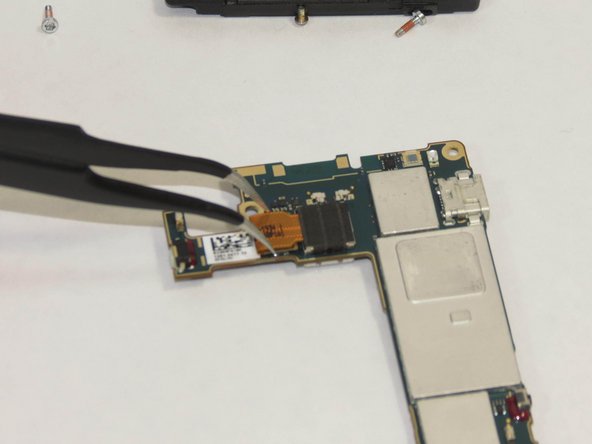
    • Using the tweezers remove the camera from the power source.

    crwdns2952109:0crwdne2952109:0

    crwdns2917038:0crwdne2917038:0

  13. Sony Xperia Sola Camera Module Replacement, Remove the camera module.: crwdns2935265:013crwdnd2935265:01crwdnd2935265:01crwdne2935265:0
    • Pick up board and remove camera module. The module should seem to just pop out.

    crwdns2952109:0crwdne2952109:0

    crwdns2917038:0crwdne2917038:0

crwdns2915888:0crwdne2915888:0

To reassemble your device, follow these instructions in reverse order.

crwdns2935221:0crwdne2935221:0

crwdns2935229:02crwdne2935229:0

Cary Drew

crwdns2935283:009/25/14crwdne2935283:0

866 crwdns2915208:0crwdne2915208:0

crwdns2935297:05crwdne2935297:0

crwdns2935287:0crwdne2935287:0

USF Tampa, Team 1-1, Brown Fall 2014 crwdns2935289:0USF Tampa, Team 1-1, Brown Fall 2014crwdne2935289:0

USFT-BROWN-F14S1G1

crwdns2931471:04crwdne2931471:0

crwdns2935297:05crwdne2935297:0

crwdns2947412:00crwdne2947412:0

crwdns2917038:0crwdne2917038:0

crwdns2936625:0crwdne2936625:0:

crwdns2936751:024crwdne2936751:0 0

crwdns2936753:07crwdne2936753:0 2

crwdns2936753:030crwdne2936753:0 38

crwdns2942667:0crwdne2942667:0 727