crwdns2933423:0crwdne2933423:0
crwdns2947577:0crwdnd2947577:0crwdne2947577:0

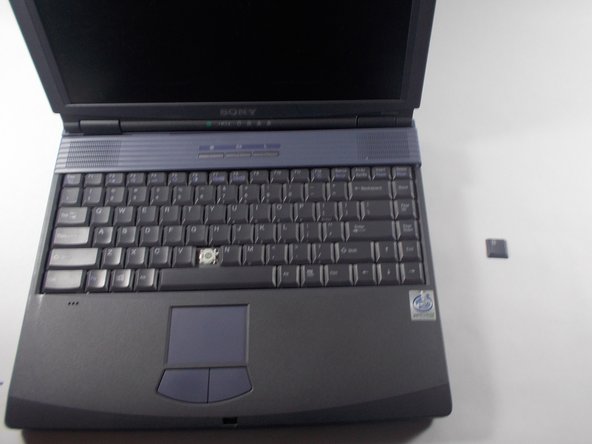
Sony VAIO PCG-F360 Single Key Replacement

crwdns2869540:0crwdne2869540:0: 738

crwdns2959988:0crwdne2959988:0

crwdns2959990:0crwdne2959990:0
2
crwdns2959992:0crwdne2959992:0
10
crwdns2959994:0crwdne2959994:0
64
crwdns2959996:0crwdne2959996:0
738
crwdns2955950:0crwdne2955950:0: 0

crwdns2959998:0crwdne2959998:0

crwdns2960000:0crwdne2960000:0
crwdns2959984:0crwdne2959984:0: 0

crwdns2959956:0crwdne2959956:0

crwdns2959986:0crwdne2959986:0: 0

crwdns2959958:0crwdne2959958:0

crwdns2955944:0crwdne2955944:0: crwdns2931287:05crwdne2931287:0
crwdns2955970:0crwdne2955970:0: crwdns2937799:0crwdne2937799:0
crwdns2862633:0crwdne2862633:0

crwdns2862634:0crwdne2862634:0

Sony VAIO PCG-F360 Single Key Replacement

crwdns2959930:0crwdne2959930:0

crwdns2943215:0crwdne2943215:0

    1. Sony VAIO PCG-F360 Single Key Replacement, Battery: crwdns2935265:01crwdnd2935265:01crwdnd2935265:01crwdne2935265:0
      • Position the laptop screen-side down as shown.

      • In this position the battery housing will be located on the right hand side.

      crwdns2952109:0crwdne2952109:0

      crwdns2917038:0crwdne2917038:0

    2. Sony VAIO PCG-F360 Single Key Replacement: crwdns2935265:02crwdnd2935265:01crwdnd2935265:01crwdne2935265:0
      • Lift the panel up and then out to gain access to the battery.

      crwdns2952109:0crwdne2952109:0

      crwdns2917038:0crwdne2917038:0

    3. Sony VAIO PCG-F360 Single Key Replacement: crwdns2935265:03crwdnd2935265:01crwdnd2935265:01crwdne2935265:0
      • Use the indentations to pull the old battery out.

      crwdns2952109:0crwdne2952109:0

      crwdns2917038:0crwdne2917038:0

    4. Sony VAIO PCG-F360 Single Key Replacement: crwdns2935265:04crwdnd2935265:01crwdnd2935265:01crwdne2935265:0
      • The battery is now removed and it is safe to move on to uninstalling other components.

      crwdns2952109:0crwdne2952109:0

      crwdns2917038:0crwdne2917038:0

    1. Sony VAIO PCG-F360 Single Key Replacement, Single Key: crwdns2935265:05crwdnd2935265:01crwdnd2935265:03crwdne2935265:0 Sony VAIO PCG-F360 Single Key Replacement, Single Key: crwdns2935265:05crwdnd2935265:02crwdnd2935265:03crwdne2935265:0 Sony VAIO PCG-F360 Single Key Replacement, Single Key: crwdns2935265:05crwdnd2935265:03crwdnd2935265:03crwdne2935265:0
      • Use the pludger to pop off the key by prying under it.

      • You now can clean and replace the key.

      crwdns2952109:0crwdne2952109:0

      crwdns2917038:0crwdne2917038:0

crwdns2915888:0crwdne2915888:0

To reassemble your device, follow these instructions in reverse order.

crwdns2935221:0crwdne2935221:0

crwdns2862417:0crwdne2862417:0

crwdns2935291:0crwdne2935291:0

Hannah Millea

crwdns2935283:003/11/14crwdne2935283:0

401 crwdns2915208:0crwdne2915208:0

crwdns2935297:04crwdne2935297:0

crwdns2935287:0crwdne2935287:0

UMass Dartmouth, Team 3-5, Calaway Spring 2014 crwdns2935289:0UMass Dartmouth, Team 3-5, Calaway Spring 2014crwdne2935289:0

UMASSD-CALAWAY-S14S3G5

crwdns2931471:02crwdne2931471:0

crwdns2935297:048crwdne2935297:0

crwdns2947412:00crwdne2947412:0

crwdns2917038:0crwdne2917038:0

crwdns2936625:0crwdne2936625:0:

crwdns2936751:024crwdne2936751:0 2

crwdns2936753:07crwdne2936753:0 10

crwdns2936753:030crwdne2936753:0 64

crwdns2959996:0crwdne2959996:0 738