
Sony RM-LVR1 LCD Screen Replacement

crwdns2959932:0crwdnd2959932:0Alexander Thomascrwdnd2959932:0crwdnd2959932:0crwdnd2959932:05crwdnd2959932:0crwdne2959932:0
crwdns2959936:0Mud 7, 2024crwdne2959936:0
crwdns2869540:0crwdne2869540:0: 1,3 mil
crwdns2959988:0crwdne2959988:0
- crwdns2959990:0crwdne2959990:0
- 1
- crwdns2959992:0crwdne2959992:0
- 20
- crwdns2959994:0crwdne2959994:0
- 98
- crwdns2959996:0crwdne2959996:0
- 1.263
crwdns2955950:0crwdne2955950:0: 5
crwdns2960002:01crwdne2960002:0, crwdns2960008:04crwdne2960008:0
crwdns2960000:0crwdne2960000:0crwdns2959984:0crwdne2959984:0: 1 2
crwdns2959972:01crwdne2959972:0
crwdns2959970:02crwdne2959970:0
crwdns2959986:0crwdne2959986:0: 0 1
crwdns2959958:0crwdne2959958:0
crwdns2959976:01crwdne2959976:0
crwdns2915892:0crwdne2915892:0
crwdns2959928:0crwdne2959928:0 ↓This guide will teach you step by step how to replace your LCD screen.
crwdns2959930:0crwdne2959930:0
crwdns2943215:0crwdne2943215:0
-
Spudger4.9
-


-
-
-
Use a Phillips #00 screwdriver to remove the four (4) screws on the back of the device.
-
If the screws strips or is previously stripped, refer to the stripped screw repair guide.
 crwdns2952109:0crwdne2952109:0
-
-
-
Battery is the rectangular and silver object in the center of device.
-
Remove battery with finger by prying at the rear.
-
If unable to remove battery, pry out using spudger.
-
-
-
-
-
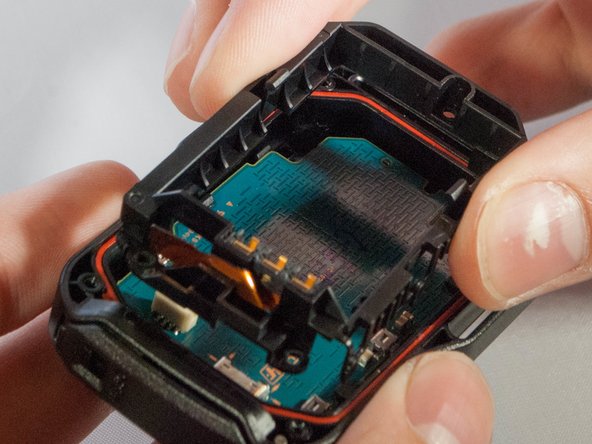
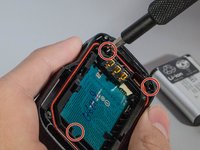
Unscrew the 3 (three) screws holding the bracket in place.
-
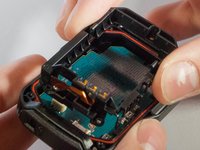
Then remove the bracket by prying one end up.
-
-
crwdns2935267:0crwdne2935267:0Tweezers$4.99
-
With tweezers, unplug the ribbon cable from the white connector.
-
-
-
Remove motherboard from the device by pulling upward gently, with fingers or tweezers.
-
-
-
Gently push out on these two clips holding the LCD to the motherboard
-
Once you have the first two off, ever so carefully, push the LCD towards the remaining two clips.
-
-
-
-
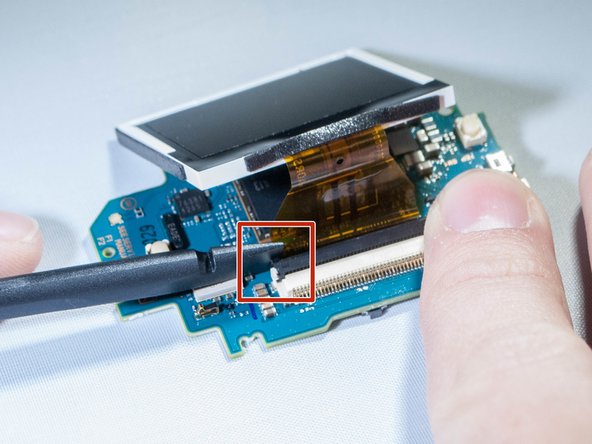
Undo the ribbon cable attached between the motherboard and screen by prying up black tab which holds the cable, using spudger. (See pictures)
-
-
-
Remove the screen from the motherboard.
-
-




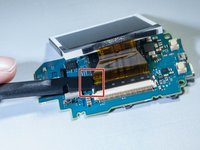
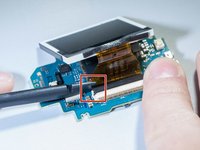

To reassemble your device, follow these instructions in reverse order.
crwdns2935221:0crwdne2935221:0
crwdns2935227:0crwdne2935227:0

crwdns2935287:0crwdne2935287:0

Eastern Washington University, Team S2-G2, Crane Fall 2017 crwdns2935289:0Eastern Washington University, Team S2-G2, Crane Fall 2017crwdne2935289:0
EWU-CRANE-F17S2G2
crwdns2931471:03crwdne2931471:0
crwdns2935297:036crwdne2935297:0
crwdns2947412:04crwdne2947412:0
здорово!
подскажите где купить дисплей?, или его маркировку?. на дисплее ничего не написано, не могу найти.
Александр - crwdns2934203:0crwdne2934203:0 crwdns2950251:0crwdne2950251:0
Hi
I cant find an replacement lcd.
Could anybody help me where to get one?
Cheers
Sven
Sven van Bellen - crwdns2934203:0crwdne2934203:0 crwdns2950251:0crwdne2950251:0
any link to the replacement LCD please?
Bart Ptachowski - crwdns2934203:0crwdne2934203:0 crwdns2950251:0crwdne2950251:0
Hi .
search : HD 170 LCD Drift aliexp****
i think it will do the job .
cheers
ruigyl - crwdns2934203:0crwdne2934203:0 crwdns2950251:0crwdne2950251:0
