crwdns2933423:0crwdne2933423:0
crwdns2947577:0crwdnd2947577:0crwdne2947577:0

Sony DSC-RX10M3 Back and Right Panel Replacement

crwdns2869540:0crwdne2869540:0: 2,2K

crwdns2959988:0crwdne2959988:0

crwdns2959990:0crwdne2959990:0
1
crwdns2959992:0crwdne2959992:0
25
crwdns2959994:0crwdne2959994:0
84
crwdns2959996:0crwdne2959996:0
2.171
crwdns2955950:0crwdne2955950:0: 0

crwdns2959998:0crwdne2959998:0

crwdns2960000:0crwdne2960000:0
crwdns2959984:0crwdne2959984:0: 3

crwdns2959974:03crwdne2959974:0

crwdns2959986:0crwdne2959986:0: 0

crwdns2959958:0crwdne2959958:0

crwdns2955944:0crwdne2955944:0: crwdns2931287:010crwdne2931287:0
crwdns2955970:0crwdne2955970:0: crwdns2937801:0crwdne2937801:0
Sony DSC-RX10M3 Back and Right Panel Replacement

crwdns2915892:0crwdne2915892:0

crwdns2959928:0crwdne2959928:0 ↓

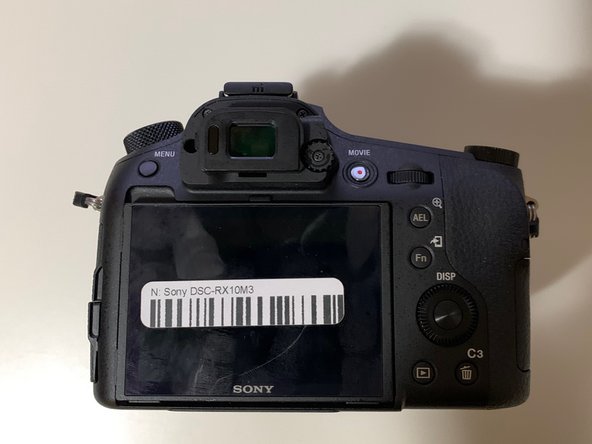
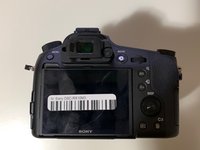
This guide is an important pre-requisite that is required to replace the Sony DSC-RX10M3 LCD and viewfinder. You will find in this guide the important steps required to make sure that you properly remove the back casing which exposes the motherboard of the device.

crwdns2959930:0crwdne2959930:0

crwdns2943215:0crwdne2943215:0

    1. Sony DSC-RX10M3 Back and Right Panel Replacement, Battery Replacement: crwdns2935265:01crwdnd2935265:01crwdnd2935265:01crwdne2935265:0
      • Turn off the Device by scrolling the tab to "OFF" indicated by the arrow.

      crwdns2952109:0crwdne2952109:0

      crwdns2917038:0crwdne2917038:0

    2. Sony DSC-RX10M3 Back and Right Panel Replacement: crwdns2935265:02crwdnd2935265:01crwdnd2935265:03crwdne2935265:0 Sony DSC-RX10M3 Back and Right Panel Replacement: crwdns2935265:02crwdnd2935265:02crwdnd2935265:03crwdne2935265:0 Sony DSC-RX10M3 Back and Right Panel Replacement: crwdns2935265:02crwdnd2935265:03crwdnd2935265:03crwdne2935265:0
      • Remove the battery located at the bottom of the device.

      crwdns2952109:0crwdne2952109:0

      crwdns2917038:0crwdne2917038:0

    1. Sony DSC-RX10M3 Back and Right Panel Replacement, Back and Right Panel: crwdns2935265:03crwdnd2935265:01crwdnd2935265:01crwdne2935265:0
      • Remove the twelve 0.7mm Phillips #000 screws from the bottom case.

      crwdns2952109:0crwdne2952109:0

      crwdns2917038:0crwdne2917038:0

    2. Sony DSC-RX10M3 Back and Right Panel Replacement: crwdns2935265:04crwdnd2935265:01crwdnd2935265:02crwdne2935265:0 Sony DSC-RX10M3 Back and Right Panel Replacement: crwdns2935265:04crwdnd2935265:02crwdnd2935265:02crwdne2935265:0
      • Remove the two 0.7mm screws that secure the right side of the camera.

      • Remove the two 0.7mm screws that secure the left side of the camera, near the Wi-Fi logo and charging port.

      crwdns2952109:0crwdne2952109:0

      crwdns2917038:0crwdne2917038:0

    3. Sony DSC-RX10M3 Back and Right Panel Replacement: crwdns2935265:05crwdnd2935265:01crwdnd2935265:02crwdne2935265:0 Sony DSC-RX10M3 Back and Right Panel Replacement: crwdns2935265:05crwdnd2935265:02crwdnd2935265:02crwdne2935265:0
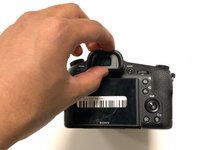
      • Gently pull off the plastic eye guard.

      crwdns2952109:0crwdne2952109:0

      crwdns2917038:0crwdne2917038:0

    4. Sony DSC-RX10M3 Back and Right Panel Replacement: crwdns2935265:06crwdnd2935265:01crwdnd2935265:02crwdne2935265:0 Sony DSC-RX10M3 Back and Right Panel Replacement: crwdns2935265:06crwdnd2935265:02crwdnd2935265:02crwdne2935265:0
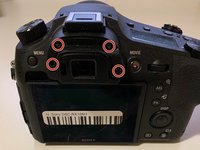
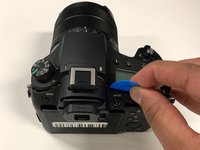
      • Use a Phillips #000 screwdriver to remove the four 0.4mm screws located under the rubber eye guard.

      • Use a plastic opening tool to detach the back panel of the camera.

      crwdns2952109:0crwdne2952109:0

      crwdns2917038:0crwdne2917038:0

    5. Sony DSC-RX10M3 Back and Right Panel Replacement: crwdns2935265:07crwdnd2935265:01crwdnd2935265:01crwdne2935265:0
      crwdns2935267:0crwdne2935267:0
      Tweezers
      $4.99
      • This is a tight spot; make sure you use minimal force when removing the cover.

      • Using tweezers, disconnect the ribbon cable connecting the LCD to the circuit board.

      crwdns2952109:0crwdne2952109:0

      crwdns2917038:0crwdne2917038:0

    6. Sony DSC-RX10M3 Back and Right Panel Replacement: crwdns2935265:08crwdnd2935265:01crwdnd2935265:01crwdne2935265:0
      • This step is only needed if you wish to remove the right side panel.

      • Use a plastic openeing tool to gently detach the right panel.

      crwdns2952109:0crwdne2952109:0

      crwdns2917038:0crwdne2917038:0

crwdns2915888:0crwdne2915888:0

To reassemble your device, follow these instructions in reverse order.

crwdns2935221:0crwdne2935221:0

crwdns2935229:03crwdne2935229:0

Salman Hersi

crwdns2935283:001/14/20crwdne2935283:0

339 crwdns2915208:0crwdne2915208:0

crwdns2935297:02crwdne2935297:0

crwdns2935287:0crwdne2935287:0

York University, Team S4-G4, Woodhouse Winter 2020 crwdns2935289:0York University, Team S4-G4, Woodhouse Winter 2020crwdne2935289:0

YORK-WOODHOUSE-W20S4G4

crwdns2931471:03crwdne2931471:0

crwdns2935297:036crwdne2935297:0

crwdns2947412:00crwdne2947412:0

crwdns2917038:0crwdne2917038:0

crwdns2936625:0crwdne2936625:0:

crwdns2936751:024crwdne2936751:0 1

crwdns2936753:07crwdne2936753:0 25

crwdns2936753:030crwdne2936753:0 84

crwdns2959996:0crwdne2959996:0 2,171