crwdns2933423:0crwdne2933423:0
crwdns2947577:0crwdnd2947577:0crwdne2947577:0

Sony BDP-BX510 Wi-Fi Module Replacement

crwdns2869540:0crwdne2869540:0: 739

crwdns2959988:0crwdne2959988:0

crwdns2959990:0crwdne2959990:0
2
crwdns2959992:0crwdne2959992:0
12
crwdns2959994:0crwdne2959994:0
59
crwdns2959996:0crwdne2959996:0
739
crwdns2955950:0crwdne2955950:0: 0

crwdns2959998:0crwdne2959998:0

crwdns2960000:0crwdne2960000:0
crwdns2959984:0crwdne2959984:0: 0

crwdns2959956:0crwdne2959956:0

crwdns2959986:0crwdne2959986:0: 0

crwdns2959958:0crwdne2959958:0

crwdns2955944:0crwdne2955944:0: 15 - 20 crwdns2931279:0crwdne2931279:0
crwdns2955970:0crwdne2955970:0: crwdns2937801:0crwdne2937801:0
Sony BDP-BX510 Wi-Fi Module Replacement

crwdns2915892:0crwdne2915892:0

crwdns2959928:0crwdne2959928:0 ↓

In the situation that your Sony BDP-BX510 Wi-Fi module is not working despite trying the solutions on the troubleshooting page, you may need to replace it. This guide will provide you with the steps required to safely remove your Wi-Fi module for replacement.

crwdns2959930:0crwdne2959930:0

crwdns2943215:0crwdne2943215:0

    1. Sony BDP-BX510 Wi-Fi Module Replacement, Outer Cover: crwdns2935265:01crwdnd2935265:01crwdnd2935265:01crwdne2935265:0
      • Plug in the device to turn it on, then press the eject ( ⏏ ) button to open the tray.

      crwdns2952109:0crwdne2952109:0

      crwdns2917038:0crwdne2917038:0

    2. Sony BDP-BX510 Wi-Fi Module Replacement: crwdns2935265:02crwdnd2935265:01crwdnd2935265:02crwdne2935265:0 Sony BDP-BX510 Wi-Fi Module Replacement: crwdns2935265:02crwdnd2935265:02crwdnd2935265:02crwdne2935265:0
      • To remove the tray cover, hold both sides of the tray cover and gently apply a downward pressure.

      • Apply slightly more pressure to the left side until it unhooks then unhook the right side.

      • Close the disk tray by pressing the eject button again, then power off the device and unplug it.

      • Do not use too much force to remove the tray cover as you may break it.

      crwdns2952109:0crwdne2952109:0

      crwdns2917038:0crwdne2917038:0

    3. Sony BDP-BX510 Wi-Fi Module Replacement: crwdns2935265:03crwdnd2935265:01crwdnd2935265:02crwdne2935265:0 Sony BDP-BX510 Wi-Fi Module Replacement: crwdns2935265:03crwdnd2935265:02crwdnd2935265:02crwdne2935265:0
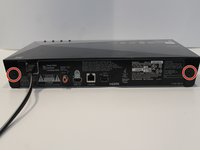
      • Turn to the back of the device.

      • Remove the two 7mm Phillips #2 screws.

      • Slide the two plastic covers on both sides of the device towards the back of the device to remove them.

      crwdns2952109:0crwdne2952109:0

      crwdns2917038:0crwdne2917038:0

    4. Sony BDP-BX510 Wi-Fi Module Replacement: crwdns2935265:04crwdnd2935265:01crwdnd2935265:03crwdne2935265:0 Sony BDP-BX510 Wi-Fi Module Replacement: crwdns2935265:04crwdnd2935265:02crwdnd2935265:03crwdne2935265:0 Sony BDP-BX510 Wi-Fi Module Replacement: crwdns2935265:04crwdnd2935265:03crwdnd2935265:03crwdne2935265:0
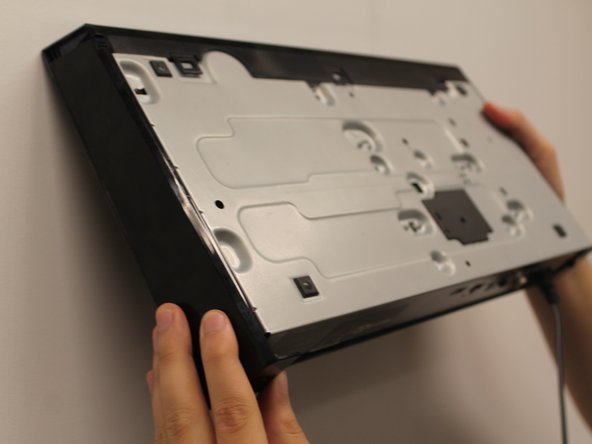
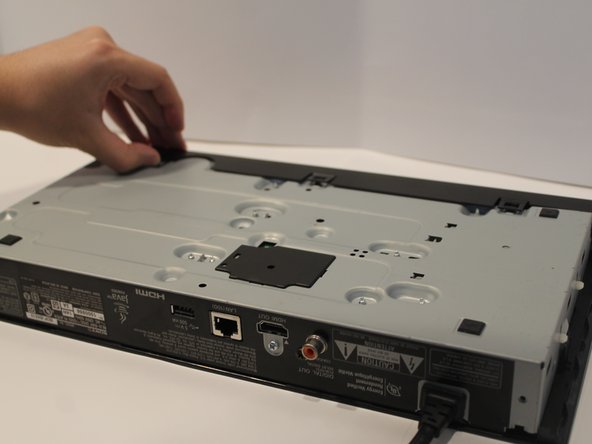
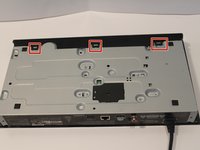
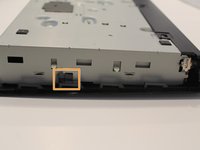
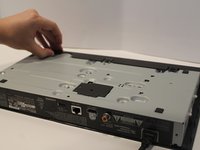
      • Turn the device so you can see the bottom.

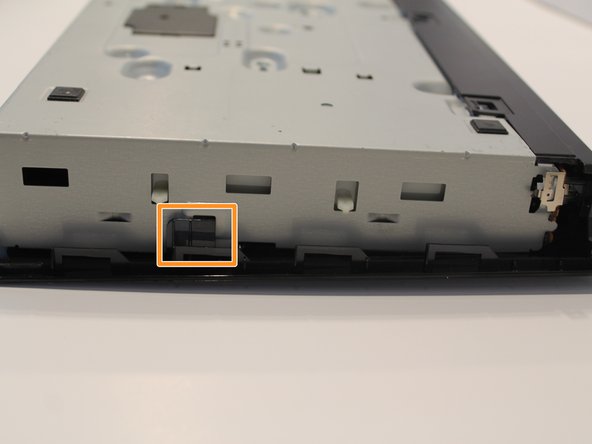
      • Unclip the three black plastic clips on the bottom of the device.

      • Unclip one clip on each side of the device.

      crwdns2952109:0crwdne2952109:0

      crwdns2917038:0crwdne2917038:0

    5. Sony BDP-BX510 Wi-Fi Module Replacement: crwdns2935265:05crwdnd2935265:01crwdnd2935265:01crwdne2935265:0
      • Slide the cover forward to remove.

      crwdns2952109:0crwdne2952109:0

      crwdns2917038:0crwdne2917038:0

    1. Sony BDP-BX510 Wi-Fi Module Replacement, Port Board: crwdns2935265:06crwdnd2935265:01crwdnd2935265:01crwdne2935265:0
      • Find the large ribbon cable that connects the port board to the motherboard.

      • Carefully pull directly upwards to disconnect the cable.

      crwdns2952109:0crwdne2952109:0

      crwdns2917038:0crwdne2917038:0

    2. Sony BDP-BX510 Wi-Fi Module Replacement: crwdns2935265:07crwdnd2935265:01crwdnd2935265:01crwdne2935265:0
      • Using the Phillips #1 screwdriver, remove the 5mm screwdriver attached to the port board.

      crwdns2952109:0crwdne2952109:0

      crwdns2917038:0crwdne2917038:0

    3. Sony BDP-BX510 Wi-Fi Module Replacement: crwdns2935265:08crwdnd2935265:01crwdnd2935265:01crwdne2935265:0
      • Unclip the metal piece on the lower right corner by gently lifting it up.

      crwdns2952109:0crwdne2952109:0

      crwdns2917038:0crwdne2917038:0

    4. Sony BDP-BX510 Wi-Fi Module Replacement: crwdns2935265:09crwdnd2935265:01crwdnd2935265:01crwdne2935265:0
      • Remove the port board by simply pulling it away from the device.

      crwdns2952109:0crwdne2952109:0

      crwdns2917038:0crwdne2917038:0

    1. Sony BDP-BX510 Wi-Fi Module Replacement, Wi-Fi Module: crwdns2935265:010crwdnd2935265:01crwdnd2935265:01crwdne2935265:0
      • Pull the cable that attaches the Wi-Fi module to the motherboard.

      • The cable will be hard to remove, so pull hard but carefully.

      crwdns2952109:0crwdne2952109:0

      crwdns2917038:0crwdne2917038:0

    2. Sony BDP-BX510 Wi-Fi Module Replacement: crwdns2935265:011crwdnd2935265:01crwdnd2935265:01crwdne2935265:0
      • Use a Phillips #1 screwdriver to remove the single 5mm screw that holds Wi-Fi module to the device.

      crwdns2952109:0crwdne2952109:0

      crwdns2917038:0crwdne2917038:0

    3. Sony BDP-BX510 Wi-Fi Module Replacement: crwdns2935265:012crwdnd2935265:01crwdnd2935265:01crwdne2935265:0
      • Carefully remove the Wi-Fi module from the device.

      • Avoid getting fingerprints on the module.

      crwdns2952109:0crwdne2952109:0

      crwdns2917038:0crwdne2917038:0

crwdns2915888:0crwdne2915888:0

To reassemble your device, follow these instructions in reverse order.

crwdns2935221:0crwdne2935221:0

Niki Ngosi

crwdns2935283:001/19/20crwdne2935283:0

393 crwdns2915208:0crwdne2915208:0

crwdns2935297:03crwdne2935297:0

crwdns2935287:0crwdne2935287:0

York University, Team S1-G10, Woodhouse Winter 2020 crwdns2935289:0York University, Team S1-G10, Woodhouse Winter 2020crwdne2935289:0

YORK-WOODHOUSE-W20S1G10

crwdns2931471:02crwdne2931471:0

crwdns2935297:072crwdne2935297:0

crwdns2947412:00crwdne2947412:0

crwdns2917038:0crwdne2917038:0

crwdns2936625:0crwdne2936625:0:

crwdns2936751:024crwdne2936751:0 2

crwdns2936753:07crwdne2936753:0 12

crwdns2936753:030crwdne2936753:0 59

crwdns2959996:0crwdne2959996:0 739