crwdns2933423:0crwdne2933423:0
crwdns2947577:0crwdnd2947577:0crwdne2947577:0

Sony Alpha NEX-C3 Control Wheel Replacement

crwdns2869540:0crwdne2869540:0: 4851

crwdns2959988:0crwdne2959988:0

crwdns2959990:0crwdne2959990:0
5
crwdns2959992:0crwdne2959992:0
29
crwdns2959994:0crwdne2959994:0
137
crwdns2959996:0crwdne2959996:0
4.851
crwdns2955950:0crwdne2955950:0: 0

crwdns2959998:0crwdne2959998:0

crwdns2960000:0crwdne2960000:0
crwdns2959984:0crwdne2959984:0: 4

crwdns2959974:04crwdne2959974:0

crwdns2959986:0crwdne2959986:0: 1

crwdns2959980:01crwdne2959980:0

crwdns2955944:0crwdne2955944:0: crwdns2931287:05crwdne2931287:0
crwdns2955970:0crwdne2955970:0: crwdns2937801:0crwdne2937801:0
Sony Alpha NEX-C3 Control Wheel Replacement

crwdns2915892:0crwdne2915892:0

crwdns2959928:0crwdne2959928:0 ↓

The control wheel is used to navigate through pictures, and can wear down over time, and will need replacement.

crwdns2959930:0crwdne2959930:0

crwdns2943215:0crwdne2943215:0

    1. Sony Alpha NEX-C3 Control Wheel Replacement, Top Panel: crwdns2935265:01crwdnd2935265:01crwdnd2935265:01crwdne2935265:0
      • Turn the camera off by sliding the power switch.

      crwdns2952109:0crwdne2952109:0

      crwdns2917038:0crwdne2917038:0

    2. Sony Alpha NEX-C3 Control Wheel Replacement: crwdns2935265:02crwdnd2935265:01crwdnd2935265:01crwdne2935265:0
      • Use a Phillips head 000 screwdriver to remove the 4.0mm screw inside the USB port.

      crwdns2952109:0crwdne2952109:0

      crwdns2917038:0crwdne2917038:0

    3. Sony Alpha NEX-C3 Control Wheel Replacement: crwdns2935265:03crwdnd2935265:01crwdnd2935265:01crwdne2935265:0
      • Use a Phillips head 000 screwdriver to remove the one 4.0mm screw on the side opposite of the USB port near the shutter button.

      crwdns2952109:0crwdne2952109:0

      crwdns2917038:0crwdne2917038:0

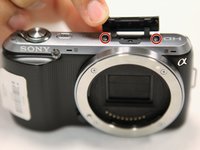
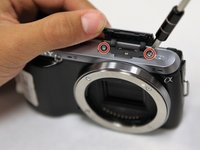
    4. Sony Alpha NEX-C3 Control Wheel Replacement: crwdns2935265:04crwdnd2935265:01crwdnd2935265:02crwdne2935265:0 Sony Alpha NEX-C3 Control Wheel Replacement: crwdns2935265:04crwdnd2935265:02crwdnd2935265:02crwdne2935265:0
      • Open the flap at the top of the camera.

      • Use a Phillips head 000 screwdriver to remove the two 4.0mm screws inside.

      crwdns2952109:0crwdne2952109:0

      crwdns2917038:0crwdne2917038:0

    5. Sony Alpha NEX-C3 Control Wheel Replacement: crwdns2935265:05crwdnd2935265:01crwdnd2935265:01crwdne2935265:0
      • Gently lift off the top panel with your hands.

      crwdns2952109:0crwdne2952109:0

      crwdns2917038:0crwdne2917038:0

    1. Sony Alpha NEX-C3 Control Wheel Replacement, Back Panel: crwdns2935265:06crwdnd2935265:01crwdnd2935265:01crwdne2935265:0
      • Use a Phillips head 000 screwdriver to remove the 4.0mm screw at the side opposite of the USB port.

      crwdns2952109:0crwdne2952109:0

      crwdns2917038:0crwdne2917038:0

    2. Sony Alpha NEX-C3 Control Wheel Replacement: crwdns2935265:07crwdnd2935265:01crwdnd2935265:02crwdne2935265:0 Sony Alpha NEX-C3 Control Wheel Replacement: crwdns2935265:07crwdnd2935265:02crwdnd2935265:02crwdne2935265:0
      • Use a Phillips head 000 screwdriver to remove the three 4.0mm screws on the bottom of the camera.

      crwdns2952109:0crwdne2952109:0

      crwdns2917038:0crwdne2917038:0

    3. Sony Alpha NEX-C3 Control Wheel Replacement: crwdns2935265:08crwdnd2935265:01crwdnd2935265:01crwdne2935265:0
      • Tilt up the LCD screen.

      • Use a Phillips head 000 screwdriver to remove the two coarse 4.0mm screws near the bottom of the camera.

      crwdns2952109:0crwdne2952109:0

      crwdns2917038:0crwdne2917038:0

    4. Sony Alpha NEX-C3 Control Wheel Replacement: crwdns2935265:09crwdnd2935265:01crwdnd2935265:01crwdne2935265:0
      • Gently pry off the back panel, by wiggling it around the LCD screen.

      crwdns2952109:0crwdne2952109:0

      crwdns2917038:0crwdne2917038:0

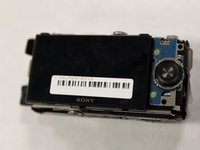
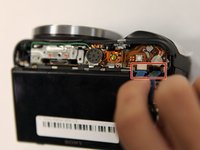
    1. Sony Alpha NEX-C3 Control Wheel Replacement, Control Wheel: crwdns2935265:010crwdnd2935265:01crwdnd2935265:02crwdne2935265:0 Sony Alpha NEX-C3 Control Wheel Replacement, Control Wheel: crwdns2935265:010crwdnd2935265:02crwdnd2935265:02crwdne2935265:0
      • Tilt up the LCD screen.

      • Grab the silver plate, and gently pry it up.

      crwdns2952109:0crwdne2952109:0

      crwdns2917038:0crwdne2917038:0

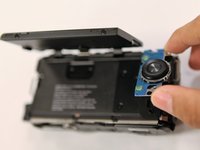
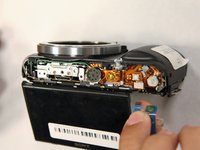
    2. Sony Alpha NEX-C3 Control Wheel Replacement: crwdns2935265:011crwdnd2935265:01crwdnd2935265:02crwdne2935265:0 Sony Alpha NEX-C3 Control Wheel Replacement: crwdns2935265:011crwdnd2935265:02crwdnd2935265:02crwdne2935265:0
      • Gently pinch blue ribbon cable, and pull it out of the port.

      crwdns2952109:0crwdne2952109:0

      crwdns2917038:0crwdne2917038:0

crwdns2915888:0crwdne2915888:0

To reassemble your device, follow these instructions in reverse order.

crwdns2935221:0crwdne2935221:0

crwdns2935229:04crwdne2935229:0

Jonathan Chen

crwdns2935283:010/17/17crwdne2935283:0

720 crwdns2915208:0crwdne2915208:0

crwdns2935297:06crwdne2935297:0

crwdns2935287:0crwdne2935287:0

UC Santa Barbara, Team S1-G1, Weedon Fall 2017 crwdns2935289:0UC Santa Barbara, Team S1-G1, Weedon Fall 2017crwdne2935289:0

UCSB-WEEDON-F17S1G1

crwdns2931471:03crwdne2931471:0

crwdns2935297:072crwdne2935297:0

crwdns2947412:00crwdne2947412:0

crwdns2917038:0crwdne2917038:0

crwdns2936625:0crwdne2936625:0:

crwdns2936751:024crwdne2936751:0 5

crwdns2936753:07crwdne2936753:0 29

crwdns2936753:030crwdne2936753:0 137

crwdns2959996:0crwdne2959996:0 4,851