
Sony Alpha NEX-6 Control Wheel Replacement

crwdns2959932:0crwdnd2959932:0Clayton Dalecrwdnd2959932:0crwdnd2959932:0crwdnd2959932:03crwdnd2959932:0crwdne2959932:0
crwdns2959936:0Mud 7, 2024crwdne2959936:0
crwdns2869540:0crwdne2869540:0: 6.3K
crwdns2959988:0crwdne2959988:0
- crwdns2959990:0crwdne2959990:0
- 2
- crwdns2959992:0crwdne2959992:0
- 29
- crwdns2959994:0crwdne2959994:0
- 131
- crwdns2959996:0crwdne2959996:0
- 6,321
crwdns2955950:0crwdne2955950:0: 0
crwdns2959998:0crwdne2959998:0
crwdns2960000:0crwdne2960000:0crwdns2959984:0crwdne2959984:0: 5 6
crwdns2959974:05crwdne2959974:0
crwdns2959970:06crwdne2959970:0
crwdns2959986:0crwdne2959986:0: 0 1
crwdns2959958:0crwdne2959958:0
crwdns2959976:01crwdne2959976:0
crwdns2915892:0crwdne2915892:0
crwdns2959928:0crwdne2959928:0 ↓This guide will illustrate how to dis-assemble the back camera case to gain access the control wheel assembly. Then it will show how to replace the control wheel and adjacent soft keys.
crwdns2959930:0crwdne2959930:0
crwdns2943215:0crwdne2943215:0
-
Spudger4.9
-


-
-
-
Turn the camera off by switching the power knob "OFF" text to the white selector dot.
 crwdns2952109:0crwdne2952109:0
-
-
-
Flip the camera upside-down and carefully place it on a flat surface.
-
With the lens facing outward, locate the battery compartment - indicated by a grooved latch.
-
Push the latch to the right to unlock the battery compartment. The door should flip upward.
-
-
-
With the compartment open, locate a blue tab shown with spudger
-
Press the tab to the side (to the left, or toward the camera wall). This will eject the camera battery.
-
-
-
-
-
Remove the two 3.5mm Phillips #00 screws that hold the back case - located inside the battery compartment.
-
-
-
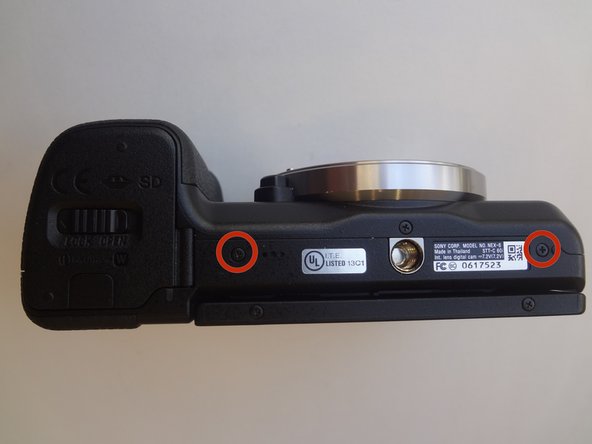
Remove the two 3.5mm Phillips #00 screws that hold the back case - located on the bottom of the camera.
-
-
-
Remove the 3.5 mm Phillips #00 screw on the side of camera - located between the charging and HDMI ports.
-
Remove the 4.0 mm Phillips #00 screw on the side of the camera - located next to the WiFi sign.
-
-
-
-
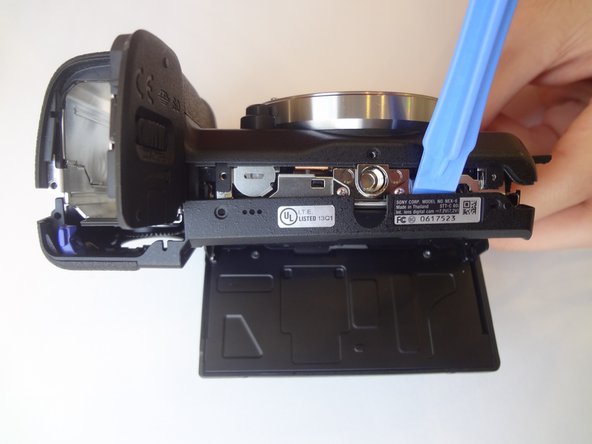
Starting with the battery compartment gently begin to separate the back case front the camera.
-
Using a plastic opening tool, separate the bottom of the back case from the camera. Then proceed by separating the sides.
-
Gently lift the back case away from the camera an slide it down to completely remove the back case.
-
-
-
-
-
Pry out the ribbon cable by carefully pushing on its side tabs with a spudger.
-
-
crwdns2935267:0crwdne2935267:0Tweezers$4.99
-
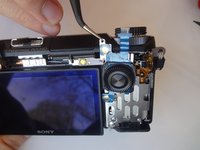
Using a spudger, lift the metal locking tab located at the top right corner of control wheel assembly.
-
Using tweezers, carefully slide the assembly up to release it.
-
-





To reassemble your device, follow these instructions in reverse order.
crwdns2935221:0crwdne2935221:0
crwdns2935229:05crwdne2935229:0

crwdns2935287:0crwdne2935287:0

USF Tampa, Team 11-2, Blackwell Winter 2015 crwdns2935289:0USF Tampa, Team 11-2, Blackwell Winter 2015crwdne2935289:0
USFT-BLACKWELL-W15S11G2
crwdns2931471:04crwdne2931471:0
crwdns2935297:084crwdne2935297:0
