
Sony Alpha NEX-6 Back Case Replacement

crwdns2959932:0crwdnd2959932:0Clayton Dalecrwdnd2959932:0crwdnd2959932:0crwdnd2959932:03crwdnd2959932:0crwdne2959932:0
crwdns2959936:0Kho 18, 2015crwdne2959936:0
crwdns2869540:0crwdne2869540:0: 5천
crwdns2959988:0crwdne2959988:0
- crwdns2959990:0crwdne2959990:0
- 6
- crwdns2959992:0crwdne2959992:0
- 40
- crwdns2959994:0crwdne2959994:0
- 117
- crwdns2959996:0crwdne2959996:0
- 4,987
crwdns2955950:0crwdne2955950:0: 3
crwdns2960008:03crwdne2960008:0
crwdns2960000:0crwdne2960000:0crwdns2959984:0crwdne2959984:0: 2 3
crwdns2959974:02crwdne2959974:0
crwdns2959970:03crwdne2959970:0
crwdns2959986:0crwdne2959986:0: 0 1
crwdns2959958:0crwdne2959958:0
crwdns2959976:01crwdne2959976:0
crwdns2915892:0crwdne2915892:0
crwdns2959928:0crwdne2959928:0 ↓This guide includes screws removal and a procedure for removing the back case. Follow the steps precisely to avoid breaking of plastic locking tabs.
crwdns2959930:0crwdne2959930:0
crwdns2943215:0crwdne2943215:0
-
Spudger4.9
-


-
-
-
Turn the camera off by switching the power knob "OFF" text to the white selector dot.
 crwdns2952109:0crwdne2952109:0
-
-
-
Flip the camera upside-down and carefully place it on a flat surface.
-
With the lens facing outward, locate the battery compartment - indicated by a grooved latch.
-
Push the latch to the right to unlock the battery compartment. The door should flip upward.
-
-
-
With the compartment open, locate a blue tab shown with spudger
-
Press the tab to the side (to the left, or toward the camera wall). This will eject the camera battery.
-
-
-
-
-
Remove the two 3.5mm Phillips #00 screws that hold the back case - located inside the battery compartment.
-
-
-
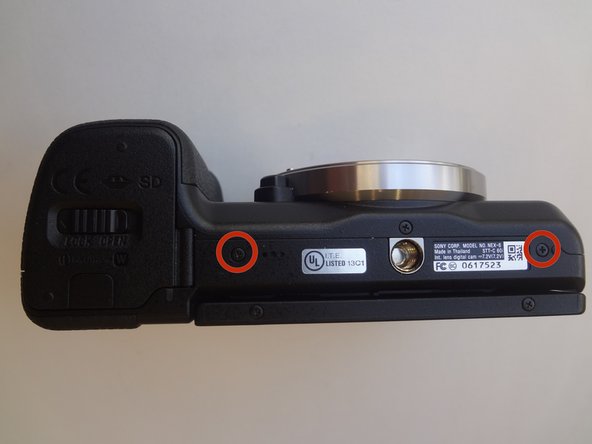
Remove the two 3.5mm Phillips #00 screws that hold the back case - located on the bottom of the camera.
-
-
-
-
Remove the 3.5 mm Phillips #00 screw on the side of camera - located between the charging and HDMI ports.
-
Remove the 4.0 mm Phillips #00 screw on the side of the camera - located next to the WiFi sign.
-
-
-
Starting with the battery compartment gently begin to separate the back case front the camera.
-
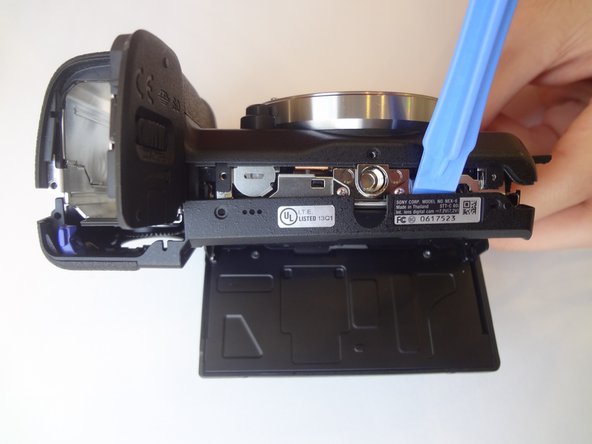
Using a plastic opening tool, separate the bottom of the back case from the camera. Then proceed by separating the sides.
-
Gently lift the back case away from the camera an slide it down to completely remove the back case.
-
-





To reassemble your device, follow these instructions in reverse order.
crwdns2935221:0crwdne2935221:0
crwdns2935229:02crwdne2935229:0

crwdns2935287:0crwdne2935287:0

USF Tampa, Team 11-2, Blackwell Winter 2015 crwdns2935289:0USF Tampa, Team 11-2, Blackwell Winter 2015crwdne2935289:0
USFT-BLACKWELL-W15S11G2
crwdns2931471:04crwdne2931471:0
crwdns2935297:084crwdne2935297:0
crwdns2947412:03crwdne2947412:0
At {STEP 7} you will notice the last parts to release are the flash button / record button areas. This is particularly tricky.
The flash button release seems to be attached inside, so take care. In my case I did not remove the back case completely due to this.
The corner where the record button is requires extra force to slide down / pry out.
Re-assembly : Take note of these parts.
- the PLAY button flexible circuit has a small hole which fits into a pin on the back case. It is important to align this correctly or your play & AEL button may not function.
- The eye piece has a flexible circuit on its right side which tucks behind a small tab - take care this is not dislodged or it could be damaged when re assembling.
Riquez JP - crwdns2934203:0crwdne2934203:0 crwdns2950251:0crwdne2950251:0
Does your team know how to fix the Flash Pop-up button ? It seems the flash for me and others is stuck open and can't be clicked back down. Can you assist ?
rullor - crwdns2934203:0crwdne2934203:0 crwdns2950251:0crwdne2950251:0
Can you please let me know how to replace the battery door? Thank you.
Richard Bullough - crwdns2934203:0crwdne2934203:0 crwdns2950251:0crwdne2950251:0
