crwdns2933423:0crwdne2933423:0
crwdns2947577:0crwdnd2947577:0crwdne2947577:0

Side Panel Removal

crwdns2869540:0crwdne2869540:0: 4천

crwdns2959988:0crwdne2959988:0

crwdns2959990:0crwdne2959990:0
6
crwdns2959992:0crwdne2959992:0
27
crwdns2959994:0crwdne2959994:0
135
crwdns2959996:0crwdne2959996:0
4,043
crwdns2955950:0crwdne2955950:0: 1

crwdns2960006:01crwdne2960006:0

crwdns2960000:0crwdne2960000:0
crwdns2959984:0crwdne2959984:0: 7

crwdns2959974:07crwdne2959974:0

crwdns2959986:0crwdne2959986:0: 1

crwdns2959980:01crwdne2959980:0

crwdns2955944:0crwdne2955944:0: crwdns2931283:030crwdne2931283:0
crwdns2955970:0crwdne2955970:0: crwdns2937585:0crwdne2937585:0
crwdns2944444:0crwdne2944444:0

crwdns2944446:0crwdne2944446:0

Side Panel Removal

crwdns2915892:0crwdne2915892:0

crwdns2959928:0crwdne2959928:0 ↓

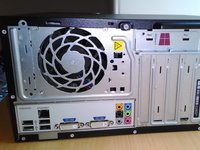
How to remove the side panel on the HP Pavilion p6 desktop computer.

crwdns2959930:0crwdne2959930:0

crwdns2943215:0crwdne2943215:0

    1. Side Panel Removal, Side Panel Removal: crwdns2935265:01crwdnd2935265:01crwdnd2935265:03crwdne2935265:0 Side Panel Removal, Side Panel Removal: crwdns2935265:01crwdnd2935265:02crwdnd2935265:03crwdne2935265:0 Side Panel Removal, Side Panel Removal: crwdns2935265:01crwdnd2935265:03crwdnd2935265:03crwdne2935265:0
      • Before you start make sure that all of the leads have been disconnected from the computer.

      • It is strongly recomended to wait at least 15 minutes after turning it off to allow the computer and internal components to cool down.

      • It is recomended to lay the computer down with the pull tab at the top to allow it to be easily opened.

      • It is also worth mentioning at this point that for complete safety when working inside the computer that wearing an anti-static band and touching a grounded metal object before starting is good practice.

      crwdns2952109:0crwdne2952109:0

      crwdns2917038:0crwdne2917038:0

    2. Side Panel Removal: crwdns2935265:02crwdnd2935265:01crwdnd2935265:03crwdne2935265:0 Side Panel Removal: crwdns2935265:02crwdnd2935265:02crwdnd2935265:03crwdne2935265:0 Side Panel Removal: crwdns2935265:02crwdnd2935265:03crwdnd2935265:03crwdne2935265:0
      • In order to remove the side panel a single screw needs to first be removed.

      • The side panel can then be pulled towards the back of the computer using the pull tab provided.

      • The panel then needs to be rotated as showen in order to remove it from the computer.

      crwdns2952109:0crwdne2952109:0

      crwdns2917038:0crwdne2917038:0

crwdns2915888:0crwdne2915888:0

To reassemble your device, follow these instructions in reverse order.

crwdns2935221:0crwdne2935221:0

crwdns2935229:07crwdne2935229:0

Oli

crwdns2935283:001/03/14crwdne2935283:0

1,577 crwdns2915208:0crwdne2915208:0

crwdns2935297:04crwdne2935297:0

crwdns2947410:01crwdne2947410:0

I took it out, but now it’s not going all the way in

Ali - crwdns2934203:0crwdne2934203:0 crwdns2950251:0crwdne2950251:0

crwdns2917038:0crwdne2917038:0

crwdns2936625:0crwdne2936625:0:

crwdns2936751:024crwdne2936751:0 6

crwdns2936753:07crwdne2936753:0 27

crwdns2936753:030crwdne2936753:0 135

crwdns2959996:0crwdne2959996:0 4,043