crwdns2933423:0crwdne2933423:0
crwdns2947577:0crwdnd2947577:0crwdne2947577:0

Sharp Aquos Crystal USB Port Replacement

crwdns2942213:0crwdne2942213:0

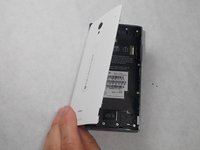
    1. Sharp Aquos Crystal USB Port Replacement, Back Panel: crwdns2935265:01crwdnd2935265:01crwdnd2935265:03crwdne2935265:0 Sharp Aquos Crystal USB Port Replacement, Back Panel: crwdns2935265:01crwdnd2935265:02crwdnd2935265:03crwdne2935265:0 Sharp Aquos Crystal USB Port Replacement, Back Panel: crwdns2935265:01crwdnd2935265:03crwdnd2935265:03crwdne2935265:0
      • Peel back the back cover of the phone from the access point to remove it. It should come off easily using your hands.

      crwdns2952109:0crwdne2952109:0

      crwdns2917038:0crwdne2917038:0

    1. Sharp Aquos Crystal USB Port Replacement, USB Port: crwdns2935265:02crwdnd2935265:01crwdnd2935265:02crwdne2935265:0 Sharp Aquos Crystal USB Port Replacement, USB Port: crwdns2935265:02crwdnd2935265:02crwdnd2935265:02crwdne2935265:0
      • Remove seven 3mm Star #5 screws shown in the picture with a screwdriver.

      • Remove two 3.5mm Star #5 screws shown in the picture with a screwdriver.

      • Remove two 5mm Star #5 screws shown in the picture with a screwdriver.

      crwdns2952109:0crwdne2952109:0

      crwdns2917038:0crwdne2917038:0

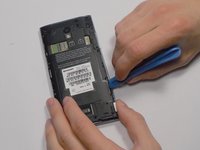
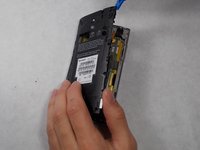
    2. Sharp Aquos Crystal USB Port Replacement: crwdns2935265:03crwdnd2935265:01crwdnd2935265:02crwdne2935265:0 Sharp Aquos Crystal USB Port Replacement: crwdns2935265:03crwdnd2935265:02crwdnd2935265:02crwdne2935265:0
      • Pry open the back panel using a plastic opening tool. Do this around the edges until you are able to lift it off.

      crwdns2952109:0crwdne2952109:0

      crwdns2917038:0crwdne2917038:0

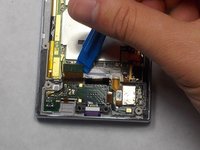
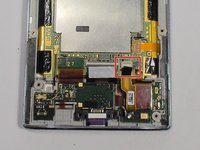
    3. Sharp Aquos Crystal USB Port Replacement: crwdns2935265:04crwdnd2935265:01crwdnd2935265:02crwdne2935265:0 Sharp Aquos Crystal USB Port Replacement: crwdns2935265:04crwdnd2935265:02crwdnd2935265:02crwdne2935265:0
      • Disconnect the wire by lifting it up with a plastic opening tool.

      crwdns2952109:0crwdne2952109:0

      crwdns2917038:0crwdne2917038:0

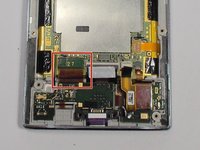
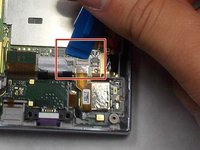
    4. Sharp Aquos Crystal USB Port Replacement: crwdns2935265:05crwdnd2935265:01crwdnd2935265:03crwdne2935265:0 Sharp Aquos Crystal USB Port Replacement: crwdns2935265:05crwdnd2935265:02crwdnd2935265:03crwdne2935265:0 Sharp Aquos Crystal USB Port Replacement: crwdns2935265:05crwdnd2935265:03crwdnd2935265:03crwdne2935265:0
      • To disconnect the cable, use the tip of a spudger or your fingernail to flip up the small retaining flap. Then, you can safely pull the ribbon cable out.

      crwdns2952109:0crwdne2952109:0

      crwdns2917038:0crwdne2917038:0

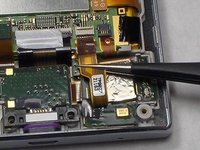
    5. Sharp Aquos Crystal USB Port Replacement: crwdns2935265:06crwdnd2935265:01crwdnd2935265:01crwdne2935265:0
      • After removing the wires, carefully snap out the usb port with your hands. It is held down by some plastic clips, so some force may be needed.

      crwdns2952109:0crwdne2952109:0

      crwdns2917038:0crwdne2917038:0

crwdns2915888:0crwdne2915888:0

To reassemble your device, follow these instructions in reverse order.

crwdns2935221:0crwdne2935221:0

crwdns2935229:02crwdne2935229:0

Felicia Imbriano

crwdns2935283:003/08/16crwdne2935283:0

1,266 crwdns2915208:0crwdne2915208:0

crwdns2935297:08crwdne2935297:0

crwdns2935287:0crwdne2935287:0

UMass Dartmouth, Team 7-4, Catania Spring 2016 crwdns2935289:0UMass Dartmouth, Team 7-4, Catania Spring 2016crwdne2935289:0

UMASSD-CATANIA-S16S7G4

crwdns2931471:03crwdne2931471:0

crwdns2935297:096crwdne2935297:0

crwdns2947412:00crwdne2947412:0

crwdns2917038:0crwdne2917038:0

crwdns2936625:0crwdne2936625:0:

crwdns2936751:024crwdne2936751:0 11

crwdns2936753:07crwdne2936753:0 32

crwdns2936753:030crwdne2936753:0 66

crwdns2942667:0crwdne2942667:0 3,133