
Samsung WB1100F LCD Screen Replacement

crwdns2959932:0crwdnd2959932:0Jesse Lindseycrwdnd2959932:0crwdnd2959932:0crwdnd2959932:04crwdnd2959932:0crwdne2959932:0
crwdns2959936:0Mud 7, 2024crwdne2959936:0
crwdns2869540:0crwdne2869540:0: 1K
crwdns2959988:0crwdne2959988:0
- crwdns2959990:0crwdne2959990:0
- 5
- crwdns2959992:0crwdne2959992:0
- 24
- crwdns2959994:0crwdne2959994:0
- 93
- crwdns2959996:0crwdne2959996:0
- 1,043
crwdns2955950:0crwdne2955950:0: 0
crwdns2959998:0crwdne2959998:0
crwdns2960000:0crwdne2960000:0crwdns2959984:0crwdne2959984:0: 1 2
crwdns2959972:01crwdne2959972:0
crwdns2959970:02crwdne2959970:0
crwdns2959986:0crwdne2959986:0: 0 1
crwdns2959958:0crwdne2959958:0
crwdns2959976:01crwdne2959976:0
crwdns2862615:0crwdne2862615:0
crwdns2862616:0crwdne2862616:0
crwdns2915892:0crwdne2915892:0
crwdns2959928:0crwdne2959928:0 ↓This guide will show you how to replace the LCD Panel on the Samsung WB1100F. It will show you a step by step replacement guide of how to replace the LCD Panel.
crwdns2959930:0crwdne2959930:0
crwdns2943215:0crwdne2943215:0


-
-
-
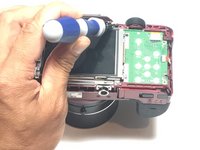
Remove six 1.2 mm Phillips #00 screws connected to the tripod dock and adjacent screws.
-
Remove six 1.2 mm Phillips #00 screws from the side of the camera.
 crwdns2952109:0crwdne2952109:0
-
-
-
Using the flat end of a spudger, loosen the connection between the back panel and the device. Remove the back panel using your hands.
-
-
-
-
-
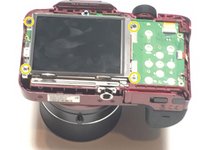
Remove four 1.2 mm Phillips #1 screws connected to the LCD screen.
-
-
-
crwdns2935267:0crwdne2935267:0Tweezers$4.99
-
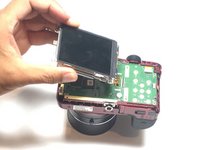
Flip the LCD screen over to reveal the display cable.
-
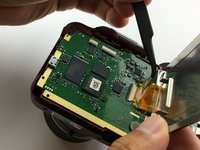
Use the tip of a spudger or your fingernail to flip up the small retaining flap on the display cable ZIF connector.
-
Using a pair of tweezers, remove the ribbon cable from its socket on the motherboard.
-
-




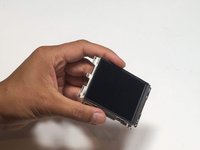
To reassemble your device, follow these instructions in reverse order.
crwdns2935221:0crwdne2935221:0
crwdns2935227:0crwdne2935227:0

crwdns2935287:0crwdne2935287:0

Metro State, Team 1-1, Carpenter SU 2016 crwdns2935289:0Metro State, Team 1-1, Carpenter SU 2016crwdne2935289:0
MSU-CARPENTER-SU16S1G1
crwdns2931471:03crwdne2931471:0
crwdns2935297:060crwdne2935297:0
