
Samsung TL220 Power Button Replacement

crwdns2959932:0crwdnd2959932:0chelsacrwdnd2959932:0crwdnd2959932:0crwdnd2959932:03crwdnd2959932:0crwdne2959932:0
crwdns2959936:0Mud 7, 2024crwdne2959936:0
crwdns2869540:0crwdne2869540:0: 759
crwdns2959988:0crwdne2959988:0
- crwdns2959990:0crwdne2959990:0
- 4
- crwdns2959992:0crwdne2959992:0
- 23
- crwdns2959994:0crwdne2959994:0
- 91
- crwdns2959996:0crwdne2959996:0
- 759
crwdns2955950:0crwdne2955950:0: 0
crwdns2959998:0crwdne2959998:0
crwdns2960000:0crwdne2960000:0crwdns2959984:0crwdne2959984:0: 2 3
crwdns2959974:02crwdne2959974:0
crwdns2959970:03crwdne2959970:0
crwdns2959986:0crwdne2959986:0: 0 1
crwdns2959958:0crwdne2959958:0
crwdns2959976:01crwdne2959976:0
crwdns2862613:0crwdne2862613:0
crwdns2862614:0crwdne2862614:0
crwdns2862625:0crwdne2862625:0
crwdns2862626:0crwdne2862626:0
crwdns2915892:0crwdne2915892:0
crwdns2959928:0crwdne2959928:0 ↓All you need for this guide is the will to fix your camera. Enjoy!
crwdns2959930:0crwdne2959930:0
crwdns2943215:0crwdne2943215:0


-
-
-
Check for debris and dust around the power button to make sure it's clean.
-
If dust is absent, then begin with unscrewing the seven outside shell 4 mm Philips screws with the Philips screw driver.
-
Now carefully pry open the back casing with the ifixit plastic opening tool.
 crwdns2952109:0crwdne2952109:0
-
-
-
Now that you have the back casing off, gently remove the LCD screen from the camera.
-
Next unscrew the three 4 mm Philips screws on the back panel with the same screw driver(See image).
-
-
crwdns2935267:0crwdne2935267:0Tweezers$4.99
-
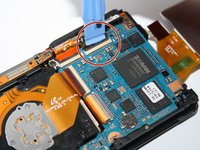
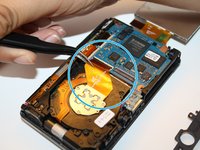
Unclip the four connecters that hold down the orange copper film strips with the plastic opening tool.
-
Then carefully pull out the three film strips with the ifixit tweezers.
-
-
-
Remove the 4 mm Philip screw located above the center film strip with the Philips screw driver. This will allow the top frame to come loose to take off.
-
-
-
Then pull back the black claw located at the bottom right of the camera, to the right with the plastic opening tool. This holds the main plate down.
-
-
-
-
Slowly lift with your fingers, the top frame of the camera to get to the power button.
-
-
-
Replace power button with new one.
-
-




To reassemble your device, follow these instructions in reverse order.
crwdns2935221:0crwdne2935221:0
crwdns2935229:02crwdne2935229:0

crwdns2935287:0crwdne2935287:0

3 Tech Girls crwdns2935289:03 Tech Girlscrwdne2935289:0
Community
crwdns2931471:02crwdne2931471:0
crwdns2935297:048crwdne2935297:0
