crwdns2933423:0crwdne2933423:0
crwdns2947577:0crwdnd2947577:0crwdne2947577:0

Samsung SGH-A137 Keypad Replacement

crwdns2942213:0crwdne2942213:0

    1. Samsung SGH-A137 Keypad Replacement, Battery: crwdns2935265:01crwdnd2935265:01crwdnd2935265:01crwdne2935265:0
      • Use your thumbs to pull down on the back cover to remove it and expose the battery.

      crwdns2952109:0crwdne2952109:0

      crwdns2917038:0crwdne2917038:0

    2. Samsung SGH-A137 Keypad Replacement: crwdns2935265:02crwdnd2935265:01crwdnd2935265:01crwdne2935265:0
      • Locate the indent in the case below the battery. (see red square)

      • Place your finger at the indent and pull up on the battery to remove it.

      crwdns2952109:0crwdne2952109:0

      crwdns2917038:0crwdne2917038:0

    1. Samsung SGH-A137 Keypad Replacement, Motherboard: crwdns2935265:03crwdnd2935265:01crwdnd2935265:03crwdne2935265:0 Samsung SGH-A137 Keypad Replacement, Motherboard: crwdns2935265:03crwdnd2935265:02crwdnd2935265:03crwdne2935265:0 Samsung SGH-A137 Keypad Replacement, Motherboard: crwdns2935265:03crwdnd2935265:03crwdnd2935265:03crwdne2935265:0
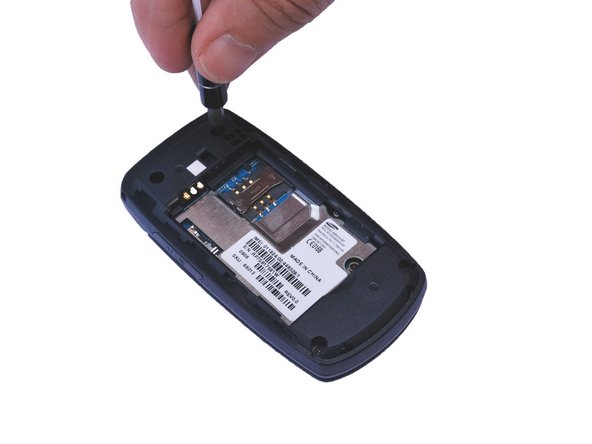
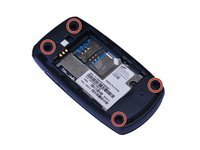
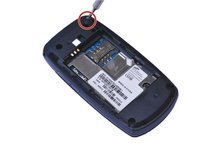
      • Locate the 4 screw holes and remove the 0.4 mm Phillips head screws using a #000 Phillips head screwdriver. (See red circles)

      crwdns2952109:0crwdne2952109:0

      crwdns2917038:0crwdne2917038:0

    2. Samsung SGH-A137 Keypad Replacement: crwdns2935265:04crwdnd2935265:01crwdnd2935265:01crwdne2935265:0
      • Using a plastic opening tool, gently pry open the back of the phone at the seam.

      • Carefully work the tool all the way around the opening while prying up to avoid breaking the plastic retaining clips.

      crwdns2952109:0crwdne2952109:0

      crwdns2917038:0crwdne2917038:0

    3. Samsung SGH-A137 Keypad Replacement: crwdns2935265:05crwdnd2935265:01crwdnd2935265:02crwdne2935265:0 Samsung SGH-A137 Keypad Replacement: crwdns2935265:05crwdnd2935265:02crwdnd2935265:02crwdne2935265:0
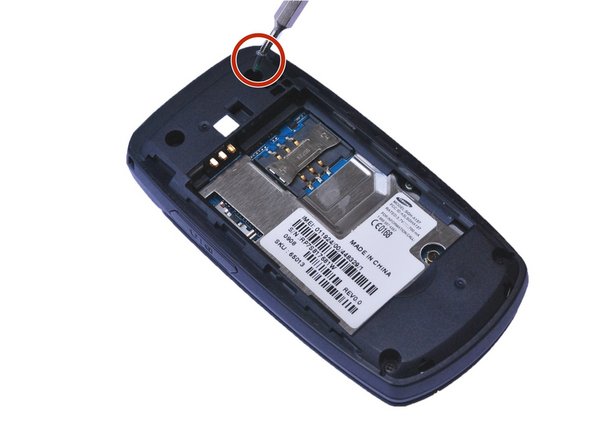
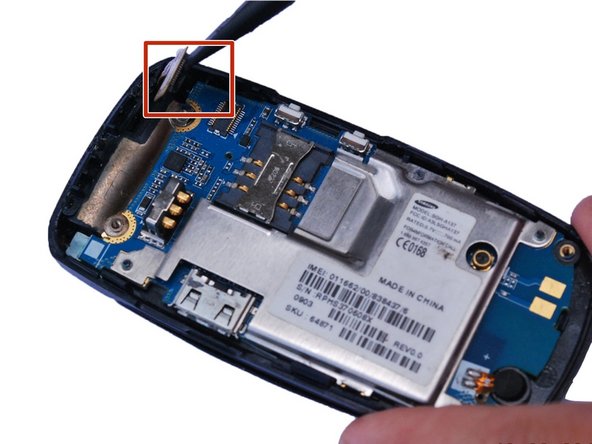
      • Smaller press-fit connectors may require a simple flick with a plastic opening tool or spudger.

      • Place the flat edge of a spudger under the edge of the press-fit connector and , gently pry the connector straight up from its socket. (Highlighted by the red square)

      crwdns2952109:0crwdne2952109:0

      crwdns2917038:0crwdne2917038:0

    4. Samsung SGH-A137 Keypad Replacement: crwdns2935265:06crwdnd2935265:01crwdnd2935265:01crwdne2935265:0
      • Using a plastic opening tool, gently pry up the motherboard.

      • You might need to pry from several different locations to get the motherboard loose enough to remove.

      crwdns2952109:0crwdne2952109:0

      crwdns2917038:0crwdne2917038:0

    1. Samsung SGH-A137 Keypad Replacement, Keypad: crwdns2935265:07crwdnd2935265:01crwdnd2935265:01crwdne2935265:0
      • Gently push the keypad out toward the back.

      crwdns2952109:0crwdne2952109:0

      crwdns2917038:0crwdne2917038:0

    2. Samsung SGH-A137 Keypad Replacement: crwdns2935265:08crwdnd2935265:01crwdnd2935265:01crwdne2935265:0
      • Replace the defective keypad and reassemble the phone.

      crwdns2952109:0crwdne2952109:0

      crwdns2917038:0crwdne2917038:0

crwdns2915888:0crwdne2915888:0

To reassemble your device, follow these instructions in reverse order.

crwdns2935221:0crwdne2935221:0

crwdns2935227:0crwdne2935227:0

Gayle Eberhardt Mitchell

crwdns2935283:009/04/15crwdne2935283:0

652 crwdns2915208:0crwdne2915208:0

crwdns2935297:03crwdne2935297:0

crwdns2935287:0crwdne2935287:0

USF Sarasota-Manatee, Team 1-1, Stewart Fall 2015 crwdns2935289:0USF Sarasota-Manatee, Team 1-1, Stewart Fall 2015crwdne2935289:0

USFSM-STEWART-F15S1G1

crwdns2931471:05crwdne2931471:0

crwdns2935297:050crwdne2935297:0

crwdns2947412:00crwdne2947412:0

crwdns2917038:0crwdne2917038:0

crwdns2936625:0crwdne2936625:0:

crwdns2936751:024crwdne2936751:0 0

crwdns2936753:07crwdne2936753:0 8

crwdns2936753:030crwdne2936753:0 27

crwdns2942667:0crwdne2942667:0 650