crwdns2933423:0crwdne2933423:0
crwdns2947577:0crwdnd2947577:0crwdne2947577:0

Samsung SGH A707 Keypad Replacement

crwdns2942213:0crwdne2942213:0

    1. Samsung SGH A707 Keypad Replacement, Battery: crwdns2935265:01crwdnd2935265:01crwdnd2935265:01crwdne2935265:0
      • Press on the markings on the cover and pull it down to reveal the battery.

      crwdns2952109:0crwdne2952109:0

      crwdns2917038:0crwdne2917038:0

    2. Samsung SGH A707 Keypad Replacement: crwdns2935265:02crwdnd2935265:01crwdnd2935265:01crwdne2935265:0
      • Use your fingers to pull the battery out of its position. You may also flip the phone and the battery will fall out.

      crwdns2952109:0crwdne2952109:0

      crwdns2917038:0crwdne2917038:0

    3. Samsung SGH A707 Keypad Replacement: crwdns2935265:03crwdnd2935265:01crwdnd2935265:01crwdne2935265:0
      • Here is the phone without the battery.

      crwdns2952109:0crwdne2952109:0

      crwdns2917038:0crwdne2917038:0

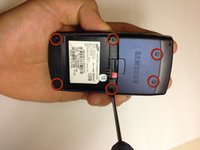
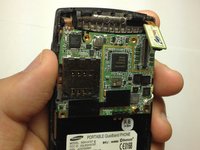
    1. Samsung SGH A707 Keypad Replacement, Motherboard: crwdns2935265:04crwdnd2935265:01crwdnd2935265:02crwdne2935265:0 Samsung SGH A707 Keypad Replacement, Motherboard: crwdns2935265:04crwdnd2935265:02crwdnd2935265:02crwdne2935265:0
      • Unscrew the six screws on the back of the phone using the Phillips #0 screw driver.

      crwdns2952109:0crwdne2952109:0

      crwdns2917038:0crwdne2917038:0

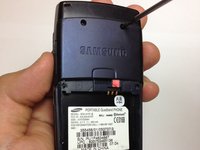
    2. Samsung SGH A707 Keypad Replacement: crwdns2935265:05crwdnd2935265:01crwdnd2935265:01crwdne2935265:0
      • Use the prying tool the pry off the phone's plastic frame.

      crwdns2952109:0crwdne2952109:0

      crwdns2917038:0crwdne2917038:0

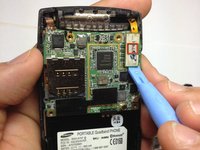
    3. Samsung SGH A707 Keypad Replacement: crwdns2935265:06crwdnd2935265:01crwdnd2935265:03crwdne2935265:0 Samsung SGH A707 Keypad Replacement: crwdns2935265:06crwdnd2935265:02crwdnd2935265:03crwdne2935265:0 Samsung SGH A707 Keypad Replacement: crwdns2935265:06crwdnd2935265:03crwdnd2935265:03crwdne2935265:0
      • Use the prying tool to disconnect the rectangular connector.

      crwdns2952109:0crwdne2952109:0

      crwdns2917038:0crwdne2917038:0

    4. Samsung SGH A707 Keypad Replacement: crwdns2935265:07crwdnd2935265:01crwdnd2935265:01crwdne2935265:0
      • Use the prying tool to disconnect the small connector.

      crwdns2952109:0crwdne2952109:0

      crwdns2917038:0crwdne2917038:0

    5. Samsung SGH A707 Keypad Replacement: crwdns2935265:08crwdnd2935265:01crwdnd2935265:01crwdne2935265:0
      • Gently pull off the circuit board.

      crwdns2952109:0crwdne2952109:0

      crwdns2917038:0crwdne2917038:0

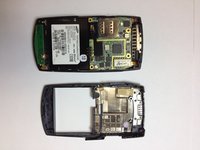
    6. Samsung SGH A707 Keypad Replacement: crwdns2935265:09crwdnd2935265:01crwdnd2935265:01crwdne2935265:0
      • Here is the phone without the logic board.

      crwdns2952109:0crwdne2952109:0

      crwdns2917038:0crwdne2917038:0

    1. Samsung SGH A707 Keypad Replacement, Keypad: crwdns2935265:010crwdnd2935265:01crwdnd2935265:01crwdne2935265:0
      • Hold the phone and gently separate the circuit board that holds the dome switches and the front face of the phone, revealing the rubber keyboard.

      crwdns2952109:0crwdne2952109:0

      crwdns2917038:0crwdne2917038:0

    2. Samsung SGH A707 Keypad Replacement: crwdns2935265:011crwdnd2935265:01crwdnd2935265:01crwdne2935265:0
      • Here is the phone without the dome switch circuit board.

      crwdns2952109:0crwdne2952109:0

      crwdns2917038:0crwdne2917038:0

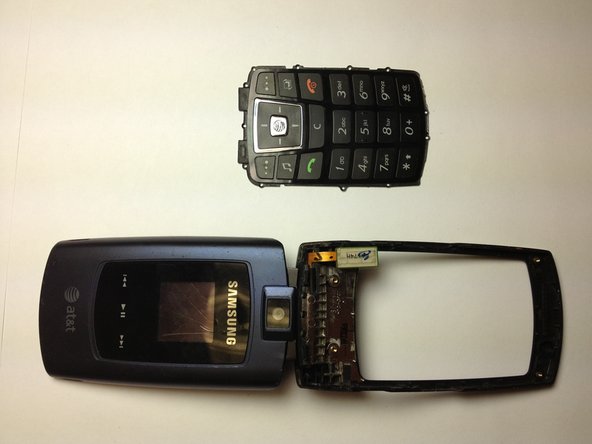
    3. Samsung SGH A707 Keypad Replacement: crwdns2935265:012crwdnd2935265:01crwdnd2935265:02crwdne2935265:0 Samsung SGH A707 Keypad Replacement: crwdns2935265:012crwdnd2935265:02crwdnd2935265:02crwdne2935265:0
      • Here is the phone and the rubber keyboard.

      crwdns2952109:0crwdne2952109:0

      crwdns2917038:0crwdne2917038:0

    4. Samsung SGH A707 Keypad Replacement: crwdns2935265:013crwdnd2935265:01crwdnd2935265:01crwdne2935265:0
      • Here is the rubber keyboard and the dome switch circuit board. A quick inspection of these elements can reveal keypad malfunctions. Look for dirt or debris that do not belong there.

      crwdns2952109:0crwdne2952109:0

      crwdns2917038:0crwdne2917038:0

crwdns2915888:0crwdne2915888:0

To reassemble your device, follow these instructions in reverse order.

crwdns2935221:0crwdne2935221:0

yfm

crwdns2935283:011/06/12crwdne2935283:0

25 crwdns2915208:0crwdne2915208:0

crwdns2935297:07crwdne2935297:0

crwdns2935287:0crwdne2935287:0

University of Maryland, Team 1-1, Calloway Fall 2012 crwdns2935289:0University of Maryland, Team 1-1, Calloway Fall 2012crwdne2935289:0

UMD-CALLOWAY-F12S1G1

crwdns2931471:04crwdne2931471:0

crwdns2935297:084crwdne2935297:0

crwdns2947412:00crwdne2947412:0

crwdns2917038:0crwdne2917038:0

crwdns2936625:0crwdne2936625:0:

crwdns2936751:024crwdne2936751:0 0

crwdns2936753:07crwdne2936753:0 2

crwdns2936753:030crwdne2936753:0 23

crwdns2942667:0crwdne2942667:0 942